


Summary of Password Based Circuit Breaker using PIC Microcontroller with C code
This article details a password-controlled circuit breaker project using a PIC16F877 microcontroller. It allows authorized users to toggle power loads by entering specific passwords on a keypad, which are verified via an LCD display. The system uses two distinct passwords to control two separate relays, effectively acting as switches for connected loads.Parts used in the Password Based Circuit Breaker:
- PIC16F877 Microcontroller
- Keypad
- 16x2 LCD Display
- Relays (two units)
- LCD 4-bit Interface Module
- Keypad Interface Module
- PIC C CCS Compiler Software
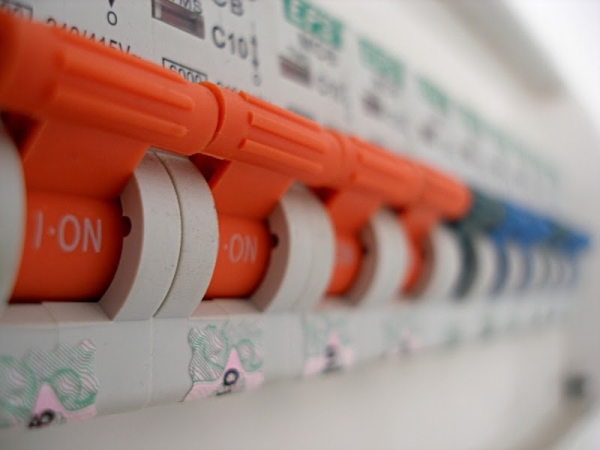
Circuit breakers are electromechanical devices used in the power system to connect or disconnect the power flow at the generator, substation, or load location. Only authorised persons with correct password can connect or disconnect the circuit breaker. Each Line will have separate passwords to operate, By entering the password the current state of the line is toggled. That is, the load will gets connected or disconnected. For verification, after entering the password you need to press the ‘=’ button on keypad (Which is just like an ‘ENTER’ key).
Block Diagram of the Password based Circuit Breaker
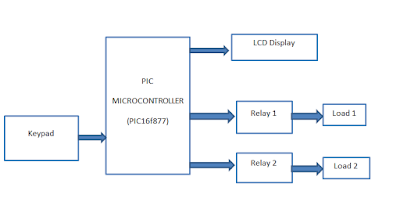
PIC16F877 is the heart of this project, which takes input from keypad as password and displays the current status on a 16x2 LCD Display. For the demonstration purpose, I am using only two loads, which is controlled by two relays.
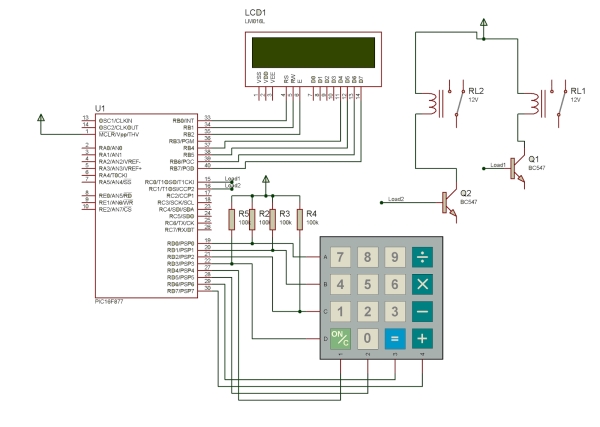
“1234” and “9876” are the two passwords used here for activating and deactivating the Load 1 and Load 2 respectively. As I mentioned in the above paragraph, don’t forget to enter ‘=’ after feeding the password. Press ‘ON/C’ Button to clear the screen.
Circuit Diagram of Password Circuit Breaker
 Embedded C Code
Quick Solutions to Questions related to Password Based Circuit Breaker:
- What is the main function of this circuit?
It connects or disconnects power flow at a load location only when an authorized person enters the correct password. - How do you verify the entered password?
You must press the '=' button on the keypad after typing the password to act like an 'ENTER' key. - Which microcontroller is used in this project?
The PIC16F877 is used as the heart of the project to process inputs and control outputs. - What are the specific passwords for Load 1 and Load 2?
The password "1234" activates Load 1 and "9876" activates Load 2. - How can you clear the screen during operation?
Press the 'ON/C' Button to clear the display screen. - Does each line have its own password?
Yes, each line has a separate password to operate the circuit breaker independently. - What happens after entering the correct password?
The current state of the line toggles, meaning the load gets connected or disconnected. - Can I download the code for this project?
Yes, the simulation, C-code, and project files can be downloaded from the source.
Related projects
PIC16F877 Driving LCD in 4-Bit Mode using PIC16F877 with Proteus Simulation
Introduction This microcontroller project shows how a PIC16F877 can drive an LCD display using 4-bit mode inside a Proteus simulation.The project demonstrates...
Programmers & ICSP · PIC16F877AEPE PIC/LCD Demo using PIC16F877 with Proteus Simulation
IntroductionThe EPE PIC/LCD Demo is a classic microcontroller project that demonstrates how a PIC16F877 can fully control a PG12864F graphical LCD.Designed as...
Motors & Robotics · PIC16F877AEfficient Sun-Following Robot: A Solar Tracker with Microcontroller Control
Abstract The impending global challenge of dwindling non-renewable fuel resources underscores the urgency of transitioning towards renewable energy alternatives like solar power....
Development Boards & Kits · PIC18F4520Voltage Measurement with A PIC Microcontroller
Voltage Measurement with PIC Microcontroller articulates a methodical framework for facilitating analog voltage measurement using the PIC18F4520, an advanced member of Microchip’s...
Development Boards & KitsUltra-Low Power: Microcontroller Standby Current to 130uA with OPEnS Power Control Board
At the OPEnS Lab, a key focus for our projects is achieving exceptionally long battery life. This was particularly true for the...
Development Boards & KitsAn Integrated Approach to Developing Applications with Microchip PIC Microcontrollers
1. Introduction In our daily lives, a variety of devices such as telephones, household appliances, and cars incorporate "smart" electronics, typically manifested...

Ibrar Ayyub
I am an experienced technical writer holding a Master's degree in computer science from BZU Multan, Pakistan University. With a background spanning various industries, particularly in home automation and engineering, I have honed my skills in crafting clear and concise content. Proficient in leveraging infographics and diagrams, I strive to simplify complex concepts for readers. My strength lies in thorough...