


Summary of GSM Modem Interface with PIC 18F4550 Microcontroller
This project implements a GSM modem interface using a PIC 18F4550 microcontroller to control four doors (A, B, C, D) via push buttons. Pressing specific keys triggers door opening signals and sends acknowledgment SMS alerts to pre-assigned mobile numbers. The system utilizes AT commands for GSM testing, SMS transmission, and voice calls, configured with a 16MHz crystal and 9600 baud rate communication.Parts used in the GSM Modem Interface with PIC 18F4550 Micro controller:
- PIC 18F4550 Microcontroller
- GSM Modem
- SIM Card
- Cross Cable Modem
- Push Buttons (Keys)
- 16MHz Crystal
- Windows Computer with Hyperterminal software
- CCS Compiler for Pic Microcontrollers
GSM Modem Interface with PIC 18F4550 Micro controller:
Description:
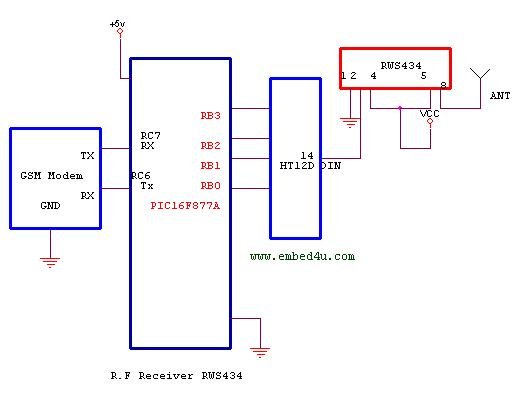
In this project we use PIC 18F4550 Micro controller in transmitter section keys are connected to PB0 to PB3. If we press the key PB0 the Pressed Key Value is transmitted to the micro controller section i.e receiver section . In the controller we pre programmed to open the door A. If we press the key PB1 means the particular port is enabled and it sends enabled signal to the receiver micro controller section. In that particular port we pre programmed to open the door B. Likewise we pre programmed for all four pins to do a particular task. At the same time the acknowledgement message send to the pre assigned mobile number through GSM Modem. Doing some slight modification in the code you can develop your own applications.
GSM Modem Testing Procedure:
1. Insert SIM Card into SIM Tray.
2. Connect Cross Cable Modem to Microcontroller.
3. Open Hyperterminal from Windows select COM Port and Set Baud Rate 9600.
4. Enter AT hyperterminal then ENTER Respond ‘Ok’ ACK from GSM Modem.
O.k will come modem is working fine.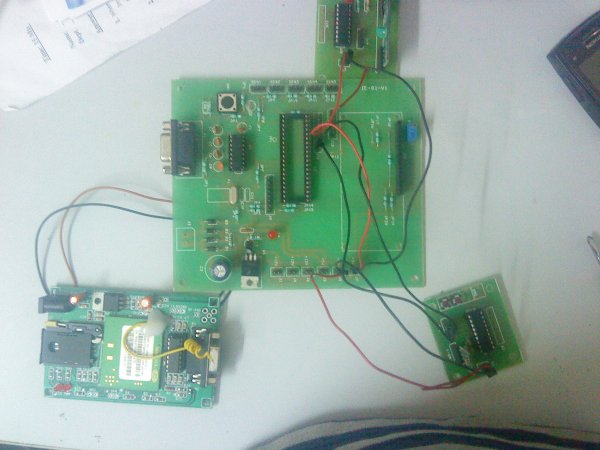
Sending SMS from GSM Modem:
AT+CMGF=1 Press ENTER
Ctr+Z 0x0D and 0X0A for ENTER;
AT+CMGS=Mobile No
Dial voice Call AT Command:
ATD9000000000; //for Dial voice call through GSM Modem.
ATH Press Enter //Hang up the voice call.
Source Code:
1
//**********************************************************
***************************************************//
2
3
//Author:Embed4u Team
4
//Compiler: CCS Compiler for Pic Microcontrollers
5
//Website: www.embed4u.com
6
7
//**********************************************************
***************************************************//
8
9
#include<16f877a.h> //Replace pic 18f4550 without code modification its working
10
#include<stdio.h>
11
#fuses HS,NOWDT,NOPROTECT,NOLVP
12
#use delay(clock=16000000)//16MHZ Crystal
13
#use rs232(baud=9600, xmit=PIN_C6, rcv=PIN_C7)
14
void send_SMS_SIM1()
15
{
16
printf("at+cmgs=\"+919000000000"\n");//Enter Your Mobile Number1
17
18
putc(0x0d);
19
putc(0x0a);
20
delay_ms(1000);
21
}
22
void send_SMS_SIM2()
23
{
24
printf("at+cmgs=\"+919111111111\"\n");//Enter Your Mobile Number2
25
26
putc(0x0d);
27
putc(0x0a);
28
delay_ms(1000);
29
}
30
void GSM_initialise()
31
{
32
printf("at+cmgf=1\n");
33
34
putc(0x0d);
35
putc(0x0a);
36
delay_ms(1000);
37
}
38
void main()
39
{
40
port_b_pullups(TRUE);
41
GSM_initialise();
42
while(1)
43
{
44
if(input(PIN_B0)==0)
45
{
46
send1();
47
printf("****Test****\n\r");
48
delay_ms(10);
49
printf("ALERT!!! Door A has opened\n\r");
50
delay_ms(10);
51
printf("*******");
52
putc(26);
53
delay_ms(1000);
54
55
send2();
56
printf("****Test****\n\r");
57
delay_ms(10);
58
printf("ALERT!!! Door A has opened\n\r");
59
delay_ms(10);
60
printf("*******");
61
putc(26);
62
delay_ms(1000);
63
64
}
65
else if(input(PIN_B1)==0)
66
{
67
send1();
68
printf("****Test****\n\r");
69
delay_ms(10);
70
printf("ALERT!!! Door B has opened\n\r");
71
delay_ms(10);
72
printf("*******");
73
putc(26);
74
delay_ms(1000);
75
76
send2();
77
printf("****Test****\n\r");
78
delay_ms(10);
79
printf("ALERT!!! Door B has opened\n\r");
80
delay_ms(10);
81
printf("*******");
82
putc(26);
83
delay_ms(1000);
84
85
}
86
else if(input(PIN_B2)==0)
87
{
88
send1();
89
printf("****Test****\n\r");
90
delay_ms(10);
91
printf("ALERT!!! Door C has opened\n\r");
92
delay_ms(10);
93
printf("*******");
94
putc(26);
95
delay_ms(1000);
96
97
send2();
98
printf("****Test****\n\r");
99
delay_ms(10);
100
printf("ALERT!!! Door C has opened\n\r");
101
delay_ms(10);
102
printf("*******");
103
putc(26);
104
delay_ms(1000);
105
106
}
107
else if(input(PIN_B3)==0)
108
{
109
send1();
110
printf("****Test****\n\r");
111
delay_ms(10);
112
printf("ALERT!!! Door D has opened\n\r");
113
delay_ms(10);
114
printf("*******");
115
putc(26);
116
delay_ms(1000);
117
118
send2();
119
printf("****Test****\n\r");
120
delay_ms(10);
121
printf("ALERT!!! Door D has opened\n\r");
122
delay_ms(10);
123
printf("*******");
124
putc(26);
125
delay_ms(1000);
126
127
}
128
delay_ms(2000);
129
output_b(0xff);
130
}
131
132
}
For more detail: GSM Modem Interface with PIC 18F4550 Microcontroller
Quick Solutions to Questions related to GSM Modem Interface with PIC 18F4550 Micro controller:
-
How are the doors controlled in this project?
Pressing keys connected to PB0 through PB3 transmits signals to open Door A, Door B, Door C, or Door D respectively. -
What happens after a key is pressed?
An acknowledgement message is sent to a pre-assigned mobile number through the GSM Modem. -
How do you test if the GSM Modem is working?
Enter the AT command in Hyperterminal; receiving an Ok response indicates the modem is functioning correctly. -
What baud rate is required for communication?
The system uses a Baud Rate of 9600 for the RS232 connection between the modem and microcontroller. -
Which compiler is used for this code?
The source code is written for the CCS Compiler for Pic Microcontrollers. -
Can the PIC 16F877A be used instead of the 18F4550?
Yes, replacing the include file for the 16F877A allows the code to work without modification. -
How do you send an SMS from the GSM Modem?
Send the command AT+CMGF=1 followed by AT+CMGS and the mobile number. -
How is a voice call initiated through the modem?
Dial the number using the ATD command followed by a semicolon.
Related projects
PICDEM FS USB CDC Evaluation Board using PIC18F4550 with Proteus Simulation
Introduction The PICDEM FS USB CDC Evaluation Board is a practical microcontroller project built around the PIC18F4550, designed to demonstrate USB communication...
Peripheral Tutorials · PIC18F4550PICDEM FS USB Mass Storage Device using PIC18F4550 with Proteus Simulation
Introduction This microcontroller project demonstrates how to simulate a USB Mass Storage Device (MSD) using the PIC18F4550 in a Proteus simulation environment....
Development Boards & Kits · PIC18F2550Pinguino Project: A PIC Microcontroller Based Arduino
This is a complete tutorial to make a PIC Microcontroller based Arduino. This is a complete tutorial to make PIC microcontroller based...
Communication & Interfacing · PIC18F4520CAN FD Node based on a PIC18 Microcontroller
The introduction sets the stage for an embedded systems project that involves developing a Embedded C CAN FD project using the MCP2517FD...
Communication & InterfacingLAN9662 Gigabit Switch: Optimized for Industrial Ethernet
Introduction It should come as little surprise therefore that one element of what is now more commonly referred to in some circles...
Communication & InterfacingPIC Microcontroller: Fundamentals & Applications for Students
Introduction Microcontrollers are the key components in the embedded systems market. A variety of embedded systems was formed and developed after the...

Ibrar Ayyub
I am an experienced technical writer holding a Master's degree in computer science from BZU Multan, Pakistan University. With a background spanning various industries, particularly in home automation and engineering, I have honed my skills in crafting clear and concise content. Proficient in leveraging infographics and diagrams, I strive to simplify complex concepts for readers. My strength lies in thorough...