Summary of The cheapest ESP8266 programmer!
This article demonstrates how to build a simple programmer for ESP-01 and ESP-201 modules using an Arduino UNO. The setup allows uploading various firmwares like AT, LUA, or Espruino by connecting the microcontroller via cables and optionally adding a button and slide switch to control Flash mode and reset functions.
Parts used in the ESP Programmer:
- Arduino/Genuino UNO
- Cables
- ESP-01 module
- ESP-201 module
- Button (optional)
- Slide switch (optional)
- 100n capacitor (optional)
- Logic Level Converter voltage divider (optional)
Hi folks, now I’ll teach you how to make your programmer to the ESP-01 and ESP-201, (perhaps serve with other models) using an Arduino UNO, a few cables and optionally a button and a slide switch, in my case I use them because I had available, with this programmer able to upload the Arduino sketches and any other firmware (AT, LUA, Espruino, etc).
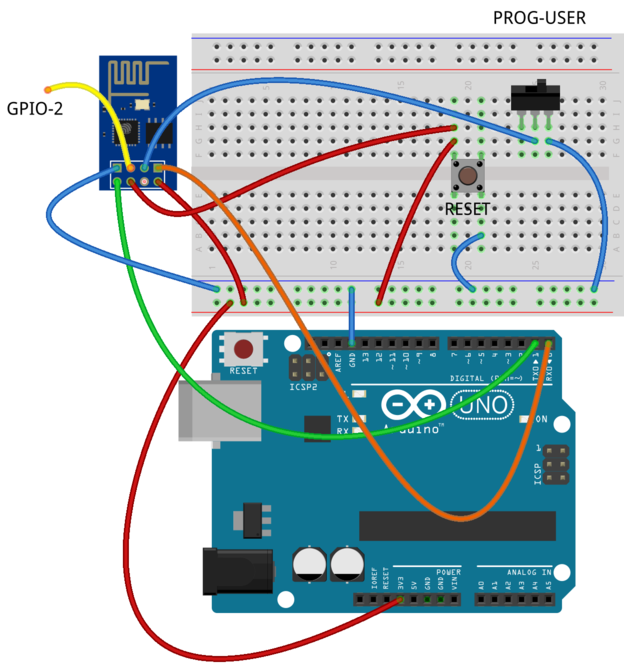
Okay, let’s start, first do the following circuit.
Optionally if necessary can place a 100n capacitor between Vcc and GND and if you’re a fan of security, you can put a divider or Logic Level Converter voltage between RX and TX.
1.- Connect the Arduino/Genuino UNO.
2.- Put the ESP-01 in Flash mode, set the slide switch to GND.
3.- Push the Button reset.
4.-And open the app for Flash, that you like.
Note.- I test with:
a.- Flash tool 2.4 -Link
b.- ESP8266 Flasher –Link–
c.- Arduino IDE –Link–
That is all!!!
Enjoy!!
For More Details: The cheapest ESP8266 programmer!
- How do I connect the circuit?
Connect the Arduino/Genuino UNO using cables and place a 100n capacitor between Vcc and GND if necessary. - Can I use other models besides ESP-01?
Yes, the guide mentions it may serve with other models like the ESP-201. - What is the best way to set the ESP-01 to Flash mode?
Set the slide switch to GND to put the ESP-01 in Flash mode. - Does the project require a logic level converter?
No, it is optional; you can put a divider or Logic Level Converter voltage between RX and TX if you are a fan of security. - What steps must I take before opening the flash app?
You must push the Button reset after setting the slide switch to GND. - Which software tools were tested for this programmer?
The author tested with Flash tool 2.4, ESP8266 Flasher, and Arduino IDE. - Can I upload firmware other than Arduino sketches?
Yes, this programmer can upload any other firmware such as AT, LUA, or Espruino. - Is a button required for the circuit?
No, the button is optional and used because the author had one available.