


Summary of USB PIC Programmer
This article describes a compact, open-source USB PIC programmer based on the "Open Programmer" project. The author modified the original design to fit inside a small plastic box by using a single smart ZIF socket and low-profile components, sacrificing support for non-PIC microcontrollers. The device includes a PIC18F2550 chip managed by provided firmware and software compatible up to Windows 8.Parts used in the Compact USB PIC Programmer:
- Small plastic box
- USB connector
- ZIF socket
- Two LEDs
- PIC18F2550 microcontroller
- Main module with low profile components
- Four ten millimeter height columns
What concerned me was the need to mount, on the mainboard, a specific socket board depending on the model of PIC being programmed. Moreover, the proposed layout did not meet my personal “compact look” ideas. So, I propose here a small layout version of that circuit, adopting a single smart on-board ZIF socket. This version sacrifices many non-PIC microcontroller models. I will thank everybody proposing a larger range implementation, suitable to program Atmel and other devices. Anyway, if your goal is to program PIC devices, you are on the good site.
A small box, a USB connector, a ZIF socket, two leds. That’all in my compact proposal.
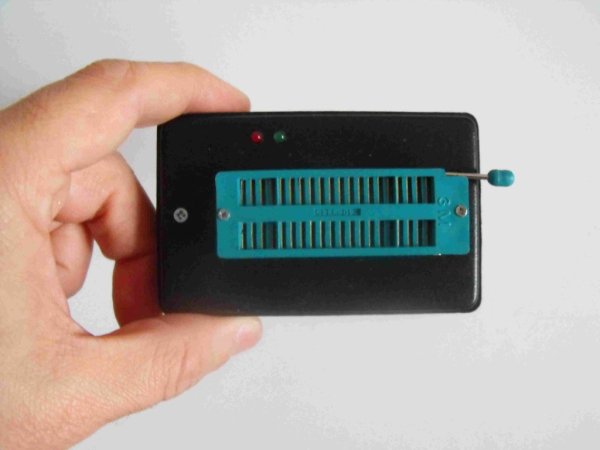
Description
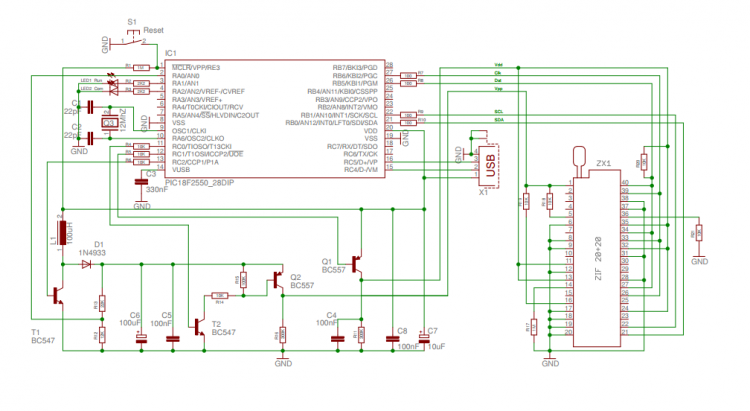
The details are available on the original project mentionned above. Hereafter, I shown my Compact version, with a schematic, PCB layout and instruction for assemby and inserting it in a very common little plastic box. At the bottom of this page, I supply a copy of the program to load on the PIC18F2550 used to manage the programming functions, as well as a copy of the PC side program. I tested the program up to Win-8 without problems. Take into account that, on the original site, a newer version of both Firmware and Software is available.
Schematic
Assembly
Build first the main module using low profile components being under 10 mm of height from the PCB surface, since a second board will be mounted over that one. Mount 4 ten millimeters height columns to allow the final assembly of the second board. Use low profiles parts to fix the columns, otherwise some manual metals removal can be needed to reduce the occupation on the copper side.
For more detail: USB PIC Programmer
Quick Solutions to Questions related to Compact USB PIC Programmer:
- What is the main goal of this project?
The goal is to provide a compact layout version of the Open Programmer circuit to program PIC devices via a USB port. - How does this version differ from the original Open Programmer?
This version uses a single smart on-board ZIF socket and fits into a small box, unlike the original which required specific socket boards for different models. - Can this programmer be used for Atmel devices?
No, this version sacrifices support for many non-PIC microcontroller models including Atmel devices to achieve a compact size. - Which microcontroller manages the programming functions?
The PIC18F2550 is used to manage the programming functions. - Is the software compatible with modern operating systems?
The program was tested up to Win-8 without problems, though newer versions may be available on the original site. - What assembly requirement must be met for the main module?
Low profile components under 10 mm in height must be used because a second board will be mounted over it. - Why are four ten millimeter height columns used?
They allow for the final assembly of the second board mounted on top of the main module. - Where can I find the schematic and PCB layout?
The details, schematic, and PCB layout are described as being available on the page or linked from the original project.
Related projects
CAN FD Node based on a PIC18 Microcontroller
The introduction sets the stage for an embedded systems project that involves developing a Embedded C CAN FD project using the MCP2517FD...
Communication & InterfacingLAN9662 Gigabit Switch: Optimized for Industrial Ethernet
Introduction It should come as little surprise therefore that one element of what is now more commonly referred to in some circles...
Communication & InterfacingPIC Microcontroller: Fundamentals & Applications for Students
Introduction Microcontrollers are the key components in the embedded systems market. A variety of embedded systems was formed and developed after the...
Communication & Interfacing10BASE-T1S Ethernet: Simplified OEM Design for Auto Devices
Introduction Cars these days are surrounded by technology. They come loaded with all sorts of electronic gadgets and sensors. This project wants...
Communication & InterfacingDesigning a Microcontroller Framework for PC-Based Control of Electrical Appliances
ABSTRACT The preference for personal computers as a platform for designing and implementing control algorithms is growing due to the ease of...
Communication & InterfacingEfficient Multichannel Data Acquisition with USB Connectivity using PIC Microcontroller
1. INTRODUCTION With the rapid advancements in embedded technology, there is a growing demand for a data acquisition system that combines fast...

Ibrar Ayyub
I am an experienced technical writer holding a Master's degree in computer science from BZU Multan, Pakistan University. With a background spanning various industries, particularly in home automation and engineering, I have honed my skills in crafting clear and concise content. Proficient in leveraging infographics and diagrams, I strive to simplify complex concepts for readers. My strength lies in thorough...