


Summary of USB BATTERY CHARGER CIRCUIT WITH PIC16F629
This article describes a USB-powered AAA battery charger using the PIC16F629 microcontroller. It features dual-color LEDs and a buzzer for charging status warnings, with a charge time of 1–14 hours. The circuit utilizes a 7805 voltage regulator to convert 9V or 12V inputs if not powered by USB. A capacitor (C1) is included to prevent USB port disconnection by managing initial current draw. Software in ASM and HEX formats is provided.Parts used in the USB Battery Charger Circuit:
- PIC16F629 Microcontroller
- AAA Batteries
- Dual-color LED
- Buzzer
- 7805 Voltage Regulator IC
- Capacitor C1
- USB Port Interface
- ASM and HEX Software Files
USB Battery Charger Circuit Pic16f629 microcontroller integrated with the computer’s USB port 1 100-1000 The AAA battery charging circuit charging time the battery current compared to 1-14 hours of battery is full time dual-color LED and buzzer and warning... Electronics Projects, USB Battery Charger Circuit with PIC16F629 "battery charger circuit, microchip projects, microcontroller projects, pic assembly example,
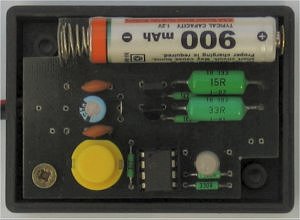
USB Battery Charger Circuit Pic16f629 microcontroller integrated with the computer’s USB port 1 100-1000 The AAA battery charging circuit charging time the battery current compared to 1-14 hours of battery is full time dual-color LED and buzzer and warning is given. Besleneeg from the USB port in the circuit diagram for the circuit in 7805 will use a 5 volt regulator IC that you do not want to use the USB port with an adapter 9v 12v going to use … 7805 should be installed .. USB battery charging circuit assembly prepared with the resources of the microcontroller software. Asm and. Hex file there.
PIC16F629 USB BATTERY CHARGER
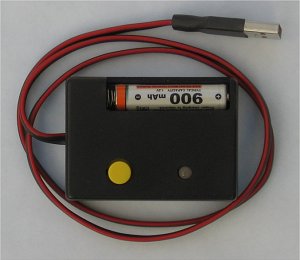
USB devices may draw from the PC up to 100 mA. The larger current can subscribe only when it is requested in the configuration descriptor and Energy approves the operating system. That in this charger does not, and therefore may not work in any PC. For this reason, the mind staffed capacitor C1, which when turned on will draw a large current for a long time and fungi that can (and should) be evaluated as a short circuit and disconnect the USB port.
Source: http://www.cmail.cz/doveda/konstrukce/aku_usb/index.htm USB Battery Charger Circuit with PIC16F629 pic assembly alternative link:
FILE DOWNLOAD LINK LIST (in TXT format): LINKS-746.zip
Source: USB BATTERY CHARGER CIRCUIT WITH PIC16F629
Quick Solutions to Questions related to USB Battery Charger Circuit:
- What is the maximum current USB devices can draw from a PC?
USB devices may draw up to 100 mA from the PC. - How long does it take to fully charge the battery?
The charging time ranges from 1 to 14 hours depending on the battery current. - Can this circuit work without a USB port connection?
Yes, you can use an adapter providing 9V or 12V input instead of the USB port. - Why is capacitor C1 included in the circuit?
It draws a large current upon turning on to prevent the USB port from being evaluated as a short circuit and disconnected. - Does the charger automatically request higher current from the operating system?
No, this charger does not request higher current in the configuration descriptor, so it may not work in any PC. - What components indicate when the battery is full?
A dual-color LED and a buzzer provide a warning when the battery is full. - What software files are required for assembly?
The project requires ASM and HEX files prepared with the microcontroller software. - Which voltage regulator IC is recommended for non-USB power sources?
The 7805 5-volt regulator IC should be installed for 9V or 12V inputs.
Related projects
CAN FD Node based on a PIC18 Microcontroller
The introduction sets the stage for an embedded systems project that involves developing a Embedded C CAN FD project using the MCP2517FD...
Communication & InterfacingLAN9662 Gigabit Switch: Optimized for Industrial Ethernet
Introduction It should come as little surprise therefore that one element of what is now more commonly referred to in some circles...
Communication & InterfacingPIC Microcontroller: Fundamentals & Applications for Students
Introduction Microcontrollers are the key components in the embedded systems market. A variety of embedded systems was formed and developed after the...
Communication & Interfacing10BASE-T1S Ethernet: Simplified OEM Design for Auto Devices
Introduction Cars these days are surrounded by technology. They come loaded with all sorts of electronic gadgets and sensors. This project wants...
Communication & InterfacingDesigning a Microcontroller Framework for PC-Based Control of Electrical Appliances
ABSTRACT The preference for personal computers as a platform for designing and implementing control algorithms is growing due to the ease of...
Communication & InterfacingEfficient Multichannel Data Acquisition with USB Connectivity using PIC Microcontroller
1. INTRODUCTION With the rapid advancements in embedded technology, there is a growing demand for a data acquisition system that combines fast...

Muhammad Bilal
I am a highly skilled and motivated individual with a Master's degree in Computer Science. I have extensive experience in technical writing and a deep understanding of SEO practices.