
Summary of Pickit 2 clone The Universal Microchip PIC Programmer /Debugger
The PICkit 2 Programmer/Debugger is a low-cost tool for programming and debugging Microchip microcontrollers. This article describes building a clone that supports baseline, mid-range, PIC18, 8-bit, 16-bit, and 32-bit devices. Key features include USB communication, in-circuit debugging via MPLAB IDE, and the ability to program targets without a PC using two EEPROM chips (IC3 and IC4). The design avoids complex MOSFETs, utilizing only a single voltage boost circuit.
Parts used in the PICkit 2 Clone:
- Microcontroller for programmer
- Voltage boost circuit
- EEPROM chip IC3
- EEPROM chip IC4
- Firmware software
- Circuit board components
The PICkit™ 2 Programmer/Debugger is a low-cost development tool with an easy to use interface for programming and debugging Microchip’s Flash families of microcontrollers. The full featured Windows programming interface supports baseline, mid-range, PIC18,8-bit, 16-bit, and 32-bit microcontrollers, and many Microchip Serial EEPROM products. With Microchip’s powerful MPLAB Integrated Development Environment (IDE) the PICkit 2 enables in circuit debugging on most PIC microcontrollers. In-Circuit-Debugging runs, halts and single steps the program while the PIC microcontroller is embedded in the application. When halted at a breakpoint, the file registers can be examined and modified.
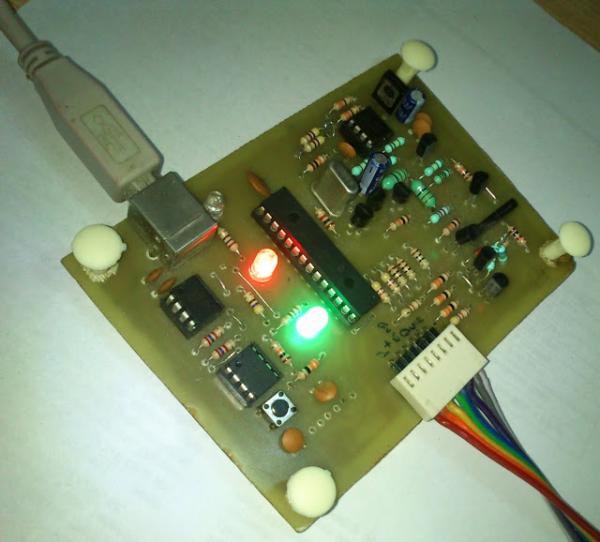 Features
1. This device will work like the normal pickit2.
2. This wll work for any pic (5 and 3.3V devices)
3. No mosfets no complex, only one voltage boost circuit.
4. you can program the target without PC.
The following packages include circuit and firmware.
Firmware is the software which going to be burn into programmer’s microcontroller, this firmware have code to enable the programmer to communicate with pc via usb and target microcontroller.
Click This link to dwonload the Firware and circuit Pickit 2 clone files
For Supported device list Please refer to Readme.txt and pickit 2 user manual for details on building, installing and using Pickit 2.
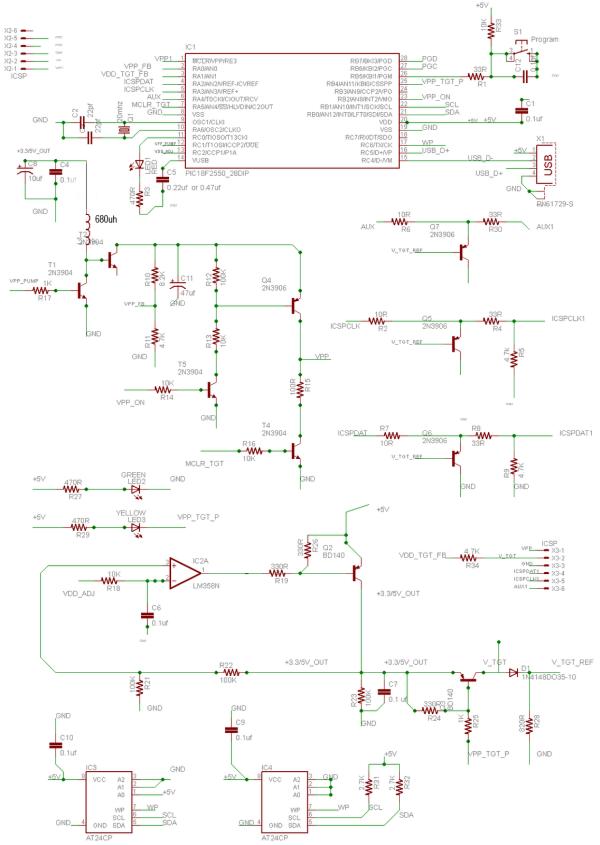
Step 2:-
Buy The parts You need
click here to download complete part list
you can skip IC3 and IC4 if you do not want the feature of programming without PC.
these two eeprom chip are to store the code to be written on the target mcu without pc.
- What microcontrollers does the PICkit 2 support?
It supports baseline, mid-range, PIC18, 8-bit, 16-bit, and 32-bit microcontrollers. - Can I program the target without a PC?
Yes, if you install EEPROM chips IC3 and IC4 to store the code. - Does this project require MOSFETs?
No, the design uses no MOSFETs and only one voltage boost circuit. - How do I enable USB communication with the programmer?
You must burn specific firmware into the programmer's microcontroller. - Where can I download the firmware and circuit files?
The text provides a link to download Pickit 2 clone files including the Readme.txt. - What is the function of IC3 and IC4?
These EEPROM chips store code to allow writing to the target MCU without a PC. - Which software environment enables in-circuit debugging?
Microchip’s MPLAB Integrated Development Environment (IDE) enables this feature. - Can this device work with 5V and 3.3V devices?
Yes, it works for any PIC device operating at 5V and 3.3V.
