


Summary of ELECTRONIC PIANO USING PIC MICROCONTROLLER (PIC18F4550)
This article describes an electronic piano project built using the PIC18F4550 microcontroller. It details how 11 buttons generate specific musical frequencies (A4 to D5) by outputting square waves through a speaker connected to pin RA0. The system relies on the mikroC Sound_Play library for software implementation, utilizing delay functions to control tone duration and pitch.Parts used in the Electronic Piano Using PIC Microcontroller:
- PIC18F4550 microcontroller
- Speaker
- B1 to B11 Buttons
- BJT or MOSFET Transistor
- Amplifier
- PCB Printed Circuit Board
Electronic piano circuit PCB printed circuit board drawing upon the Pic18f4550 microcontroller PIC has been a regular speaker on the card directly to number 2 in the pin of this RA0-Pic18f4550 AN0 pine bjt,...Electronics Projects, Electronic Piano Using PIC microcontroller (PIC18F4550) "microchip projects, microcontroller projects, "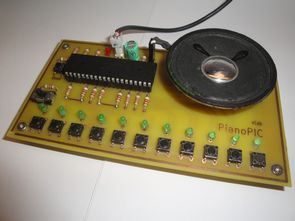
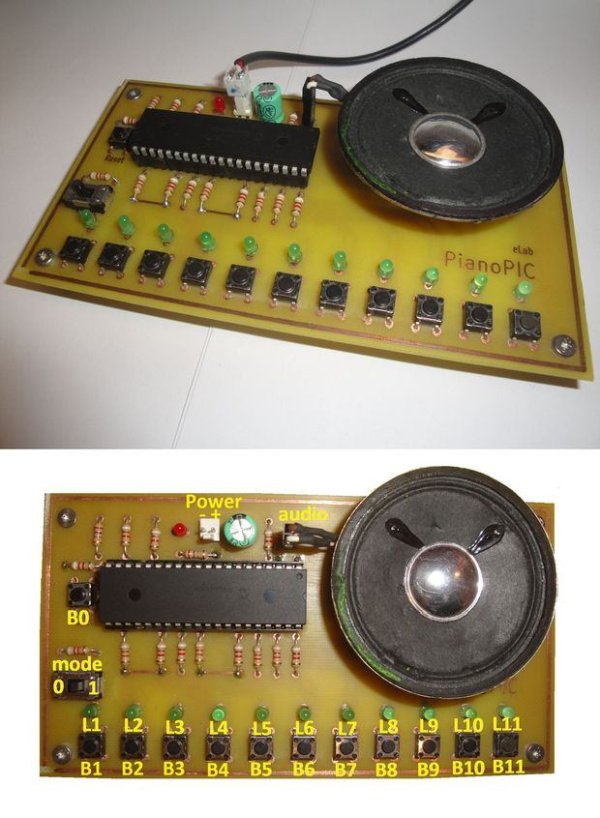
Electronic piano circuit PCB printed circuit board drawing upon the Pic18f4550 microcontroller PIC has been a regular speaker on the card directly to number 2 in the pin of this RA0-Pic18f4550 AN0 pine bjt, mosfet transistor or the amplifier can be increased by adding volume.
B1 …Each of the different frequencies of sound to piano buttons B11 to produce.
B1-LA (440 Hz)
B2-Sİ (494 Hz)
B3-DO2 (2X261Hz)
B4-RE2 (2X293Hz)
B5-Mİ2 (2X329Hz)
B6-FA2 (2X349Hz
B7-SOL2 (2X392Hz)
B8-LA2 (2X440Hz)
B9-Sİ2 (2X494Hz)
B10-DO4 (4X261Hz)
B11-RE4 (4X293Hz)
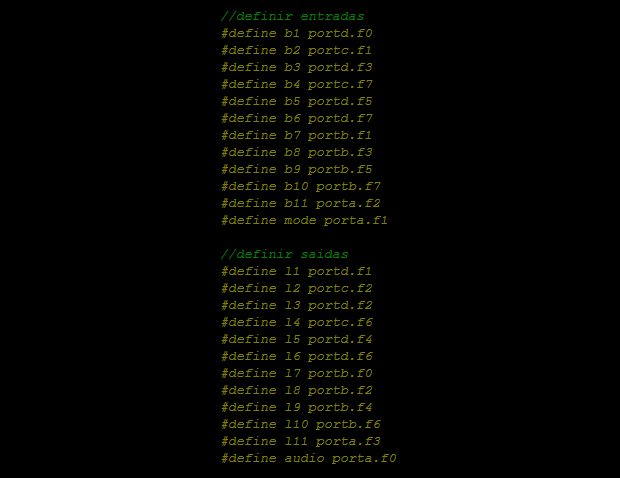
Crafted with only the software you don’t have source code mikroC hex, but given the information needed for sound Sound_Play library used mikroc
For example, B1 button;
Audio output 440 Hz square wave. To do this, 440 Hz duration 1/440 = approx 2272 mS equal to. After the delay (1136 mS) “1” output, and then exit the “0″, do (you can google translate minor errors with the statement that it will solve the situation inceleyinc the sample code mikroC people dealing with) each of them is used to produce different frequencies of sound.
if (b1)

{

audio=1;

delay_us(1136);

audio=0;

delay_us(1136);
}
source: ELECTRONIC PIANO USING PIC MICROCONTROLLER (PIC18F4550) alternative link: Electronic Piano Using PIC microcontroller (PIC18F4550).RAR alternative link2 alternative link3
Quick Solutions to Questions related to Electronic Piano Using PIC Microcontroller:
- Which microcontroller is used in this project?
The project uses the Pic18f4550 microcontroller. - How are different sound frequencies produced?
Each button from B1 to B11 produces a different frequency of sound when pressed. - What is the frequency generated by button B1?
Button B1 generates a LA tone at 440 Hz. - Can the volume be increased in this circuit?
Yes, volume can be increased by adding a BJT, MOSFET transistor, or amplifier. - Which software library is used for sound generation?
The Sound_Play library used in mikroC is utilized for sound generation. - How is the audio output waveform created for button B1?
A 440 Hz square wave is created by setting the output high for 1136 microseconds and low for 1136 microseconds. - Is source code provided for the project?
No, the text states that source code is not available, but information needed for the Sound_Play library is given. - Which pin connects the speaker directly?
The speaker connects directly to pin number 2, which is RA0.
Related projects
PICDEM FS USB CDC Evaluation Board using PIC18F4550 with Proteus Simulation
Introduction The PICDEM FS USB CDC Evaluation Board is a practical microcontroller project built around the PIC18F4550, designed to demonstrate USB communication...
Peripheral Tutorials · PIC18F4550PICDEM FS USB Mass Storage Device using PIC18F4550 with Proteus Simulation
Introduction This microcontroller project demonstrates how to simulate a USB Mass Storage Device (MSD) using the PIC18F4550 in a Proteus simulation environment....
Development Boards & Kits · PIC18F2550Pinguino Project: A PIC Microcontroller Based Arduino
This is a complete tutorial to make a PIC Microcontroller based Arduino. This is a complete tutorial to make PIC microcontroller based...
Audio, Sound & RadioAudio Spectrum Analyzer
We developed an audio spectrum analyzer as our final project for ECE 4760. This analyzer presented a histogram-style representation of audio signals....
Audio, Sound & Radio · PIC12F675Audio CRO using PIC12F675 Microcontroller
This project is a miniature Audio CRO. For those not familiar with the abbreviation "CRO," it means "Cathode Ray Oscilloscope" and this...
Audio, Sound & RadioBuild a musical EKG with the Freescale FRDM-KL05
Short Introduction: I have been following the Battle of the DreamBoards Championship with interest and I enjoyed the variation of functionality features...

Ibrar Ayyub
I am an experienced technical writer holding a Master's degree in computer science from BZU Multan, Pakistan University. With a background spanning various industries, particularly in home automation and engineering, I have honed my skills in crafting clear and concise content. Proficient in leveraging infographics and diagrams, I strive to simplify complex concepts for readers. My strength lies in thorough...