
Summary of BMP180 based USB atmospheric pressure monitor
This project is a USB atmospheric pressure monitor designed to test the Bosch BMP180 sensor's operating characteristics. Built around a PIC18F2550 microcontroller with a built-in USB 2.0 interface, it functions as a USB HID device without requiring special drivers. The system includes a custom Windows application for displaying and plotting real-time temperature and pressure data within the 300hPa to 1100hPa range.
Parts used in the USB Atmospheric Pressure Monitor:
- Bosch BMP180 sensor
- PIC18F2550 microcontroller
- USB 2.0 interface
- Windows application
We initially developed this USB atmospheric pressure monitor to study some operating characteristics of Bosch BMP180 sensor. BMP180 is low cost sensor to measuring barometric pressure and temperature. According to the data sheet this sensor can use to measure pressure ranging between 300hPa to 1100hPa. This sensor is introduced couple of years back but still it is popular due to lower cost and simplicity.
We did this unit to test BMP180 sensor more accurately and to study it’s behaviors. This unit is based on PIC18F2550 microcontroller and the main reason to select this MCU is because of it’s built-in USB 2.0 interface.
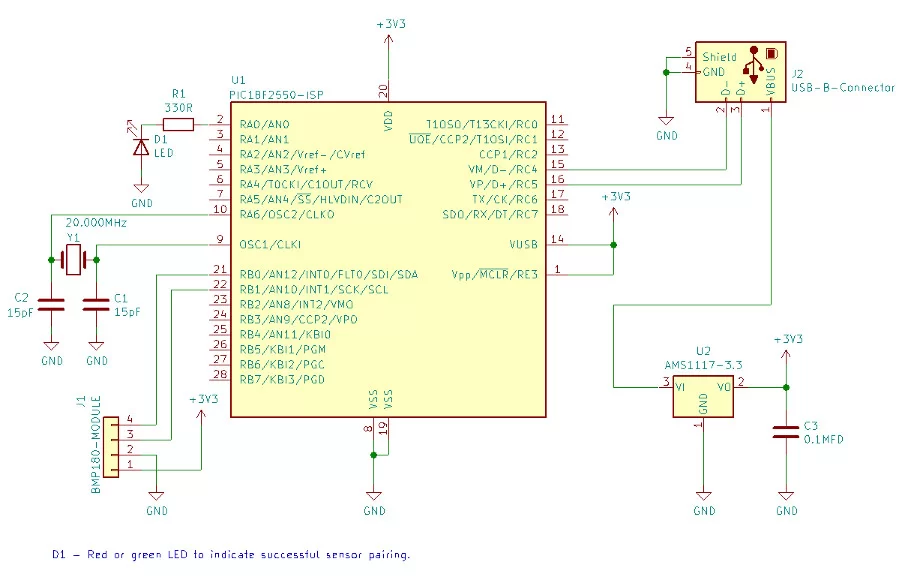
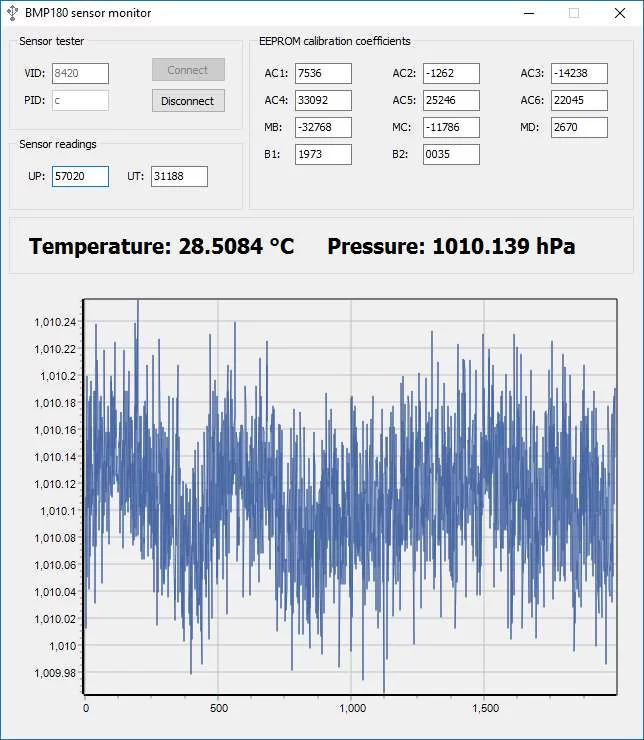
To display sensor calibration data and it’s readings we did small windows application. This application display and plot temperature and pressure readings captured from the BMP180 sensor.
- What is the primary purpose of this project?
To study the operating characteristics of the Bosch BMP180 sensor. - Can this unit measure temperature?
Yes, the sensor measures both barometric pressure and temperature. - Does the device require special drivers?
No, it works as a USB HID device without any special device driver. - What is the pressure measurement range of the sensor?
The sensor can measure pressure ranging between 300hPa to 1100hPa. - Which microcontroller is used in this unit?
The unit is based on the PIC18F2550 microcontroller. - Why was the PIC18F2550 selected?
It was chosen because of its built-in USB 2.0 interface. - How are the sensor readings visualized?
A small Windows application displays and plots the captured data. - In which environment was the unit tested?
The unit was tested in a Windows 10 environment.

