


Summary of A simple display that uses the POV to display messages in the air using PIC12F629 microcontroller
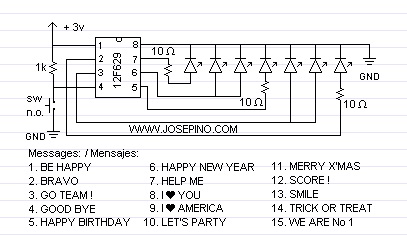
This article describes a simple rotating "Air Display" that uses the persistence of vision (POV) effect to display messages in mid-air. The system is controlled by a PIC12F629 microcontroller, requiring only a single button for power, message cycling, and shutdown. An algorithm was previously available for custom programming, though it is no longer provided.Parts used in the Air Display:
- PIC12F629 microcontroller
- Rotating display mechanism
- Button (for power, message change, and off)
- HEX file for programming
Download the HEX file HEREProgram the PIC with this HEX file. (Use right-click and "Save as")
UPDATE: Nov 6, 2005 - Algorithm is available. You can create your own program in any language using any microcontroller.
Build your own Air Display using this algorithm. Sorry, no longer available.
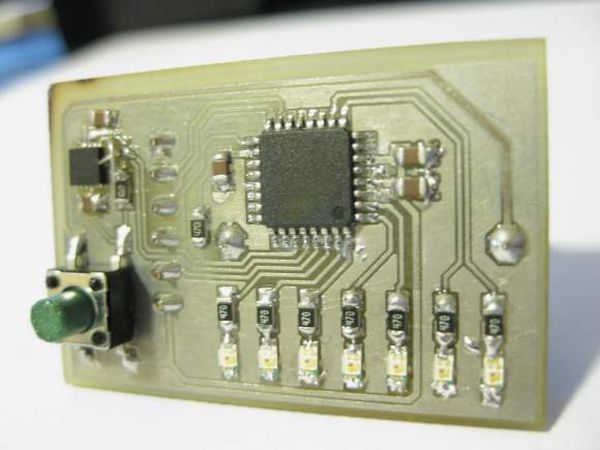
The operation is super simple and you don't need an user manual. Press the button to turn it on. Press the button to change the message and press the button to turn it off.
For more detail: A simple display that uses the POV to display messages in the air using PIC12F629 microcontroller
Quick Solutions to Questions related to Air Display:
-
How does the Air Display work?
The display writes messages on the air while rotating, allowing you to read them due to the persistence of vision. -
What microcontroller is used in this project?
The project uses a PIC12F629 microcontroller. -
How do I turn the device on or off?
You press the button to turn it on and press the same button again to turn it off. -
How can I change the displayed message?
Pressing the button changes the message currently being displayed. -
Is an user manual required to operate this device?
No, the operation is super simple and you do not need an user manual. -
Where can I download the HEX file?
The article provides a link to download the HEX file to program the PIC. -
Can I create my own program for this display?
An algorithm was available to create your own program using any microcontroller, but it is no longer available.
Related projects
RGB LED PWM Driver for High Power 350mA LEDs using PIC12F629
Description This project combines a PIC and three constant current 'buck' converters to produce an RGB LED controller that will operate with...
Communication & Interfacing · PIC12F629Wireless controlled lightdimmer using PIC12F629
The meaning from this design is to build it in -i.e. a shaded lamp- and to switch this lamp on and off...
LED Projects · PIC12F629Navigation Lights for Models for PIC12F629
Description This project was inspired from a post on the Picprojects forum where a member had adapted the RGB Moodlight project for...
LCD & Display ProjectsLeveraging Blockout Banners for Effective Electronics and Tech Product Displays
Blockout banners have become a popular and effective tool for displaying electronics and tech products in various settings, from trade shows and...
LCD & Display Projects · PIC18F4520Interfacing PIC18F4520 microcontroller with an HD44780 LCD
Introduction Being able to display data from a microcontroller visually has many advantages. It allows for menus, status indicators, and instructions to...
LCD & Display ProjectsVideo Project Development in the Midst of an Impromptu Online Semester
Receiving robot parts in the mail was an unexpected conclusion to the Winter 2020 semester for students. However, when faced with a...

Ibrar Ayyub
I am an experienced technical writer holding a Master's degree in computer science from BZU Multan, Pakistan University. With a background spanning various industries, particularly in home automation and engineering, I have honed my skills in crafting clear and concise content. Proficient in leveraging infographics and diagrams, I strive to simplify complex concepts for readers. My strength lies in thorough...