
Summary of Roll and Temperature sensor applications using PIC18F2550
This article details the TD-CMP modules, highlighting their specifications like 1° compass resolution and optional tilt/roll and temperature sensing. It covers interfaces (I²C, RS232, USB), power options, and calibration procedures for compass, tilt, and roll. Users can adjust LCD contrast, increase sampling rates, and update software via a bootloader. DIY kits, bare PCBs, schematics, and source code are available for purchase or download.
Parts used in the TD-CMP Modules:
- TD-CMP02 Module
- TD-CMP03 Module
- LM335Z Temperature Sensor
- JP4 Power Jumper
- JP3 Interface Jumper
- JP2 Serial Port Jumper
- MAX3232 Level Converter
- Tiny Bootloader 1.91 Software
This page will show you how to use the TD-CMP modules in a way which fits you most.
Here are the technical specifications of the modules:
- Compass: Resolution: 1° – Accuracy: 3°
- Tilt/Roll: (TD-CMP02 and TD-CMP03 only) Resolution: 2° – Accuracy: 5°
- Temperature: (TD-CMP03 only) Resolution= 1°C/F – Accuracy =1°
- New: Sampling rate: 12,5 to 25 samples/second.
- Easy Tilt/Roll calibration.(TD-CMP02 and TD-CMP03 only)
- Interfaces: I²C, RS232 and mini-USB (as a HID device: PID=0461, VID= 1023)
- Powered by USB bus or an external 5V.
- Direct LCD readout possible. LCD contrast by user.
- Low power LED lights when facing North (angle within 11,25° both left and right from North.)
- USB Windows application (written in C#) available for free download.) Compatible with WinXp/Vista.
- Source code (CCS C and C# .NET) and schematics (Eagle) can be purchased separately.
- Module software is 100% upgradable with a simple bootloader.
- PCB Dimensions: 40 x 41 mm or 1″57 x 1″61, weight: 10 grams.
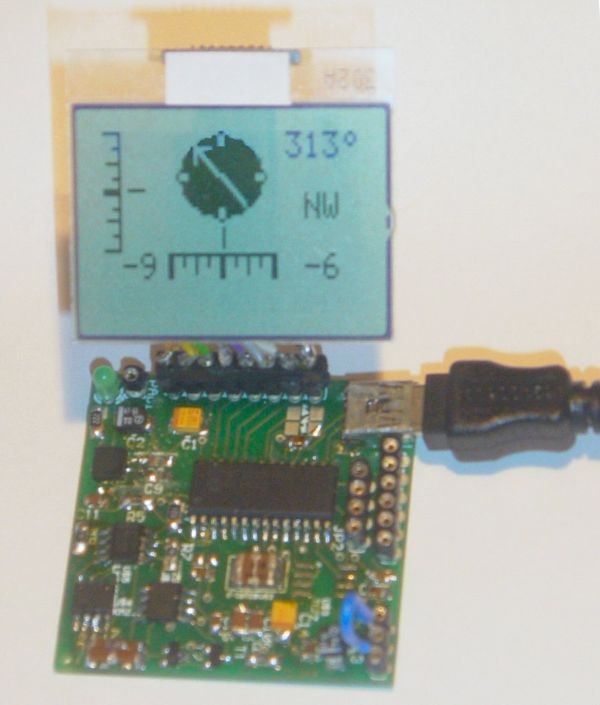
These assembled modules are available from our online shop.
You may also purchase the bare pcb, a KIT DIY* version and the source code. KIT step-by-step construction guide.
New: compass calibration.
Schematics and pcb diagrams available for download. Last update: November 26, 2009.
DIY* = Do It Yourself
Power Source: JP4: Connect pin 2 to pin 3 to power the module directly from USB. Connect pin 1 to pin 2 when powered externally via JP3, pin 1.
New: Increase sampling speed from 12,5/second to 25/second: connect SPEED1 to SPEED2 (JP3, pin4 to JP3, pin2.)
LCD contrast Adjust: Connect pin 5, JP3 to +5V before powering up. Release when the desired the contrast is reached.
Tilt/Roll Calibration: (TD-CMP02 and TD-CMP03 only):
- First place the module on a completely flat surface, power up.
- Then shortly apply +5V (pin 1, JP2) to ADJUST (pin 5, JP3) Release after 1 second.
- Check readings when applying tilt/roll to the module. Repeat the calibration procedure if necessary. Done.
Compass Calibration: (do not touch the PCB or chips whilst calibrating.)
- First place the module on a completely flat surface, power up, head to North (position as shown in diagram and picture above), then turn the module slowly 360° (make 2-3 full clockwise and/or counter-clockwise spins.)
- Now apply +5V (pin 1, JP2) to ADJUST (pin 5, JP3) Wait for 8-10 seconds; the LED will flash 3 times. Release the ADJUST pin from +5V. Power off and on.
- Check compass readings when heading the module to N, S, E, W. Repeat the calibration procedure if necessary. Done.
Module RESET: apply GND to MCLR pin.
Temperature sensor: (TD-CMP03 only): The external LM335Z sensor connects to JP3 pin 4 and 6. No temperature will be displayed when the sensor is removed.
RS232 interface:
JP2 provides the interface to connect to your COM port and hyper terminal. Communications @ 115200 bpS, 8N1.
Use a level converter like the MAX3232 between the TD-CMP module and the pc serial port. See this example.
Also used for bootloading (module software update.) Check under the download section below for the latest version. Bootloading of the HEX-file can be done with Tiny Bootloader 1.91
For more detail: Roll and Temperature sensor applications using PIC18F2550
- How do I increase the sampling speed of the module?
Connect SPEED1 to SPEED2 by linking JP3 pin4 to JP3 pin2. - Can I calibrate the tilt and roll on all TD-CMP models?
No, tilt and roll calibration is only available for the TD-CMP02 and TD-CMP03 models. - What is the best way to adjust the LCD contrast?
Connect pin 5 of JP3 to +5V before powering up, then release when the desired contrast is reached. - How do I perform compass calibration?
Place the module flat, face North, rotate it 360 degrees twice, apply +5V to ADJUST for 8-10 seconds until the LED flashes three times, then power cycle. - Does the module support external power sources?
Yes, you can power it externally via JP3 pin 1 by connecting pin 1 to pin 2 on JP2. - What interface should I use to connect to a PC COM port?
Use the RS232 interface with a level converter like the MAX3232 between the module and the PC serial port. - How can I reset the module?
Apply GND to the MCLR pin to reset the module. - Is the module software upgradable?
Yes, the module software is 100% upgradable using a simple bootloader.

