
Summary of Universal RC5/RC6 transceiver using PIC16F628
This article describes a Universal RC5/RC6 Transceiver project using a PIC16F628 microcontroller. It features an IR receiver that displays received codes (RC5, RC5X, RC6) on an LCD and indicates signal quality via LEDs. The transmitter allows users to manually adjust and send custom system and command codes for these protocols using push buttons and EEPROM storage.
Parts used in the Universal RC5/RC6 Transceiver:
- PIC16F628 microcontroller
- TSOP1736 IR receiver
- LCD display
- LED1 (green)
- LED2 (red)
- LED3 (yellow)
- IR transmitter
- S1 switch
- S2 button (ADJUST)
- S3 button (SEND)
- EEPROM
This project is an expansion from another project from this website.
On the one side you can read the RC5, RC5X and RC6 codes from remote controls on a LCD and on the other hand you can send all thinkable RC5, RC5X and RC6 codes to a device.
Besides is for this project a PCB layout drawed to make it still more easier for you.
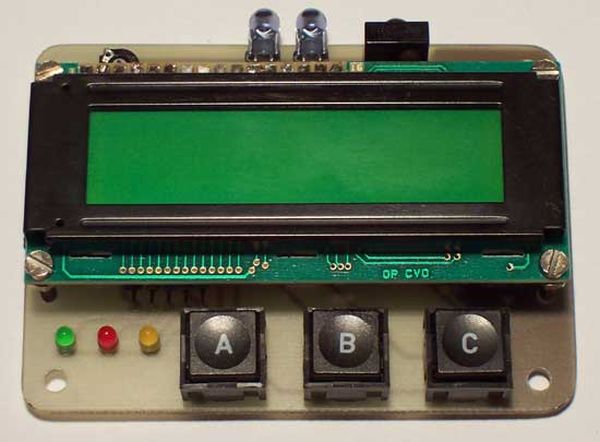
The IR receiver:
When the TSOP1736 (IR receiver) receives an infrared (IR) signal from a RC5 or RC6 remote control (like Philips) burns LED1 (green).
The LCD shows when it receives a new type of code for one second which protocol is received (RC5, RC5X or RC6).
After then the LCD shows the RC5 or RC6 system- and command code in decimal as wel in binair.
The toggle-value is shown by LED3 (yellow).
LED2 (red) burns if the received signal is poor or if it’s not a RC5, RC5X or RC6 signal.
If you only want to know the code from a button then you can ofcourse also look at the RC5 tables from this website (See here and here).
The IR transmitter:
With the IR-transmitter it is possible to send every possible code from the RC5, RC5X and RC6 protocol, like a remote control does.
With the help of the LCD you can adjust which RC5, RC5X or RC6 system- and command code must send out.
When start up select first with ‘ADJUST’ (S2) the RC5 or RC6 protocol, when the choise is right, confirm with ‘SEND’ (S3).
To adjust the command value press ‘ADJUST’.
If this button is pressed for a longer time, the counter changes from direction.
If this button is pressed much longer, then the counter starts repeating automatically and counts faster and faster.
When PORTA.5 is connected to GND (keep S1 pressed), then changes not the command value, but the RC5 or RC6 system-address, the system-address will be stored in EEPROM.
The in this way adjusted code will be transmitted, by pressing ‘SEND’ (S3).
If ‘ADJUST’ and ‘SEND’ are pressed both, the program restarts, then you can select between RC5 and RC6 again.
For more detail: Universal RC5/RC6 transceiver using PIC16F628
- How does the device indicate a poor or invalid signal?
LED2 (red) burns if the received signal is poor or if it is not a RC5, RC5X, or RC6 signal. - What information does the LCD show after receiving a code?
The LCD shows the protocol type for one second, followed by the system and command codes in decimal and binary. - Which component lights up when a valid IR signal is received?
LED1 (green) burns when the TSOP1736 receives an infrared signal from a compatible remote control. - How can you change the direction of the counter value adjustment?
Pressing the ADJUST button for a longer time changes the counter direction. - What happens if the ADJUST button is pressed for a very long time?
The counter starts repeating automatically and counts faster and faster. - How do you store a new system address in the device?
Connect PORTA.5 to GND while keeping S1 pressed, then adjust the value with the ADJUST button. - What occurs when both ADJUST and SEND buttons are pressed simultaneously?
The program restarts, allowing you to select between RC5 and RC6 protocols again. - Is a PCB layout available for this project?
Yes, a PCB layout was drawn to make building the project easier.
