
Summary of Temperature controller for K-type thermistor and MAX6675
This article describes a DIY temperature controller project using a PIC16F877A microcontroller, an HD44780 16x2 character display, and a MAX6675 breakout module for K-type thermistors. The system controls 300W cartridge heaters via a relay, featuring a three-button interface (up/down/select) with short and long press logic to adjust temperatures efficiently.
Parts used in the Temperature Controller:
- K-type thermistor
- MAX6675 breakout module
- PIC16F877A microcontroller
- HD44780 16x2 character display
- Relay
- 300W cartridge heaters
- Three buttons (up/down/select)
After CNCPaul/LathePaul created such an awesome-looking heating chamber, the postie once again knocked on the door at Nerd Towers to deliver yet another eBay purchase – this time, it was a K-type thermistor and breakout module (basically just a MAX6675 on a board with pin headers)
We had looked online at temperature controllers but they all seemed to be quite pricey for what they were – a cheap thermistor, a few 4×7 segment displays and a fancy box. Since we’ve currently got loads of 16×2 character displays and a boxful of PIC microcontrollers knocking about, it made sense (to us at least) to make our own temperature controller with a simple menu system.
We stuck an HD44780 character display onto a breadboard with a massive old PIC16F877A chip that just happened to be lying around. To this we also added the newly acquired temperature module and bundled some firmware onto the chip.
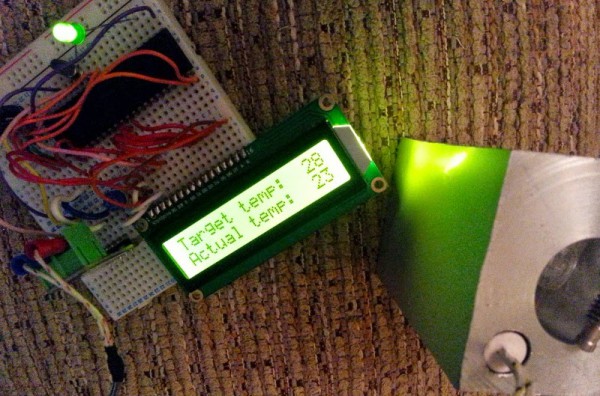
Here’s the firmware for our controller. It’s pretty basic. The most notable thing about it are the button press routines – we’re using just three buttons, up/down/select. But, like an alarm clock, a “short press” will cause the values to increase/decrease by just one at a time, but a “long press” results in the numbers whizzing by in multiples of ten.
For more detail: Temperature controller for K-type thermistor and MAX6675
- Why did the creators build their own temperature controller?
Commercial controllers were considered too expensive for the basic components they contained. - What microcontroller was used in this project?
A PIC16F877A chip was used because one was already available. - How does the user interface handle value adjustments?
A short press changes values by one, while a long press changes them by ten. - What type of heating element is controlled by this system?
The system switches mains supply to 300W cartridge heaters. - Which display technology was selected for the menu system?
An HD44780 character display was connected to the breadboard. - What component reads the temperature from the sensor?
A MAX6675 breakout module processes the signal from the K-type thermistor. - Does the LED indicate the heater status?
Yes, the LED shows whether the relay is activated or if the target temperature is met.

