
Summary of An S/PDIF Sound Card Using The PCM2906
The author updated a previous PCM2904 sound card project to include an S/PDIF interface using the pin-for-pin compatible PCM2906 chip. By replacing audio jacks with fiber-optic transmitters and receivers, the modified board successfully registered as a Texas Instruments PCM2906C Audio Codec on a Linux laptop. The design utilizes the reference circuit from the datasheet while omitting unused portions, solving ground loop issues when interfacing with PCs.
Parts used in the S/PDIF Sound Card Project:
- PCM2906 Audio Codec
- Fiber-optic transmitter
- Fiber-optic receiver
- PulseAudio Volume Control software
- VLC media player
When S/PDIF became available in the Teensy Audio Library I thought this might be the solution to ground loop problems I’d been having when interfacing projects to my PC. However, I quickly realized I didn’t have any sound cards with an S/PDIF interface.
In the belief that I’d rather build than buy I decided to update one of my previous projects, a PCM2904 based sound card, to include an S/PDIF interface. The update was a cinch because TI has a pin-for-pin replacement for the PCM2904 (the PCM2906) with an S/PDIF interface. All I had to do was replace the audio jacks with fiber-optic transmitter/receivers connected to the appropriate pins.
The resulting schematic and prototype are shown below. (If you’re interested, the boards are available through OSH Park)
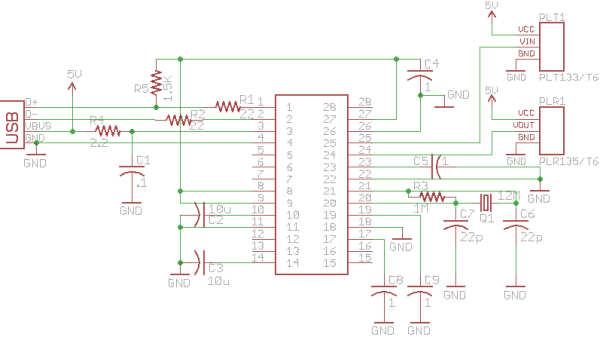
There’s not a lot to it. It’s simply the reference circuit from the PCM2906 data sheet with portions I don’t expect to use eliminated.
Testing The Interface
To test the interface I looped the transmitted fiber optic signal back to the receiver. When plugged into my Linux laptop it registered as a Texas Instruments PCM2906C Audio Codec as shown below.
Bus 004 Device 003: ID 058f:6366 Alcor Micro Corp. Multi Flash Reader
Bus 004 Device 002: ID 8087:0024 Intel Corp. Integrated Rate Matching Hub
Bus 004 Device 001: ID 1d6b:0002 Linux Foundation 2.0 root hub
Bus 003 Device 004: ID 1bcf:2c02 Sunplus Innovation Technology Inc.
Bus 003 Device 003: ID 413c:3016 Dell Computer Corp. Optical 5-Button Wheel Mouse
Bus 003 Device 002: ID 8087:0024 Intel Corp. Integrated Rate Matching Hub
Bus 003 Device 001: ID 1d6b:0002 Linux Foundation 2.0 root hub
Bus 002 Device 001: ID 1d6b:0003 Linux Foundation 3.0 root hub
Bus 001 Device 013: ID 08bb:29c6 Texas Instruments PCM2906C Audio CODEC
Bus 001 Device 001: ID 1d6b:0002 Linux Foundation 2.0 root hub
Starting up the PulseAudio Volume Control and playing back a file using VLC, I could see the input and output audio levels varying with the signal from VLC.
If you want to actually hear the looped back audio you can use the PulseAudio loopback module.
For more detail: An S/PDIF Sound Card Using The PCM2906
- Why did the author update the previous PCM2904 project?
The author wanted to solve ground loop problems encountered when interfacing projects to their PC. - What chip was used as a replacement for the PCM2904?
The TI PCM2906 was used because it is a pin-for-pin replacement with an S/PDIF interface. - How were the audio jacks replaced in the new design?
The audio jacks were replaced with fiber-optic transmitters and receivers connected to the appropriate pins. - How was the interface tested before full use?
The transmitted fiber optic signal was looped back to the receiver to verify functionality. - What device name appeared in the Linux system after connecting the card?
The system registered the device as a Texas Instruments PCM2906C Audio Codec. - Which software tools were used to verify audio levels during testing?
PulseAudio Volume Control and VLC media player were used to observe varying input and output levels.

