
Summary of SOLO V2 – YOUR SAFETY NET AGAINST PHISHING
Solo V2 is an open-source FIDO2 security key redesigned for durability, improved NFC, a new NXP microcontroller, and Rust firmware to reduce attack surface. It offers easy plug-and-play use for 2FA and passwordless logins, a reversible USB-A connector, three touch buttons, and an improved antenna and mechanical strength to resist wear and phishing-based account compromise.
Parts used in the Solo V2:
- Reversible USB-A connector
- NXP microcontroller
- NFC antenna (innovative antenna design)
- Printed circuit board (PCB) with reinforced base
- Three touch buttons
- LED indicator
- Rust-based firmware
- Enclosure/housing designed for physical robustness
A campaign was launched on Kickstarter for an open security key to protect your Gmail, Twitter, GitHub & more called Solo V2. Solo V2 is from the team that brought the first open-source FIDO2 security key.
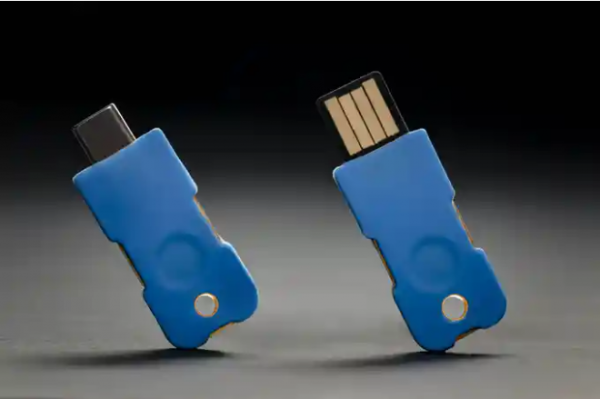
Modern security solutions are often expensive, making them unavailable to many. However, you can easily protect yourself from a compromised account thanks to the Solo V2 security key. Solo V2 helps reduces the risk of security breaches, as over 80% of all breaches are caused by passwords compromised through phishing email attacks. Talking about Solo V2, the company says :
“Our goal with Solo V2 is to harden physical security of the device itself while providing all the protections that come with 2FA or passwordless login.”
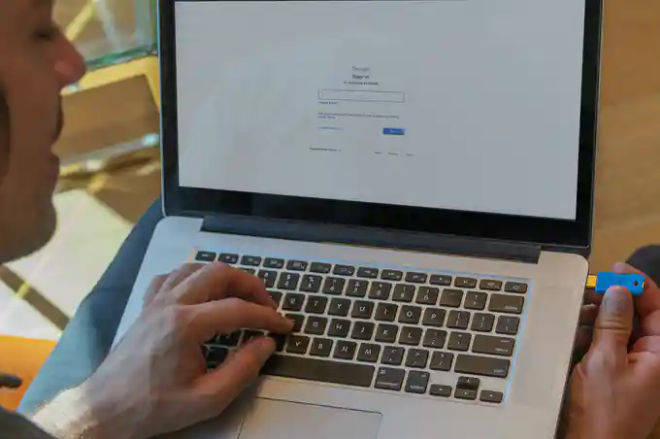
The Solo V2 is a complete redesign of the original FIDO2 security key. They designed the hardware to be more physically robust, the NFC performance is increased, and uses a brand new microcontroller by NXP with enhanced security features, and the firmware has been rewritten in Rust to be more modular/reusable by the community and to reduce the attack surface. Solo V2 is easy to use. No need to install any software. You can use your V2 immediately. You just have to follow the following steps:
-
- Log onto the website you desire to register your Solo V2 on and go to security settings.
- Typically, there is an option for enabling 2FA. In that selection, there will be an option to add a security key. Click on that, and follow the instructions to register the key.
- Once registered, the next time you log in to your account the interface will request you to insert the security key and touch the button to authenticate.
Solo V2
-
-
- is offering the first-ever reversible USB-A connector. This connector enables you to insert the key into a USB Port, and also helps you to decide what side you want to face up. This fixes the problem of having a key be oriented with the LED light not facing the operator. The
-
-
- features 3 touch buttons that eliminate the stress of depressing buttons, like what’s applicable in the first version. This allows for easier activation. Solo V2 features an innovative antenna design, which enhances its performance, improving the range and field strength. Solo V2’s design strengthens the weak points that are usually present at the base of the USB connector and the PCB.
- Read more: SOLO V2 – YOUR SAFETY NET AGAINST PHISHING
-
-
- What is Solo V2?
Solo V2 is a redesigned open-source FIDO2 security key offering improved physical durability, NFC performance, a new NXP microcontroller, and Rust firmware. - How do you use Solo V2 to protect an online account?
Register Solo V2 in the account's security settings by adding a security key for 2FA, then insert the key and touch the button when prompted at login. - Does Solo V2 require any software installation?
No, Solo V2 does not require installing any software and can be used immediately. - What improvements does Solo V2 make over the original key?
Solo V2 redesigns hardware for robustness, increases NFC performance, uses a new NXP microcontroller, rewrites firmware in Rust, adds a reversible USB-A connector, and includes three touch buttons and an improved antenna. - Can Solo V2 help protect against phishing attacks?
Yes, Solo V2 helps reduce risk of breaches caused by compromised passwords from phishing by providing hardware 2FA or passwordless login. - What is special about the USB connector on Solo V2?
Solo V2 offers the first-ever reversible USB-A connector so you can insert the key either way and choose which side faces up. - How does Solo V2 make activation easier?
It features three touch buttons that remove the need to depress buttons, allowing easier activation. - What were the firmware design goals for Solo V2?
The firmware was rewritten in Rust to be more modular and reusable by the community and to reduce the attack surface.

