


Summary of PIC12F675 external interrupt code and Proteus simulation
This article details a C language project for the PIC12F675 microcontroller using MPLAB and HI-TECH C to handle external interrupts. It explains how the GP2/INT pin triggers an interrupt via a push button, toggling the GP5 pin in response. The code is designed for applications like controlling servo motors with position encoders.Parts used in the External Interrupt Project:
- PIC12F675 microcontroller
- GP2/INT pin
- Push button
- Pull down resistor
- GP5 pin
- MPLAB v8.85 software
- HI-TECH C v9.83 compiler
- Proteus v7.10 simulator
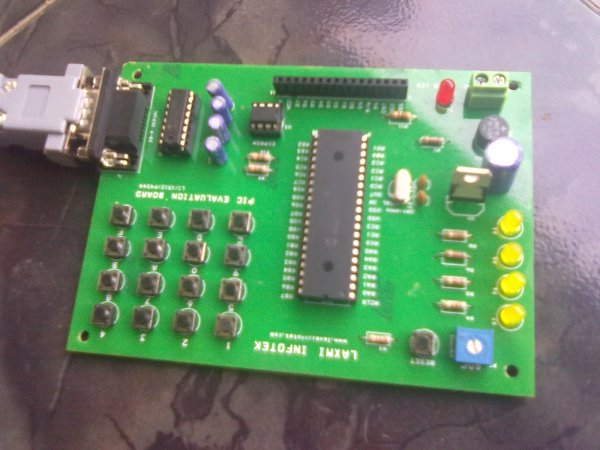
As we know, PIC12F675 microcontroller has one GP2/INT pin, which can be used to service external interrupts. This code is written in C language using MPLAB with HI-TECH C compiler. You can download this code from the 'Downloads' section at the bottom of this page.
It is assumed that you know how to blink an LED with PIC12F675 microcontroller. If you don't then please read this page first, before proceeding with this article.
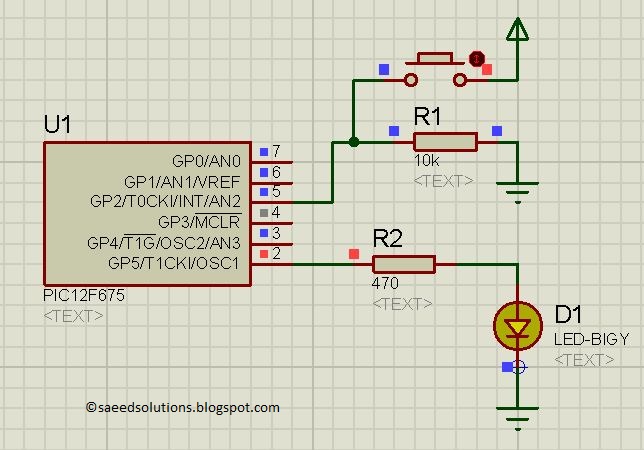
The result of simulating the code in Proteus is shown below[1].
In the above circuit[2], normally a low value is present on the GP2/INT pin because of the pull down resistor. But when push button is pressed then a low to high pulse on the GP2/INT pin generates the interrupt. And code is written in such a way that whenever interrupt is generated then GP5 pin is toggled.
Code
The code for the main function is shown below.
Downloads
External interrupt code for PIC12F675 was compiled in MPLAB v8.85 with HI-TECH C v9.83 compiler and simulation was made in Proteus v7.10. To download code and Proteus simulation click here.
For more detail: PIC12F675 external interrupt code and Proteus simulation
Quick Solutions to Questions related to External Interrupt Project:
- Which pin on the PIC12F675 handles external interrupts?
The GP2/INT pin is used to service external interrupts. - What programming language was used for this code?
The code is written in C language. - Which software tools were used to compile and simulate the project?
MPLAB v8.85 with HI-TECH C v9.83 was used for compilation, and Proteus v7.10 was used for simulation. - How does the external interrupt get triggered in this circuit?
A push button press generates a low to high pulse on the GP2/INT pin to trigger the interrupt. - What happens when the interrupt is generated?
The code toggles the GP5 pin whenever an interrupt is generated. - Is prior knowledge of blinking an LED required to understand this article?
Yes, the article assumes you know how to blink an LED with the PIC12F675 before proceeding. - Can this code be downloaded from the provided page?
Yes, the code can be downloaded from the Downloads section at the bottom of the page. - What is a suggested application for this external interrupt code?
It is useful for controlling a servo motor which has a position encoder.
Related projects
PIC 12F675 Programmable 12V Battery Monitor
Being an active outdoor guy, I have a few different types of 12V lights and a variety of battery types. - For...
Audio, Sound & Radio · PIC12F675Audio CRO using PIC12F675 Microcontroller
This project is a miniature Audio CRO. For those not familiar with the abbreviation "CRO," it means "Cathode Ray Oscilloscope" and this...
Development Boards & Kits · PIC12F675DIY $1 PIC 12f675 JDM Programmer (Cheap and Easy)
Hi EveryBody i am Again Doing something. and it is with PIC's! Almost Everybody do not want a Big Arduino in their...
Communication & Interfacing · PIC18F4520CAN FD Node based on a PIC18 Microcontroller
The introduction sets the stage for an embedded systems project that involves developing a Embedded C CAN FD project using the MCP2517FD...
Communication & InterfacingLAN9662 Gigabit Switch: Optimized for Industrial Ethernet
Introduction It should come as little surprise therefore that one element of what is now more commonly referred to in some circles...
Communication & InterfacingPIC Microcontroller: Fundamentals & Applications for Students
Introduction Microcontrollers are the key components in the embedded systems market. A variety of embedded systems was formed and developed after the...

Ibrar Ayyub
I am an experienced technical writer holding a Master's degree in computer science from BZU Multan, Pakistan University. With a background spanning various industries, particularly in home automation and engineering, I have honed my skills in crafting clear and concise content. Proficient in leveraging infographics and diagrams, I strive to simplify complex concepts for readers. My strength lies in thorough...