


Summary of PIC Industrial and Domestic Timer (Relay Controller)
This article introduces the "Industrial and Domestic Timer," a time-controlled relay project submitted by Jeswanth Kumar. Built around the PIC16F877A microcontroller, it features an LCD display, push buttons, and relays for managing up to 32 alarms per relay. The system uses a DS1307 for accurate timekeeping and stores settings in internal EEPROM, with code written in Hi-Tech C.Parts used in the Industrial and Domestic Timer:
- Microchip PIC Microcontroller PIC16F877A
- DS1307 (Time keeping module)
- 16x2 LCD
- 5 Push buttons
- 8 Relays
- Internal EEPROM of PIC microcontroller
One of our site member, Jeswanth kumar (jeswanthmg ) has submitted his project to me just before the new year eve. It took a little time for me to review this project.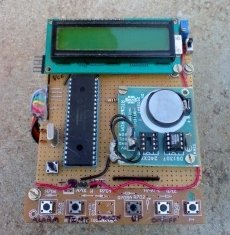
Project is titled "Industrial and Domestic Timer" is a time controller or a Time controlled relay project in simple words. Though it seems simple to say but the features of this project adds a great learning curve in both hardware and software part.
This project is buit around Microchip PIC Microcontroller PIC16F877A. Hardware includes DS1307 for time keeping, 16x2 LCD for display, 5 Push buttons and 8 relays. The alarm settings are stored in internal EEPROM of PIC microcontroller. The code for this project is written in C for Hi-Tech C Compiler.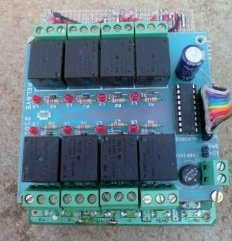
Some Highlighting features are:
- 32 alarm settings for 8 relays including on off but the number of alarms can easily be increased upto 46.
- 16x2 LCD and 5 push buttons for user interface.
- Microchip PIC16F877A as controller and DS1307 to manage time.
- PIC16F877A’s internal eeprom to store alarm settings.
- PIC’s code is written in Hi-Tech PIC C compiler.
Incase you face any kind of problem in this project feel free to post your doubts in forum.
Download Project: PIC Industrial and Domestic Timer (Relay Controller)
For more detail: PIC Industrial and Domestic Timer (Relay Controller)
Quick Solutions to Questions related to Industrial and Domestic Timer:
- What is the main function of this project?
The project acts as a time controller or time controlled relay. - Which microcontroller is used in this project?
The project is built around the Microchip PIC Microcontroller PIC16F877A. - How many alarm settings can be configured?
The system supports 32 alarm settings for 8 relays, which can be increased up to 46. - What component manages the time for the system?
The DS1307 module is used to manage time. - Where are the alarm settings stored?
Alarm settings are stored in the internal EEPROM of the PIC microcontroller. - What programming language and compiler were used?
The code is written in C using the Hi-Tech C Compiler. - How does the user interface work?
The user interacts via a 16x2 LCD and 5 push buttons.
Related projects
PIC16F877 Driving LCD in 4-Bit Mode using PIC16F877 with Proteus Simulation
Introduction This microcontroller project shows how a PIC16F877 can drive an LCD display using 4-bit mode inside a Proteus simulation.The project demonstrates...
Programmers & ICSP · PIC16F877AEPE PIC/LCD Demo using PIC16F877 with Proteus Simulation
IntroductionThe EPE PIC/LCD Demo is a classic microcontroller project that demonstrates how a PIC16F877 can fully control a PG12864F graphical LCD.Designed as...
Motors & Robotics · PIC16F877AEfficient Sun-Following Robot: A Solar Tracker with Microcontroller Control
Abstract The impending global challenge of dwindling non-renewable fuel resources underscores the urgency of transitioning towards renewable energy alternatives like solar power....
Clocks & TimersAdaptive Alarm Clock: Build a Smart, User-Centric wake-Up system
Project Overview The goal of this ambitious undergraduate project was to develop a novel alarm clock capable of analyzing a person's unique...
Clocks & TimersDesigning Your Ideal Alarm Clock: An Introduction to PIC18
Within this laboratory session, you'll employ the C language to create an alarm clock, delving into the implementation of "C" programs on...
Clocks & TimersBuilding your Dream Alarm Clock Using the PIC18
Objective: In this laboratory session, your objective is to create an alarm clock using the C programming language. You will gain proficiency...

Ibrar Ayyub
I am an experienced technical writer holding a Master's degree in computer science from BZU Multan, Pakistan University. With a background spanning various industries, particularly in home automation and engineering, I have honed my skills in crafting clear and concise content. Proficient in leveraging infographics and diagrams, I strive to simplify complex concepts for readers. My strength lies in thorough...