
Summary of PD Buddy Sink – USB Power Delivery for everyone
USB Power Delivery (PD) is a complex standard that PD Buddy Sink simplifies for hobbyists. This device acts as a smart power jack, allowing users to configure specific voltage and current needs via a USB interface. Once connected to a compatible PD supply, it negotiates the required power and delivers up to 5A at 20V or 3A at lower voltages. The project evolved through several PCB revisions from 2017 to achieve a stable, automated assembly design.
Parts used in the PD Buddy Sink:
- USB Type-C connector
- Screw terminal block
- On-board microcontroller
- MOSFET
- Setup button
- USB CDC console interface
- Configuration GUI software
Description
The Idea
One day I was digging through a box of wall warts, trying to find one that would work for my latest project. I needed one with 12-16 V output at no less than 0.5 A, and with a reasonable output connector. Untangling cords and checking labels was taking a while, and I started thinking. “If I could use USB Power Delivery, I wouldn’t ever have to do this again.” Since USB PD power supplies can provide a multitude of voltages at sizable currents, all you’d need is a little circuit board that takes the place of a power jack and tells the power supply what your project needs.
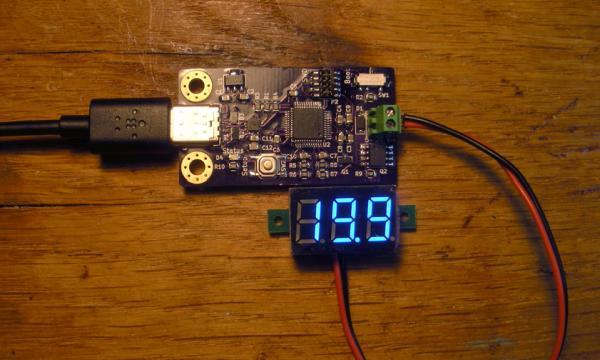
I searched the web, and to my surprise, no such device was available! I realized that I would have to create it myself, so I started figuring out the device’s requirements. It would be a small circuit board with a USB Type-C connector on one side and a screw terminal block for power output on the other. When plugged in, an on-board microcontroller would negotiate the power for your project. For simplicity and flexibility, the configuration should be done by USB. To avoid drawing excessive power, the output would have to be controlled by a MOSFET so as to only turn on once negotiation is complete.
A couple days later, I had a hardware design. A couple weeks later, I built a prototype, and the first PD Buddy Sink was born.
PD Buddy Sink
PD Buddy Sink is a smart power jack for USB Power Delivery. Configure it with the voltage and current your project needs, then plug it into any USB PD power supply with a high enough power capability. It negotiates with the power supply and turns on its output, giving your project up to 3 A at 5, 9, or 15 V, and up to 5 A at 20 V.
Project Status
Done
I developed the first PCB prototypes (v0.1) in early February 2017, and built them mid February. This design had a few errors, which were fixed in v0.2. The next revision (v0.3) was a complete redesign for automated assembly. This got a few more optimizations for the first stable release, v1.0, released in mid-July 2017.
- How does PD Buddy Sink simplify USB Power Delivery?
It acts as a smart power jack that allows users to configure voltage and current via USB, automatically negotiating with the power supply. - What are the maximum output capabilities of the device?
It provides up to 3 A at 5, 9, or 15 V, and up to 5 A at 20 V. - How can I configure the voltage and current settings?
You can plug it into a computer while holding the setup button to access the USB CDC console interface or use the experimental configuration GUI. - Which operating systems support the configuration interface?
The interface works with Linux, Mac OS X, and Windows 10. - Why did the creator decide to build this device?
They needed a specific voltage range and connector but found no existing device available on the web. - What role does the MOSFET play in the circuit?
The MOSFET controls the output to ensure power is only turned on after the negotiation process is complete. - When was the first stable release of PD Buddy Sink released?
The first stable release, version 1.0, was released in mid-July 2017. - What physical components make up the hardware design?
The design features a small circuit board with a USB Type-C connector on one side and a screw terminal block on the other.

