
Summary of Microchip PIC Serial Port Programmer
This article describes a simple COM-port JDM-style PIC microcontroller programmer built from common components. It supports many PIC MCUs including 18F series (e.g., 18F2550), requires WinPic800 software for sending HEX files, and connects to target MCU using PGC (clock), PGD (data), VPP/MCLR, VSS, and VDD pins. The programmer does not work with USB-to-serial converters. After configuring WinPic800 hardware settings, use hardware test, detect device, load the HEX file, and press Program All while an LED indicates programming activity.
Parts used in the Simple PIC Serial Port Programmer:
- COM (serial) port connector
- Commonly available electronic components (resistors, capacitors)
- LED indicator
- Connections/wiring to target MCU pins: PGC (clock)
- Connections/wiring to target MCU pins: PGD (data)
- Connections/wiring to target MCU pins: VPP/MCLR
- Connections/wiring to target MCU pins: VSS (ground)
- Connections/wiring to target MCU pins: VDD (power)
- JDM-style programmer schematic components
About the Programmer
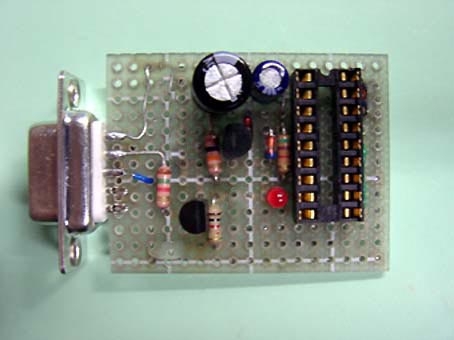
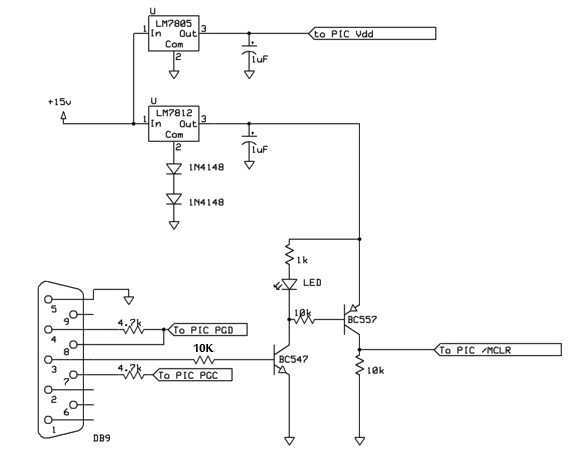
This is a Simple com port based Microchip PIC microcontroller Programmer,This Programmer is based on JDM programmer.The entire programmer is built around commonly available components
 Features
- Does not support the usb to serial converter.
- Works with most of PIC mcu.
- Works with 18F2550 and other 18F series mcu.
Connections to the Target MCU
you can programe may microcontroller by using this schematic , all you need to do is that find out the data sheet of that mcu you want to program and check the pin configration. and the look for PIN PGC(clock) PGD(data) Vpp(/MCLR) and the power Vss And Vdd like shown in the image blow.
Winpic 800:The Programming software
To be able to send hex file from your computer to PIC microcontroller you will need to download and install Windpic 800. After the installation, the first thing you will need to do is configure Winpic to work with our PIC Programmer. To do this go to “Setting” menu and select “Harware setting”. The following window will be shown and highlighted areas show you exactly which options should be selected.
 now you are all set to open you hex file and load in to the mcu. to start programming press the Program all Button in the tool bar. wait for a while to finish the programming.when the programming is going on the led must be glowing.
- Can this programmer work with USB to serial converters?
No. The programmer does not support USB to serial converters. - What PIC MCUs does this programmer work with?
It works with most PIC MCUs and specifically with 18F series including 18F2550. - Which pins on the target MCU are required for programming?
PGC (clock), PGD (data), VPP/MCLR, VSS, and VDD are required. - What software is needed to send HEX files to the PIC?
WinPic800 is required to send HEX files from the computer to the PIC. - How do you configure WinPic800 for this programmer?
Open Settings, select Hardware setting, and choose the options highlighted for the COM-port-based programmer as shown in the article. - How do you verify the programmer is connected correctly in WinPic800?
Use the hardware test button in the toolbar and then use detect device to confirm the device is found. - How do you start programming the PIC after loading the HEX file?
Press the Program All button in the WinPic800 toolbar and wait until programming finishes; an LED should glow during programming.
