
Summary of INTRODUCING TCAM-MINI – AN IR THERMAL CAMERA BOARD WITH ESP32 MODULE
tCam-Mini is a compact wireless thermal imaging camera by Dan Julio that streams radiometric data from a Flir Lepton 3.5 sensor. It provides per-pixel temperatures or AGC-enhanced images, communicates via simple JSON over a TCP/IP socket, and supports AP or STA Wi‑Fi modes. A cross‑platform desktop app (Linux, macOS, Windows) displays palettes, histograms, spotmeters, graphs, and saves/export images and videos while preserving radiometric data for later analysis.
Parts used in the tCam-Mini:
- Flir Lepton 3.5 sensor
- tCam-Mini camera board (with ESP32 module)
- Wi‑Fi module functionality (AP and STA modes provided by ESP32)
- Desktop computer running Linux, Mac OS X, or Windows (for companion app)
- Optional blackbody or temperature reference for graph baseline comparisons
- USB or network interface for data transfer to host
- Power supply for tCam-Mini
tCam-Mini is a small wireless streaming thermal imaging camera designed by Dan Julio to make it easy to get and use radiometric data from a Flir Lepton 3.5 sensor. Radiometric data includes the temperature of every pixel captured by the Lepton allowing all kinds of interesting thermographic analysis. Of course that data can also be turned into the beautiful false-color images everyone associates with thermal imaging.
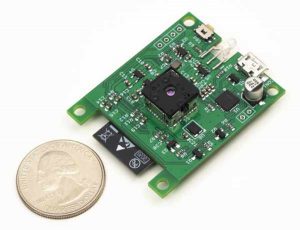
tCam-Mini comes with a capable desktop application, running on Linux, Mac OS X and Windows, making it easy-to-use, right out of the box. Custom applications running on any platform can easily communicate with tCam-Mini via a socket interface. Commands and data are transferred as easy-to-parse json strings.
Capabilities
- The tCam-Mini camera exposes the full capabilities of the Lepton.
- The camera can operate in either Radiometric/TLinear (each pixel contains temperature data) or AGC modes (no temperature data in each pixel but better images).
- Simple json-based command set with communication of a TCP/IP Socket. Makes interfacing with the camera very simple from a custom application.
- AP or STA (client) Wifi modes (static or DHCP-served IPV4 address).
- Single image or streaming data modes.
- Control over sensor emissivity, gain and spotmeter location.
The companion desktop application makes it easy to use the camera and analyze the data from it.
- Display images or streams with multiple palettes.
- Save and load images or streams in files preserving the radiometric data for use later or by other applications. Two file formats: image and video (described in the github repository).
- Export images as jpg, png or tiff files.
- Copy current image to computer’s clipboard.
- Histogram display and analysis of pixel populations.
- Spotmeter and up to four additional markers showing temperature at various points in an image.
- Graphing function to plot spotmeter and marker data over time.
- Graph baseline mode to allow comparing temperatures to a reference point in the scene (for example to compare a temperature to a blackbody constant).
- Export graph data in a text file for analysis by other programs.
- Print graph (or create a PDF on computers that can print to PDF).
Read more: INTRODUCING TCAM-MINI – AN IR THERMAL CAMERA BOARD WITH ESP32 MODULE
- What sensor does tCam-Mini use?
tCam-Mini uses the Flir Lepton 3.5 sensor. - Can tCam-Mini provide radiometric temperature data?
Yes, it can operate in Radiometric/TLinear mode where each pixel contains temperature data. - Does tCam-Mini support non‑radiometric image enhancement?
Yes, it supports AGC modes for improved images without per‑pixel temperature data. - How do custom applications communicate with tCam-Mini?
Custom applications communicate via a TCP/IP socket using simple json strings. - What Wi‑Fi modes does tCam-Mini support?
It supports AP and STA (client) Wi‑Fi modes with static or DHCP IPv4 addressing. - Can the desktop app display palettes and histograms?
Yes, the companion desktop app can display multiple palettes and a histogram for pixel populations. - Is streaming supported or just single images?
Both single image and streaming data modes are supported. - Can radiometric data be saved for later analysis?
Yes, images and streams can be saved in file formats that preserve radiometric data. - Can tCam-Mini export images to common formats?
Yes, the application can export images as jpg, png, or tiff files. - Does the desktop app provide graphing and export of graph data?
Yes, it can graph spotmeter and marker data over time and export graph data to a text file.

