


Summary of Interfacing16X2 LCD with PIC Microcontroller
This article explains interfacing a 16×2 LCD with the PIC18F4550 microcontroller. It details the microcontroller's features, including its RISC architecture, memory capacity, and I/O pins. The guide covers circuit connections involving a 12 MHz crystal oscillator, resistors for contrast, and capacitors for filtering. It outlines programming steps using MPLAB, specifying pin configurations for sending commands and data to the LCD via RS, RW, and Enable pins.Parts used in the Interfacing 16X2 LCD with PIC18F4550 project:
- 16x2 LCD
- PIC18F4550 microcontroller
- Resistor R1
- 12 MHz crystal oscillator
- Capacitor C2
- Capacitor C3
- MPLAB software
- PICKIT2 or PICKIT3 programmer
Features of PIC18F4550:
- PIC18F4550 belongs to the PIC18F family; PIC18F4550 is an 8bit microcontroller and uses RISC architecture. PIC18F4550 has 40 pins in PDIP (dual in line package) and 44 pin in TQFP (Quad flat package).
- 32KB flash memory, 2048 bytes of SRAM (synchronous Random Access memory), EEPROM (Electrically Erasable Program Read Only Memory) of 256 bytes are embedded in the PIC18F4550.
- It has 35 I/O pins for interfacing and communication with other peripherals, 13channel of 10bit analog to digital converters which are used for interfacing and communicating the analog peripherals (DC motor, LDR, etc.).
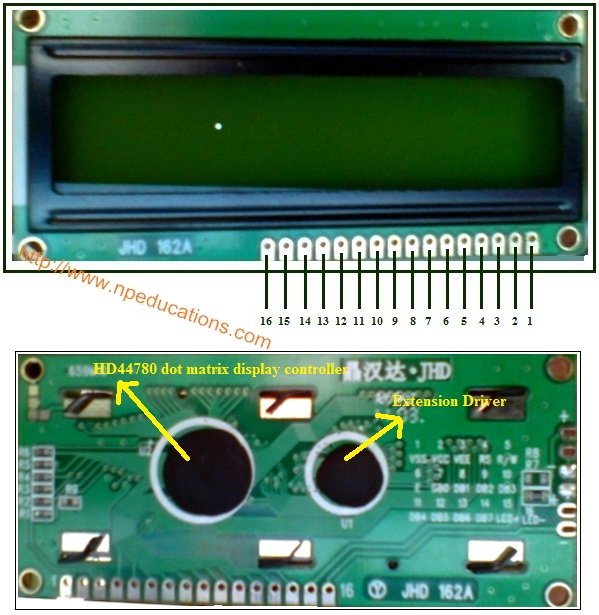 It has 2 CCP and 1 ECCP module that is enhanced capture and compare module which is mainly used for modulation and waveform generation functions. CCP module is of 16bit register works as 16 capture bit register, 16 compare bit register, and PWM and duty cycle register.
- PIC18F4550 has SPI (serial peripheral interface) and i2c (inter integrated circuit) for master and slave modes. It has SPP (Streaming Parallel Port) for USB streaming transfer.
- PIC18F4550 is embedded with 4 timer modules (timer0 to timer3), 2 comparator modules and 3 external interrupt. It has Dual Oscillator options allow microcontroller and USB module to run at different clock speeds. It can operate in 2.0V to 5.5V
16X2 LCD Interfacing PIC Microcontroller – Circuit Explanation:
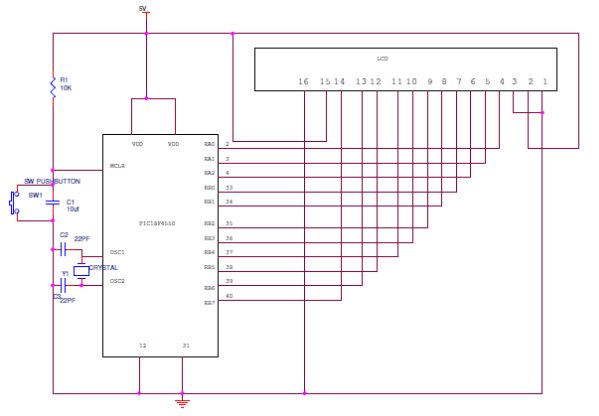
The resistor R1 is used for giving the contrast to the LCD. The crystal oscillator of 12 MHz is connected to the OSC1 and OSC2 pins of Pic microcontroller PIC18F4550 for system clock. The capacitor C2 and C3 will act filters to the crystal oscillator. You can use different ports or pins for interfacing the LCD before going to different ports please check the data sheet whether the pins for general purpose or they are special function pins.
Programming PIC for Interfacing 16X2 LCD:
Interfacing LCD to PIC is not different from interfacing to 8051. The basic concept and gist of the programming is almost same. Visit the following link for more information http://www.electronicshub.org/interfacing-16×2-lcd-8051/.
Only the pins, registers and architecture using for interfacing will be different. When we look at the program, functions like initialization, sending data to the LCD will be almost same.
In the pic programming also for initializing the LCD the R/W pin should be low for writing the data, Enable pins should be high and register select pin (RS) should be high for writing the data. For sending a command the RS should be low, R/W pin should be low and enable pin should be high.
Initializing the LCD function:
lcdcmd(0x38);//Configure the LCD in 8-bit mode,2 line and 5×7 font
lcdcmd(0x0C);// Display On and Cursor Off
lcdcmd(0x01);// Clear display screen
lcdcmd(0x06);// Increment cursor
lcdcmd(0x80);// Set cursor position to 1st line,1st column
Sending command to the LC:
- rs=0; Register select pin is low.
- rw=0; Read/write Pin is also for writing the command to the LCD.
- en=1;enable pin is high.
 Sending data to the LCD:
- rs=1; Register select pin is high.
- rw=0; Read/write Pin is also for writing the command to the LCD.
- en=1; enable pin is high.
Steps for Programming:
- Install MPLAB in your system and create a new project, in selecting device and family select PIC18F family and add PIC18F4550 controller to your project.
- Select the compiler which you have installed and add the file to your project. After adding the file paste the code which is given below and run it. As it is a precompiled and tested program you will not find any errors.
- After compiling the program with no errors dump the program into your development board using PICKIT2 or PICKIT3 programmer/ debugger.
- If you are not using PICKIT then just compile the code and make the HEX file use this HEX file for programming the PIC microcontroller.
For more detail: Interfacing16X2 LCD with PIC Microcontroller
- What is the function of resistor R1 in the circuit?
The resistor R1 is used for giving the contrast to the LCD. - How does the crystal oscillator connect to the PIC18F4550?
A 12 MHz crystal oscillator is connected to the OSC1 and OSC2 pins of the PIC microcontroller for the system clock. - What role do capacitors C2 and C3 play?
Capacitors C2 and C3 act as filters for the crystal oscillator. - When should the Register Select pin be high?
The Register Select pin should be high when writing data to the LCD. - What are the pin states for sending a command to the LCD?
To send a command, the RS pin should be low, the R/W pin should be low, and the enable pin should be high. - Which compiler tool is required to create the project?
You must install MPLAB in your system to create a new project and select the appropriate compiler. - What device selection is needed in MPLAB for this project?
In MPLAB, you must select the PIC18F family and add the PIC18F4550 controller to your project. - How can you program the microcontroller without a PICKIT programmer?
If not using PICKIT, compile the code to make a HEX file and use that HEX file for programming the PIC microcontroller.
Related projects
PICDEM FS USB CDC Evaluation Board using PIC18F4550 with Proteus Simulation
Introduction The PICDEM FS USB CDC Evaluation Board is a practical microcontroller project built around the PIC18F4550, designed to demonstrate USB communication...
Peripheral Tutorials · PIC18F4550PICDEM FS USB Mass Storage Device using PIC18F4550 with Proteus Simulation
Introduction This microcontroller project demonstrates how to simulate a USB Mass Storage Device (MSD) using the PIC18F4550 in a Proteus simulation environment....
Development Boards & Kits · PIC18F2550Pinguino Project: A PIC Microcontroller Based Arduino
This is a complete tutorial to make a PIC Microcontroller based Arduino. This is a complete tutorial to make PIC microcontroller based...
Communication & Interfacing · PIC18F4520CAN FD Node based on a PIC18 Microcontroller
The introduction sets the stage for an embedded systems project that involves developing a Embedded C CAN FD project using the MCP2517FD...
Communication & InterfacingLAN9662 Gigabit Switch: Optimized for Industrial Ethernet
Introduction It should come as little surprise therefore that one element of what is now more commonly referred to in some circles...
Communication & InterfacingPIC Microcontroller: Fundamentals & Applications for Students
Introduction Microcontrollers are the key components in the embedded systems market. A variety of embedded systems was formed and developed after the...

Ibrar Ayyub
I am an experienced technical writer holding a Master's degree in computer science from BZU Multan, Pakistan University. With a background spanning various industries, particularly in home automation and engineering, I have honed my skills in crafting clear and concise content. Proficient in leveraging infographics and diagrams, I strive to simplify complex concepts for readers. My strength lies in thorough...