


Summary of Interfacing VFD with PIC Microcontroller
This article explains interfacing a CU16025 Vacuum Fluorescent Display (VFD) with a PIC16F877A microcontroller as an alternative to LCDs, offering better contrast and temperature range but higher power consumption. The project uses a parallel 8-bit connection via custom C code in MPLAB X XC8, utilizing PORTD for data/command and PORTE for control lines.Parts used in Interfacing VFD with PIC Microcontroller:
- CU16025 VFD module
- PIC16F877A microcontroller
- MPLAB X IDE
- XC8 compiler
- PORTD (for data/command)
- PORTE (for RS and Enable lines)
Vacuum fluorescent display can be a good alternative to a Liquid-crystal displays in some applications. They have a number of advantages over LCD like extended temperature range and excellent contrast in high brightness environment.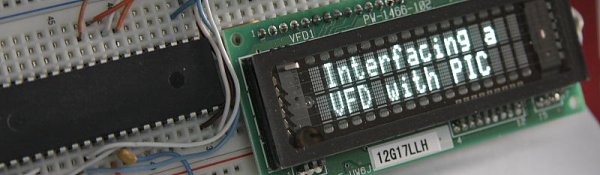 The main disadvantage is higher power consumption making them less attractive in battery operated devices. In this post I’ll show you how you can use this type of display with microcontroller. You can purchase them on Ebay as I did here.CU16025 VFD module was used for this purpose as a direct replacement for 2×16 LCD display. Although the manufacturer of these modules provides some code examples I’ve used my own driver code (originally written for a LCD) and a parallel 8 bit connection to interface this display with PIC16F877A microcontroller. I’ve adapted assembly language subroutine that I wrote earlier for VFD module initialization and for sending data/command. The code was written in C in MPLAB X using XC8 compiler. The same subroutine was also used in VFD Voltmeter project. As you can see from the schematic below 2 PORTs were used to control the display. PORTD for data/command and PORTE for RS and Enable lines.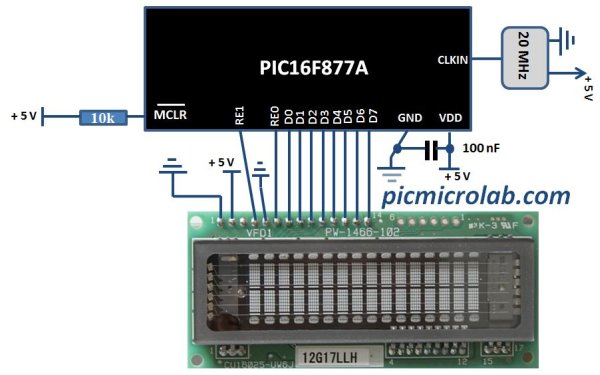
The code consist of 3 main functions: Display initialization, WriteDataVFD , WriteCommandVFD. Command for example can be an address of one of the segments and data is the character you want to display in ASCII. Comments in the source code should provide you with more detailed explanation on each instruction. Click here to download the code.
For more detail: Interfacing VFD with PIC Microcontroller
Quick Solutions to Questions related to Interfacing VFD with PIC Microcontroller:
-
Why might someone choose a VFD over an LCD?
VFDs offer an extended temperature range and excellent contrast in high brightness environments compared to LCDs. -
What is the main disadvantage of using a VFD?
The main disadvantage is higher power consumption, which makes them less attractive for battery-operated devices. -
Which microcontroller was used in this project?
The project uses a PIC16F877A microcontroller. -
How is the display connected to the microcontroller?
A parallel 8-bit connection is used where PORTD handles data/command and PORTE handles RS and Enable lines. -
What software tools were used to write the code?
The code was written in C using the MPLAB X IDE and the XC8 compiler. -
What are the three main functions in the provided code?
The code consists of Display initialization, WriteDataVFD, and WriteCommandVFD functions. -
Can this driver code be reused for other projects?
Yes, the same subroutine was also used in a VFD Voltmeter project.
Related projects
PIC16F877 Driving LCD in 4-Bit Mode using PIC16F877 with Proteus Simulation
Introduction This microcontroller project shows how a PIC16F877 can drive an LCD display using 4-bit mode inside a Proteus simulation.The project demonstrates...
Programmers & ICSP · PIC16F877AEPE PIC/LCD Demo using PIC16F877 with Proteus Simulation
IntroductionThe EPE PIC/LCD Demo is a classic microcontroller project that demonstrates how a PIC16F877 can fully control a PG12864F graphical LCD.Designed as...
Motors & Robotics · PIC16F877AEfficient Sun-Following Robot: A Solar Tracker with Microcontroller Control
Abstract The impending global challenge of dwindling non-renewable fuel resources underscores the urgency of transitioning towards renewable energy alternatives like solar power....
LCD & Display ProjectsLeveraging Blockout Banners for Effective Electronics and Tech Product Displays
Blockout banners have become a popular and effective tool for displaying electronics and tech products in various settings, from trade shows and...
LCD & Display Projects · PIC18F4520Interfacing PIC18F4520 microcontroller with an HD44780 LCD
Introduction Being able to display data from a microcontroller visually has many advantages. It allows for menus, status indicators, and instructions to...
LCD & Display ProjectsVideo Project Development in the Midst of an Impromptu Online Semester
Receiving robot parts in the mail was an unexpected conclusion to the Winter 2020 semester for students. However, when faced with a...

Ibrar Ayyub
I am an experienced technical writer holding a Master's degree in computer science from BZU Multan, Pakistan University. With a background spanning various industries, particularly in home automation and engineering, I have honed my skills in crafting clear and concise content. Proficient in leveraging infographics and diagrams, I strive to simplify complex concepts for readers. My strength lies in thorough...