


Summary of Interfacing LCD Modules with PIC Microcontrollers.
This article details interfacing a 16×2 alphanumeric LCD module with Microchip PIC microcontrollers using a custom C library. It guides users through creating an MPLAB project, adding necessary header and source files, and writing code to display text and numbers on the LCD. The tutorial specifically uses the PIC18F4520 but notes compatibility with other PIC18 series chips provided configuration settings are adjusted correctly.Parts used in the Interfacing LCD Modules with PIC Microcontrollers:
- 16×2 Alphanumeric LCD Module
- PIC18F4520 Microcontroller
- MPLAB IDE
- HI-TECH C Compiler
- lcd.h Header File
- myutils.h Header File
- lcd.c Source File
A large number of embedded project require some type of user interface. This includes displaying numerical, textual and graphical data to user. For very simple numerical display we can use 7 segment displays. If the requirement is little more than that, like displaying some alphanumeric text, we can use LCD Modules. They are cheap enough to be used in low cost projects. They come in various sizes for different requirement. A very popular one is 16×2 model. It can display 2 lines of 16 characters. Other models are 16×4,20×4, 8×1,8×2 etc.
In this tutorial we will learn how we can use such modules with Microchip PIC Microcontrollers. Here I will present my LCD library which you can use to create LCD based application/projects quickly. For demo I will use PIC18F4520 Microcontroller but you can use any PIC18 MCU. But you have to calculate the CONFIG values for correct setting and CPU clock selection etc. That means the chip should be configured correctly. See datasheet for more info on CONFIG bytes.
 MPLAB Project Creation
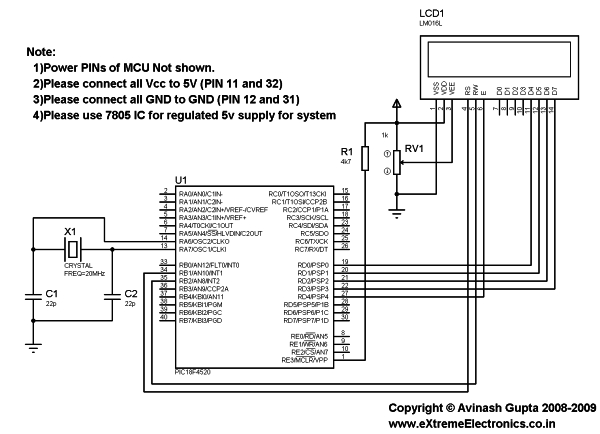
First create a MPLAB project as described in this tutorial. Name the project LCD. Also add a main file called "lcd_test.c". To use my LCD library you need to add it to your project. Just copy/paste the following files to your project folder.
Header Files
- lcd.h
- myutils.h
Source File
- lcd.c
How to add files to MPLAB Project is described here.
Now you are ready to the library functions to interact with the LCD module.
 Sample Program (lcd_test.c)
/********************************************************************

16X2 ALPHANEUMERIC LCD INTERFACING LIBRARY TEST PROGRAM

---------------------------------------------------------

A testing program for our LCD library.

Easy to use library for interfacing 16x2 lcd in 4 bit mode.
MCU: PIC18FXXXX Series from Microchip.
Compiler: HI-TECH C Compiler for PIC18 MCUs (http://www.htsoft.com/)

Copyrights 2008-2009 Avinash Gupta
eXtreme Electronics, India

For More Info visit
http://www.eXtremeElectronics.co.in

Mail: [email protected]

********************************************************************/
#include <htc.h>

#include "lcd.h"

//Chip Settings
__CONFIG(1,0x0200);
__CONFIG(2,0X1E1F);
__CONFIG(3,0X8100);
__CONFIG(4,0X00C1);
__CONFIG(5,0XC00F);
//Simple Delay Routine
void Wait(unsigned int delay)
{   for(;delay;delay--)      __delay_us(100);}void main()
{   //Let the Module start up   Wait(100);   //Initialize the LCD Module
   LCDInit(LS_BLINK);   //Clear the Module
   LCDClear();   //Write a string at current cursor pos
   LCDWriteString("Good Is Great !!");

   Wait(20000);   //Now Clear the display
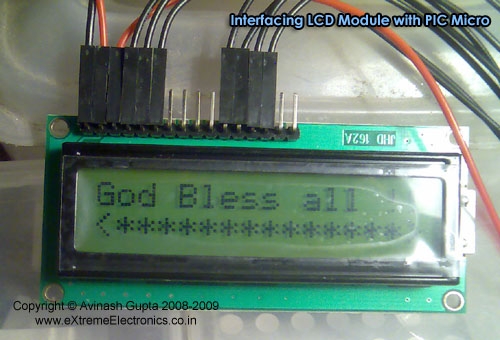
   LCDClear();   LCDWriteString("God Bless all !!");
   //Goto POS (X=0,Y=1 i.e. Line 2)
   //And Write a string
   LCDWriteStringXY(0,1,"<**************>");
   Wait(20000);   //Write Some Numbers
   for(char i=0;i<100;i++)
   {         LCDClear();  LCDWriteInt(i,3); Wait(3000);   }
   LCDClear();   LCDWriteString("    The  End    ");
   //Loop Forever   while(1);}
For more detail: Interfacing LCD Modules with PIC Microcontrollers.
- Which microcontroller is used for the demonstration?
The PIC18F4520 Microcontroller is used for the demo. - Can I use other PIC microcontrollers besides the PIC18F4520?
Yes, you can use any PIC18 MCU if you calculate the correct CONFIG values. - What compiler is recommended for this project?
The HI-TECH C Compiler for PIC18 MCUs is specified. - How many lines of characters does the popular LCD model support?
The popular 16×2 model displays 2 lines of 16 characters. - What files must be added to the MPLAB project folder?
You need to add lcd.h, myutils.h, and lcd.c to the project folder. - What function initializes the LCD module in the sample code?
The LCDInit function is used to initialize the LCD module. - How do you write a string at a specific coordinate on the display?
Use the LCDWriteStringXY function with X and Y coordinates. - Does the library support displaying numerical data?
Yes, the library includes functions like LCDWriteInt to display numbers.
Related projects
CAN FD Node based on a PIC18 Microcontroller
The introduction sets the stage for an embedded systems project that involves developing a Embedded C CAN FD project using the MCP2517FD...
Development Boards & Kits · PIC18F4520Voltage Measurement with A PIC Microcontroller
Voltage Measurement with PIC Microcontroller articulates a methodical framework for facilitating analog voltage measurement using the PIC18F4520, an advanced member of Microchip’s...
LCD & Display Projects · PIC18F4520Interfacing PIC18F4520 microcontroller with an HD44780 LCD
Introduction Being able to display data from a microcontroller visually has many advantages. It allows for menus, status indicators, and instructions to...
LCD & Display ProjectsLeveraging Blockout Banners for Effective Electronics and Tech Product Displays
Blockout banners have become a popular and effective tool for displaying electronics and tech products in various settings, from trade shows and...
LCD & Display ProjectsVideo Project Development in the Midst of an Impromptu Online Semester
Receiving robot parts in the mail was an unexpected conclusion to the Winter 2020 semester for students. However, when faced with a...
LCD & Display Projects · PIC16F628AFrequency Counter by PIC16F628
In this project we are building a basic and low cost frequency counter circuit . It can measure from 16Hz to 100Hz...

Ibrar Ayyub
I am an experienced technical writer holding a Master's degree in computer science from BZU Multan, Pakistan University. With a background spanning various industries, particularly in home automation and engineering, I have honed my skills in crafting clear and concise content. Proficient in leveraging infographics and diagrams, I strive to simplify complex concepts for readers. My strength lies in thorough...