
Summary of Intel D945GCLF Small Front Panel using PIC12F629
This project implements a compact front panel circuit for the Intel D945GCLF motherboard, featuring power and reset buttons alongside hard drive activity and power status LEDs. A PIC12F6xx microcontroller drives a unique sleep effect on the power LED, mimicking Apple laptop behavior. The design prioritizes simplicity, connecting directly to the motherboard via a flat cable without including USB sockets.
Parts used in the Intel D945GCLF Small Front Panel:
- Two buttons (power and reset)
- Hard disc activity LED
- Power status LED
- PIC12F6xx microcontroller
- Flat cable
- SV1 connector
Description
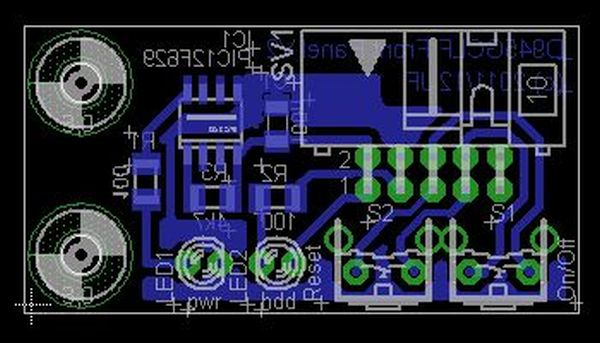
This is a simple circuit with two buttons and two LEDs to control the D945GCLF Intel motherboard. Both power and reset buttons are included as well as hard disc activity LED and power status LED. The special feature included is the sleep effect of Apple laptops on the power LED!
Design and Implementation
The design goals were:
- simple to connect to the motherboard;
- power button;
- the reset button;
- possible front usb sockets;
- Hdd LED;
- Power LED with sleep effect.
Both power and reset buttons are included in the circuit as well as the LEDs and a pic 12F6xx microcontroller to generate the effect. No USB sockets are included. The connection to the motherboard is also easily done with a flat cable.
Schematic
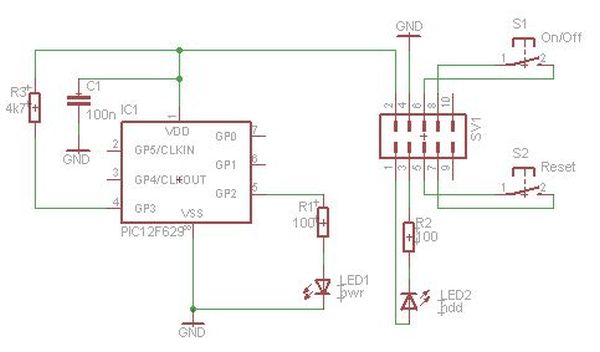
The circuit connects directly to the motherboard front panel header with SV1.
Each pin function is enumerated in the user’s manual and also here for convenience.
For more detail: Intel D945GCLF Small Front Panel using PIC12F629
- What is the special feature of the power LED?
The power LED includes a sleep effect similar to that found on Apple laptops. - Can this circuit connect to front USB sockets?
No, no USB sockets are included in this specific circuit design. - How does the circuit connect to the motherboard?
The connection is made directly to the motherboard front panel header using SV1 with a flat cable. - Which microcontroller generates the sleep effect?
A PIC12F6xx microcontroller is used to generate the specific effects. - Are both power and reset buttons included?
Yes, both power and reset buttons are included in the circuit. - What components control the LEDs?
The LEDs are controlled by the circuit along with the PIC12F6xx microcontroller. - Is the design intended to be simple to connect?
Yes, a primary design goal was making it simple to connect to the motherboard.
