


Summary of How to Interface I2C External EEPROM 24LC64 to PIC Microcontroller
This article explains how to interface an external 24LC64 I2C EEPROM with a PIC16F877 microcontroller. The system writes data to the memory chip, reads it back, and displays the results on an LCD module connected to PORTB. The I2C protocol facilitates communication between the PIC (master) and the EEPROM (slave) using SCL and SDA lines.Parts used in the Interfacing Microchip I2C EEPROM to PIC Project:
- PIC 16F877 Microcontroller
- 24LC64 Memory chip
- LCD Module
- Capacitors (33pF x 2)
- Crystal Oscillator 4MHz
- Resistor 10kΩ
Microcontrollers are standalone chips since they have memory and processor embedded. The integrated memory of microcontrollers store embedded code and other temporary variables for the execution of program. CircuitsGallery published many microcontroller tutorials and PIC microcontroller projects. Sometimes we may use non-volatile memories (i2c devices) with microcontrollers in case of storing permanent data. In this article I am gonna explain how we interface an external memory i2c microchip with PIC microcontroller. For that I took Microchip’s 24LC64, which is a 64 Kbit Electrically Erasable PROM also called I2C. This i2c tutorial will definitely serve you while doing i2c projects.
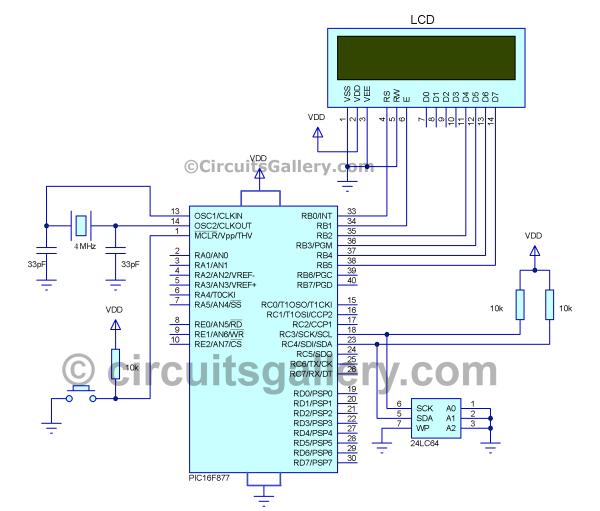
 LCD module is used to display the data. Program progresses by writing data to the 24LC64 i2c memory chip then reading it and displaying on LCD screen.
Schematics Diagram for Interfacing Microchip I2C EEPROM to PIC
Now let’s see the circuit diagram showing how to use i2c with PIC.
Components Required
- PIC 16F877 Microcontroller
- 24LC64 Memory chip (i2c datasheet)
- LCD Module
- Capacitors (33pF x 2)
- Crystal Oscillator 4MHz
- Resistor 10kΩ
How I2C Interface Works with PIC
- 16×2 LCD it is connected on PORTB of PIC which shows the read and write operations to the viewer.
- Here two wire interface (with SCL and SDA pins) is used for the communication between Memory device and PIC Microcontroller also called “I square C (I2C)” or “inter integrated circuit”
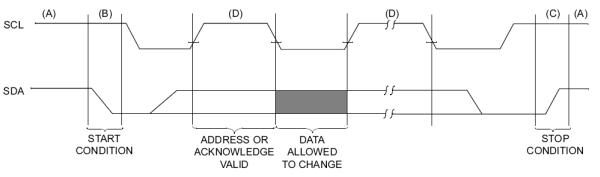
- I2C has an advantage that can connect different device in same connection with the help of device address and start and stop signals.
- In such interfacing, PIC acts as a master and I2C memory servers as slave then master and slave communicate each other. (There are situation where we use i2c master, but not here)
- SCL (Serial Clock Line) is the clock line. It is used to synchronize all data transfers over the I2C bus and SDA (Serial DAta) is the data line.
- To start communication the channel should be ideal (means it not used by other devices and it is free), in ideal stat both the pins SDA and SCL by applying high signal.
For more detail: How to Interface I2C External EEPROM 24LC64 to PIC Microcontroller
Quick Solutions to Questions related to Interfacing Microchip I2C EEPROM to PIC:
- What is the purpose of the 24LC64 chip in this project?
The 24LC64 is a 64 Kbit Electrically Erasable PROM used to store permanent data for the PIC microcontroller. - How does the PIC communicate with the memory device?
The PIC acts as a master and communicates with the I2C memory slave using two wires called SCL and SDA. - Which port of the PIC connects to the LCD module?
The 16×2 LCD is connected to PORTB of the PIC to display read and write operations. - What signal state must SDA and SCL pins be in before starting communication?
Both SDA and SCL pins must apply a high signal to ensure the channel is ideal and free. - Can different devices connect to the same I2C connection?
Yes, I2C allows connecting different devices on the same connection by using unique device addresses along with start and stop signals. - What is the function of the SCL line in the I2C interface?
SCL stands for Serial Clock Line and is used to synchronize all data transfers over the I2C bus. - Why might someone use non-volatile memories like the 24LC64 with a microcontroller?
Non-volatile memories are used to store permanent data that needs to be retained even when power is off.
Related projects
CAN FD Node based on a PIC18 Microcontroller
The introduction sets the stage for an embedded systems project that involves developing a Embedded C CAN FD project using the MCP2517FD...
Communication & InterfacingLAN9662 Gigabit Switch: Optimized for Industrial Ethernet
Introduction It should come as little surprise therefore that one element of what is now more commonly referred to in some circles...
Communication & InterfacingPIC Microcontroller: Fundamentals & Applications for Students
Introduction Microcontrollers are the key components in the embedded systems market. A variety of embedded systems was formed and developed after the...
Communication & Interfacing10BASE-T1S Ethernet: Simplified OEM Design for Auto Devices
Introduction Cars these days are surrounded by technology. They come loaded with all sorts of electronic gadgets and sensors. This project wants...
Communication & InterfacingDesigning a Microcontroller Framework for PC-Based Control of Electrical Appliances
ABSTRACT The preference for personal computers as a platform for designing and implementing control algorithms is growing due to the ease of...
Communication & InterfacingEfficient Multichannel Data Acquisition with USB Connectivity using PIC Microcontroller
1. INTRODUCTION With the rapid advancements in embedded technology, there is a growing demand for a data acquisition system that combines fast...

Ibrar Ayyub
I am an experienced technical writer holding a Master's degree in computer science from BZU Multan, Pakistan University. With a background spanning various industries, particularly in home automation and engineering, I have honed my skills in crafting clear and concise content. Proficient in leveraging infographics and diagrams, I strive to simplify complex concepts for readers. My strength lies in thorough...