


Summary of How to display text on 16×2 LCD using PIC18F4550
This article explains displaying a string on a 16x2 character LCD using a PIC18F4550. It builds on a prior single-character example: LCD data pins connect to PortB, control pins to the first three pins of PortA. The process is configuring the LCD, storing the message in a character array (e.g., unsigned char data[20]=EngineersGarage;), looping until the null terminator, and sending each character with lcddata().Parts used in the 16x2 LCD text display with PIC18F4550:
- PIC18F4550 microcontroller
- 16x2 character LCD module
- Connecting wires
- Power supply (suitable for PIC18F4550 and LCD)
- Potentiometer for LCD contrast (implied by standard LCD interfacing)
- Resistors as required for LCD backlight or signal conditioning
Several automated and semi-automated devices require a message to be displayed in order to indicate their working status. In continuation to LCD interfacing with PIC18F4550, this article explains how to display a message or string on a 16x2 character LCD.
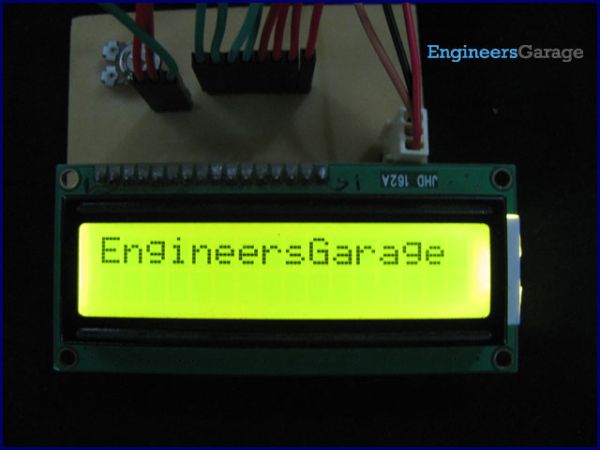
In the previous article, a single character was displayed on LCD by properly configuring its data and command registers. A string is nothing but a sequential arrangement of several characters that can be displayed on LCD by using the programming steps mentioned here. The circuit connections and user-defined functions are same as earlier. The LCD data pins are connected to PortB of PIC18F4550 while the control pins are connected to first three pins of PortA.
· Use lcddata() function to send individual character values of the string to be displayed on LCD.
For more detail: How to display text on 16x2 LCD using PIC18F4550
- How are the LCD data pins connected to the PIC18F4550?
The LCD data pins are connected to PortB of PIC18F4550. - Where are the LCD control pins connected on the PIC?
The LCD control pins are connected to the first three pins of PortA. - How is a string stored for display in the code?
Store the message in a character array, for example unsigned char data[20]=EngineersGarage;. - How does the program know when to stop sending characters?
Run a loop until the loop counter encounters the null character of the string. - Which function is used to send individual characters to the LCD?
Use the lcddata() function to send individual character values to the LCD. - What are the main programming steps to display text?
Configure the LCD, store the string in a character array, loop until the null terminator, and send each character with lcddata().
Related projects
PICDEM FS USB CDC Evaluation Board using PIC18F4550 with Proteus Simulation
Introduction The PICDEM FS USB CDC Evaluation Board is a practical microcontroller project built around the PIC18F4550, designed to demonstrate USB communication...
Peripheral Tutorials · PIC18F4550PICDEM FS USB Mass Storage Device using PIC18F4550 with Proteus Simulation
Introduction This microcontroller project demonstrates how to simulate a USB Mass Storage Device (MSD) using the PIC18F4550 in a Proteus simulation environment....
Development Boards & Kits · PIC18F2550Pinguino Project: A PIC Microcontroller Based Arduino
This is a complete tutorial to make a PIC Microcontroller based Arduino. This is a complete tutorial to make PIC microcontroller based...
LCD & Display ProjectsLeveraging Blockout Banners for Effective Electronics and Tech Product Displays
Blockout banners have become a popular and effective tool for displaying electronics and tech products in various settings, from trade shows and...
LCD & Display Projects · PIC18F4520Interfacing PIC18F4520 microcontroller with an HD44780 LCD
Introduction Being able to display data from a microcontroller visually has many advantages. It allows for menus, status indicators, and instructions to...
LCD & Display ProjectsVideo Project Development in the Midst of an Impromptu Online Semester
Receiving robot parts in the mail was an unexpected conclusion to the Winter 2020 semester for students. However, when faced with a...

Ibrar Ayyub
I am an experienced technical writer holding a Master's degree in computer science from BZU Multan, Pakistan University. With a background spanning various industries, particularly in home automation and engineering, I have honed my skills in crafting clear and concise content. Proficient in leveraging infographics and diagrams, I strive to simplify complex concepts for readers. My strength lies in thorough...