


Summary of Digital alarm clock using PIC16F877 microcontroller
This DIY alarm clock uses a PIC16F877 microcontroller to display time on a 4x20 backlit LCD and play an annoying tune via a speaker using PWM. It features timer-based timekeeping, four pushbutton inputs for menu navigation, and a planned computer interface for web synchronization. The project includes dimmable backlighting and was programmed in JAL assembly language, successfully waking the user before the alarm sound played.Parts used in the Digital Alarm Clock:
- PIC16F877 microcontroller
- 4x20 hd44780 compatible backlit LCD
- Speaker
- PWM modules (CCP1 and CCP2)
- Four pushbuttons on port D
- Battery backup (optional/planned)
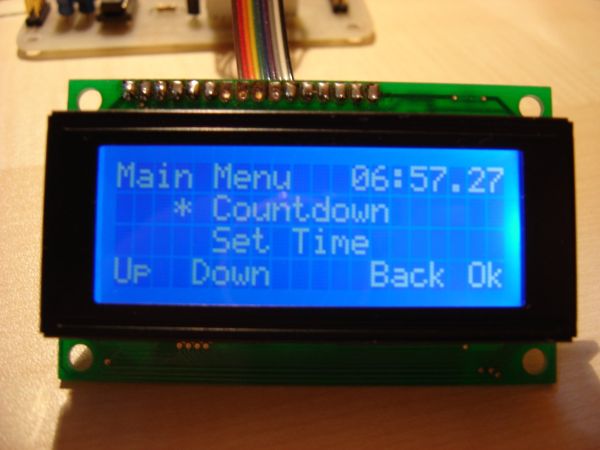
The JAL source code is available on my download page
Features
- Timekeeping using the PIC's timer0 interrupt
- 4x20 hd44780 compatible backlit LCD, displaying the time in big numbers (4x4 and 4x3) * Alarm sound tune using PWM
- computer interface for synchronizing time with the web.
- (maybe battery backup (in case of a power outage...))
Status
| Timekeeping: | Rewritten in assembler. (losing one stack level, previously losing two stack levels, ISR and procedure time...) :Display: Done. Use's Vasile's 4-line lcd routines and tables to store the texts. |
|---|---|
| Bignumbers: | Done. Data stored in tables. |
| Backlight: | The backlight is dimmed using the internal CCP1 module of the PIC in PWM mode. :Input: Four pushbuttons on port D, handled by buttons.jal (function keypress(byte in key) return bit). |
| Alarm sound: | Uses CCP2 in PWM mode, inspired by Vasile! |
| Menu code: | Works. Can set time/alarm. |
| Computer link: | (interface code) Nothing yet. |
For more detail: Digital alarm clock using PIC16F877 microcontroller
- How is timekeeping managed?
Timekeeping uses the PIC's timer0 interrupt. - What display is used for the time?
A 4x20 hd44780 compatible backlit LCD displays the time in big numbers. - Can the backlight be adjusted?
Yes, the backlight is dimmed using the internal CCP1 module of the PIC in PWM mode. - How are user inputs handled?
Four pushbuttons on port D handle input through the buttons.jal function keypress. - Does the alarm use a specific sound method?
The alarm sound tune uses PWM with the CCP2 module. - Is there a way to sync the time automatically?
There is a computer interface designed for synchronizing time with the web, though it is not yet complete. - What programming language was used?
The project uses JAL source code, with timekeeping rewritten in assembler. - What happens if power is lost?
There is a plan for battery backup in case of a power outage, but it is marked as maybe.
Related projects
PIC16F877 Driving LCD in 4-Bit Mode using PIC16F877 with Proteus Simulation
Introduction This microcontroller project shows how a PIC16F877 can drive an LCD display using 4-bit mode inside a Proteus simulation.The project demonstrates...
Programmers & ICSP · PIC16F877AEPE PIC/LCD Demo using PIC16F877 with Proteus Simulation
IntroductionThe EPE PIC/LCD Demo is a classic microcontroller project that demonstrates how a PIC16F877 can fully control a PG12864F graphical LCD.Designed as...
Motors & Robotics · PIC16F877AEfficient Sun-Following Robot: A Solar Tracker with Microcontroller Control
Abstract The impending global challenge of dwindling non-renewable fuel resources underscores the urgency of transitioning towards renewable energy alternatives like solar power....
Clocks & TimersAdaptive Alarm Clock: Build a Smart, User-Centric wake-Up system
Project Overview The goal of this ambitious undergraduate project was to develop a novel alarm clock capable of analyzing a person's unique...
Clocks & TimersDesigning Your Ideal Alarm Clock: An Introduction to PIC18
Within this laboratory session, you'll employ the C language to create an alarm clock, delving into the implementation of "C" programs on...
Clocks & TimersBuilding your Dream Alarm Clock Using the PIC18
Objective: In this laboratory session, your objective is to create an alarm clock using the C programming language. You will gain proficiency...

Ibrar Ayyub
I am an experienced technical writer holding a Master's degree in computer science from BZU Multan, Pakistan University. With a background spanning various industries, particularly in home automation and engineering, I have honed my skills in crafting clear and concise content. Proficient in leveraging infographics and diagrams, I strive to simplify complex concepts for readers. My strength lies in thorough...