


Summary of AquaCont – Aquarium Control using pic microcontroller
The AquaCont is an aquarium monitoring system built around a PIC18F4520 microcontroller. It manages electrical devices via 8 relays, featuring a real-time clock with lithium battery backup, a digital temperature sensor, and an RS232 port for PC communication using WinTimer software. The interface includes a 4x20 LCD display and 8 bicolour LEDs. The system separates power supplies (5V for logic, 12V for relays) and uses optocouplers to ensure safety isolation from high voltage.Parts used in the AquaCont:
- PIC18F4520 microcontroller
- Real time clock integrated circuit with lithium battery
- Digital temperature sensor
- 8 relays
- LC2416 EEPROM memory
- 4x20 LCD display
- 8 bicolour LEDs
- RS232 serial port
- Optocouplers
- WinTimer PC software
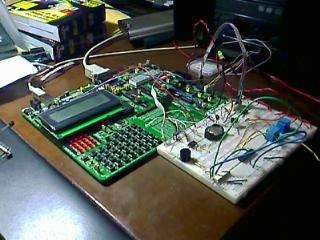
-
time / calendar
-
weekly timer for 6 daily events
-
digital temperature sensor
-
additional eeprom memory
-
8 outputs controlled by relays joinables to timer events ( 2 of them that can be joined to temperature sensor)
-
LCD display 4x20
-
8 bicolour LEDs associated to output ports
-
RS232 serial port for PC communication
The LCD display permits to monitor the current date and time, the temperature detected by the sensor and moreover it permits to visualize each port status in the last row. In the following LCD screens display it is possible to program the weekly timer events, set the temperature sensor parameters and manage the serial connection with a PC where is running the included WinTimer software.
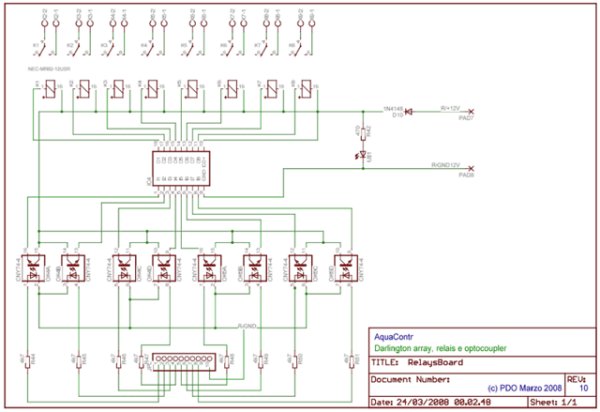
The power supply needed by the main board is 5V, while the relays board requires 12V; the different source power was useful in granting the protection of the microcontroller and his circuits from overvoltage and short circuit on the 220V. Two optocouplers are utilized for that purpose ensuring the isolation of the different voltages.
 The weekly timers are programmed basing on the clock provided by the proper integrated circuit supplied with a lithium battery. The timers data are memorized in the micro's eeprom. The RS232 serial port allows to simply program the micro using the corresponding PC software; the functions provided in the PC software are also included in the firmware, except for the PC clock syncing. Using the Pc software is also possible to assign a description, to each of the 8 relays ports that will be memorized in the additional LC2416 eeprom memory. In this memory will be also stored the temperature sensor's settings data.
For more detail: AquaCont - Aquarium Control
Quick Solutions to Questions related to AquaCont:
- What is the main function of the AquaCont system?
The system permits managing and monitoring most parameters of all electric devices found in an aquarium. - How many relays can the system control?
The system controls 8 relays joined to timer events. - Can some relays be connected to the temperature sensor?
Yes, 2 of the 8 relays can be joined to the temperature sensor. - What voltage powers the main board versus the relay board?
The main board requires 5V while the relay board requires 12V. - How does the system protect the microcontroller from overvoltage?
Two optocouplers are utilized to ensure isolation of different voltages and grant protection. - Where are the weekly timer data memorized?
The timers data are memorized in the micro's eeprom. - Does the system allow naming each relay port?
Yes, the PC software allows assigning a description to each of the 8 relay ports stored in the LC2416 eeprom. - What software is used to program the micro via the serial port?
The included WinTimer software running on a PC is used for programming.
Related projects
CAN FD Node based on a PIC18 Microcontroller
The introduction sets the stage for an embedded systems project that involves developing a Embedded C CAN FD project using the MCP2517FD...
Development Boards & Kits · PIC18F4520Voltage Measurement with A PIC Microcontroller
Voltage Measurement with PIC Microcontroller articulates a methodical framework for facilitating analog voltage measurement using the PIC18F4520, an advanced member of Microchip’s...
LCD & Display Projects · PIC18F4520Interfacing PIC18F4520 microcontroller with an HD44780 LCD
Introduction Being able to display data from a microcontroller visually has many advantages. It allows for menus, status indicators, and instructions to...
Sensors & TemperatureSpectrum Analyzer using TMS320F28023DA with Proteus Simulation
Introduction This project demonstrates a real-time audio spectrum analyzer using the TMS320F28023DA Piccolo microcontroller, simulated in Proteus VSM. The system captures an...
Sensors & TemperatureDHT22 Low Cost Humidity Sensor using PIC18F25K20 with Proteus Simulation
IntroductionThis microcontroller project demonstrates how to interface a DHT22 (RHT03) digital temperature and humidity sensor with a PIC18F25K20 using Proteus simulation.The project...
Sensors & TemperatureCrafting a Microcontroller-Based Temperature Monitoring System
Abstract As technological advancements progress, processes become increasingly intricate, demanding a corresponding expansion in the parameters necessary for efficient analysis. Data acquisition,...

Ibrar Ayyub
I am an experienced technical writer holding a Master's degree in computer science from BZU Multan, Pakistan University. With a background spanning various industries, particularly in home automation and engineering, I have honed my skills in crafting clear and concise content. Proficient in leveraging infographics and diagrams, I strive to simplify complex concepts for readers. My strength lies in thorough...