
Summary of An Easy to build & multifunctional counter with 7-Segment Led Display using PIC16F628 microcontroller
Summary (under 100 words): A multifunctional PIC-based counter using a single PIC16F628 drives up to four 7-segment LED displays. Pins allow CLEAR/COUNT, SAVE COUNT (resume or reset on power-up), selection between common cathode or common anode displays, and an INPUT for pulse counting. The design supports various sensors, optional digit reduction, transistor-driven displays for more current, and recommends red LEDs (greens may need 5.5V). A HEX file is provided for programming.
Parts used in the PIC16F628 Counter Project:
- PIC16F628 microcontroller
- 7-segment LED displays (1 to 4 digits, common cathode or common anode)
- Wiring/connectors
- Power supply (appropriate voltage for chosen displays; note green may need 5.5V)
- Switch or pulse sensor (e.g., LDR, reed switch, or other sensors)
- Optional transistors for driving displays (to increase current)
- Programming device to upload HEX file
Just one PIC to use it as counter with multiple functions. Here is the pin information:

PIN FUNCTIONS:
- CLEAR/COUNT – GND to clear count, VSS to count.
- SAVE COUNT – GND start from zero on power up, VSS continue last count.
- C CATHODE/C ANODE – GND to use COMMON CATHODE Display, VSS to use COMMON ANODE.
- INPUT – Signal in, pulses to count.
As you can see, now you can use any 7 Segment Led Display. Just connect the pin C CATHODE/C ANODE to the respective signal. The pin SAVE COUNT can be used to save the count and power off the circuit. When you power on the circuit, the display will resume the counting.
An example how to use it using common cathode displays, no resume count on power up and free runing:
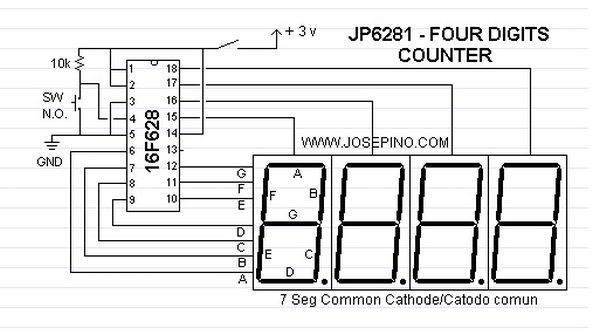
Every time when you turn ON the circuit, will display 0000. Each pulse in the INPUT pin will increase the count. You can replace the switch with a LDR, reed switch or any kind of sensor.
Use RED displays for better performance, Green displays may need 5.5 volts.
6/16/06 Update:
You can use this counter with one, two, three or four digits, just remove the displays that doesn’t need to be used. Also, you can use transistors to increase the current for each display.
For more detail: An Easy to build & multifunctional counter with 7-Segment Led Display using PIC16F628 microcontroller
- How do I clear or enable counting on the PIC counter?
Use the CLEAR/COUNT pin: connect to GND to clear count, connect to VSS to count. - Can the counter save the count when powered off?
Yes; use the SAVE COUNT pin: connect to GND to start from zero on power up, connect to VSS to continue the last count. - Does the PIC support common cathode and common anode displays?
Yes; use the C CATHODE/C ANODE pin: connect to GND for common cathode displays, connect to VSS for common anode. - What is used as the counting input?
The INPUT pin receives pulses; each pulse increases the count and can be driven by a switch, LDR, reed switch, or other sensors. - Can I use fewer than four digits?
Yes; you can use one, two, three, or four digits by removing the unused displays. - Do I need transistors for the displays?
Optional: you can use transistors to increase current for each display if needed. - Which display color is recommended?
Red displays are recommended for better performance; green displays may require 5.5 volts. - Will the display always start at 0000 on power up?
If SAVE COUNT is set to start from zero on power up (connected to GND), the display will show 0000 at power on.
