
Summary of Up-Down counter on 16*2 LCD using 8051 microcontroller
This project implements a 0–99 up/down counter using an 8051 microcontroller and a 16x2 LCD. Two switches on P2.6 (UP) and P2.7 (DOWN) increment or decrement the displayed count. LCD data lines connect to port P1, while control lines use P3 pins. The code debounces by waiting while the button is held and updates the two-digit display using ASCII digits stored in an array.
Parts used in the Up-Down counter on 16*2 LCD using 8051 microcontroller:
- 8051 microcontroller
- 16x2 LCD
- Two momentary pushbutton switches (UP and DOWN)
- Resistors and pull-ups for switches (implied by P2=0xFF)
- Wiring/connectors between microcontroller and LCD
- Power supply for 8051 and LCD
DESCRIPTION
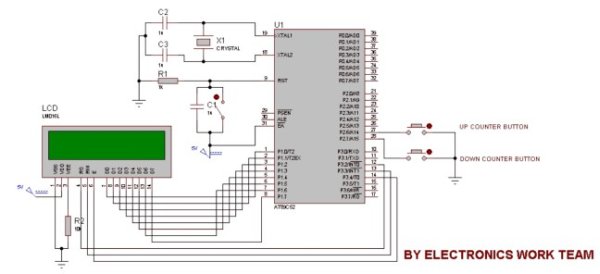
In this circuit 16*2 lcd IS used to show the value of count using 8051 microcontroller. The maximum value of count is 99 because. In this circuit we are using 8051-microcontroller, 16*2 lcd, 2 switches for up counting button & down counting button. Data pins of LCD are connected to P1 port of the 8051 microcontroller. UP counter button is connected with P2.6 and down counter button is connected with P2.7.Whenever the UP counter button is pressed the counter increments by one and when the down counter button is pressed it gets reduced by one.
PROJECT CODE
#include< reg51.h >
sfr lcddata=0x90; //LCD DATA PINS
sbit rs=P3^2;
sbit rw=P3^3;
sbit en=P3^4;
sbit g=P2^6;
sbit h=P2^7;
int m=0;
int a,b;
unsigned char n[10]={0x30,0x31,0x32,0x33,0x34,0x35,0x36,0x37,0x38,0x39};
void delay(unsigned char b)
{
unsigned char a;
for(b;b>0;b–)
{
for(a=500;a>0;a–);
}
}
void command(unsigned char dost)
{
lcddata=dost;
en=1;
rs=0;
rw=0;
delay(5);
en=0;
}
void lcddisplaydata(unsigned char n)
{
lcddata=n;
en=1;
rs=1;
rw=0;
delay(50);
en=0;
}
void main()
{
P2=0xFF;
command(0x38);
command(0x0C);
while(1)
{
if(g==0)
{
if(m==99)
{
command(0x80);
lcddisplaydata(n[9]);
command(0x81);
lcddisplaydata(n[9]);
}
else
{
m=m+1;
a=m/10;
{
command(0x80);
lcddisplaydata(n[a]);
}
b=m%10;
{
command(0x81);
lcddisplaydata(n[b]);
}
while(g==0);
}
}
if(h==0)
{
if(m==0)
{
command(0x80);
lcddisplaydata(n[0]);
command(0x81);
lcddisplaydata(n[0]);
}
else
{
m=m-1;
a=m/10;
{
command(0x80);
lcddisplaydata(n[a]);
}
b=m%10;
{
command(0x81);
lcddisplaydata(n[b]);
}
while(h==0);
}
}
}
}
For more detail: Up-Down counter on 16*2 LCD using 8051 microcontroller
- How is the LCD data connected to the microcontroller?
The LCD data pins are connected to port P1 of the 8051 microcontroller. - Which pins are used for the LCD control signals?
LCD control signals use P3 pins: rs on P3.2, rw on P3.3, and en on P3.4. - Which pins are used for the UP and DOWN buttons?
The UP button is connected to P2.6 and the DOWN button is connected to P2.7. - What is the maximum count value and why?
The maximum count is 99 because the display is shown as two decimal digits and the code limits incrementing at 99. - How does the code display digits on the LCD?
The code uses an array of ASCII codes for digits 0–9 and writes the tens and units to positions 0x80 and 0x81 respectively. - How does the program avoid multiple counts while a button is held?
After updating the count, the code waits in a while loop while the button input remains 0, effectively debouncing by blocking until release. - What happens when UP is pressed at count 99?
If UP is pressed when m equals 99, the code displays 99 without incrementing further. - What happens when DOWN is pressed at count 0?
If DOWN is pressed when m equals 0, the code displays 00 without decrementing further.
