
Summary of ESP8266 LED Matrix Clock
This project builds a simple LED matrix clock using an ESP8266 (ESP12), DS3231 RTC, six chained MAX7219 8x8 LED matrix modules, and WiFi NTP synchronization, all mounted in a pasta jar housing. The RTC keeps time while the ESP8266 updates via NTP; wiring and brief assembly/flash instructions are provided.
Parts used in the Simple LED Matrix Clock:
- 6 x 8x8 MAX7219 LED Matrix
- 1 x RTC DS3231
- 1 x ESP12 Board
- 1 x pasta jar
- 1 x 5.5mm X 2.1mm DC Power Supply Metal Jack Panel Mount
- 1 x USB to 5.5mm X 2.1mm barrel jack 5v dc power cable
- 1 x Window tint film
- 11 x female to female dupont wires
Simple LED matrix Clock based on the popular ESP8266 with Real Time Clock module and time synchronization over WiFi from an NTP server.
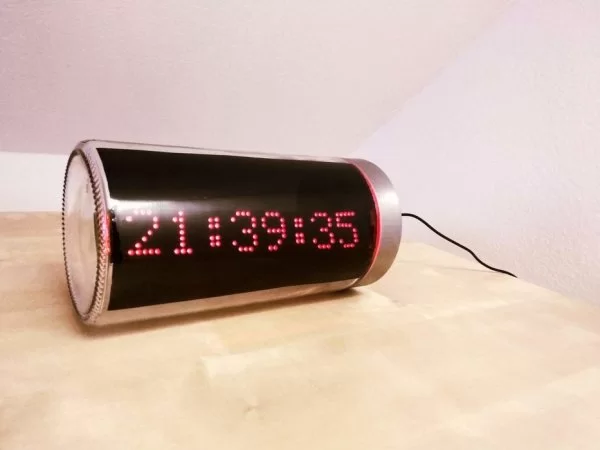
Step 1: Parts and Tools
First let’s see what we need.
Parts:
- 6 x 8×8 MAX7219 LED Matrix
- 1 x RTC DS3231
- 1 x ESP12 Board
- 1 x pasta jar
- 1 x 5.5mm X 2.1mm DC Power Supply Metal Jack Panel Mount
- 1 x USB to 5.5mm X 2.1mm barrel jack 5v dc power cable
- 1 x Window tint film
- 11 x female to female dupont wires
Tools:
- soldering iron
- spray bottle
- hobby knife
- double sided tape
All the parts can easily be sourced from ebay/aliexpress and/or local stores.
Step 2: Preparing the LED Matrix
I found it easier to buy 2 x 4pcs modules, cut one of them in half and solder it to the other one while maintaining the orientation printed on the PCB.
Step 3: Connect the LED Matrix Display and the RTC to the ESP8266
Solder the pin headers on the modules then use the dupont cables to connect them as follows.
MAX7219 to ESP8266
- VCC – 3.3V
- GND – GND
- CS – D8
- DIN – D7
- CLK – D5
DS3231 to ESP8266
- GND – GND
- VCC – 3.3V
- SDA – D1
- SCL – D2
One note on the RTC module, apparently it also has the ability to charge the battery, however that’s not a good idea when using a CR2032. One possible solution would be to cut the trace marked on the image in order to disable the charging part of the circuit. Further information on this can be found here.
Step 4: Flash the ESP8266 Module
Nest step would be to upload the code to the ESP8266.
While the original code can be found here (many thanks to the author !) you can find attached the English version of it.
The upload process is pretty straight forward, just don’t forget to update the code with your WiFi credentials.
Read more: ESP8266 LED Matrix Clock
- How many MAX7219 LED matrix modules are used?
Six 8x8 MAX7219 LED matrix modules are used. - What RTC module is used for timekeeping?
The DS3231 RTC module is used for timekeeping. - Which ESP8266 board is used in the project?
An ESP12 board is used. - How is time synchronized over the internet?
Time is synchronized over WiFi from an NTP server. - What are the power connections for the MAX7219 to the ESP8266?
Connect VCC to 3.3V and GND to GND on the ESP8266. - Which ESP8266 pins are used for CS, DIN, and CLK to the MAX7219?
CS to D8, DIN to D7, and CLK to D5. - How is the DS3231 connected to the ESP8266?
Connect GND to GND, VCC to 3.3V, SDA to D1, and SCL to D2. - Can the DS3231 module charge the battery?
The module apparently can charge the battery, but charging a CR2032 is not recommended; the trace can be cut to disable charging. - What must be updated in the code before flashing the ESP8266?
You must update the code with your WiFi credentials before uploading. - How were the 6 matrix modules assembled physically?
The builder bought 2 sets of 4-module strips, cut one in half, and soldered pieces together maintaining PCB orientation.

