


Summary of 3310 Nokia LCD & PIC12F683
### Summary The author repurposed a low-power PIC12F683 microcontroller and Nokia 3310 LCD, originally designed for a temperature probe, to create custom displays. Running on a single CR2032 battery, the project demonstrates drawing static images like "The Unicorn" and the HardOCP logo from ROM. The article provides access to source code and hex files for these projects, highlighting the display's efficiency and versatility despite its small 84×48 resolution.Parts used in the Custom Display Project:
- PIC12F683 microcontroller
- Nokia 3310 LCD (84×48 pixels)
- CR2032 Motherboard battery
- PCB (Printed Circuit Board)
- Jumper
Not long ago I saw this link for a 3310 temp probe.
Now ive played with other LCD’s lots, but this one caught my attention because of the low power requirements (It runs from a single CR2032 Motherboard battery). I built the Temp probe as shown on the site and it worked well. I had several of the PCBs made, and decided that the others would be my own projects with the same hardware. I wondered what I could push this simple PIC and Nokia LCD into doing. I started by writing the base code from scratch. The simple routines to init the LCD and display on it. My first program shown above (The Unicorn) simply plotted a static picture from ROM onto the display.
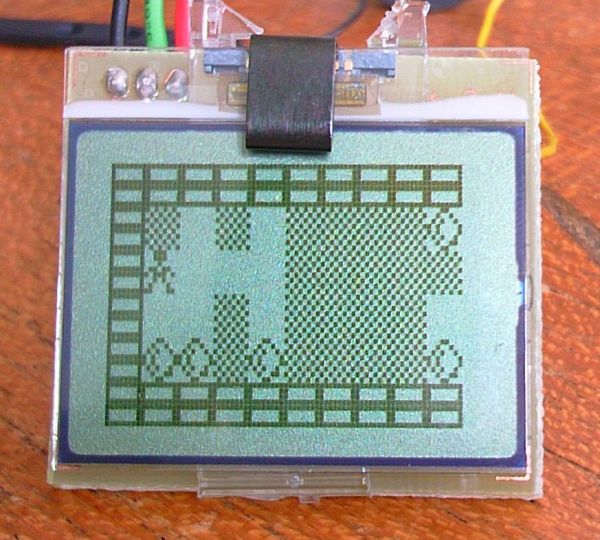
You can get the .hex file for the Unicorn picture on pic 12f675 here. The hardware as exactly as the original Temp probe spec (but you dont need temp probe, and set the jumper high).
You can get the source code here for the basic LCD setup.
For a laugh I thought id draw the HardOCP logo, you cant do much with 84×48 2colour!
For more detail: 3310 Nokia LCD & PIC12F683
Quick Solutions to Questions related to Custom Display Project:
- What power source does the display use?
The display runs from a single CR2032 Motherboard battery. - Can I use this hardware without the temperature probe?
Yes, you can set the jumper high to disable the temp probe requirement. - What is the screen resolution of the Nokia LCD used?
The screen has an 84×48 pixel resolution with 2-color capability. - Where can I find the source code for the basic LCD setup?
The source code is available via the link provided in the original article text. - Does the project require external power supplies?
No, it operates using only the single CR2032 battery mentioned. - How did the author initialize the LCD?
The author wrote base code from scratch to handle initialization routines.
Related projects
PIC 12F675 Programmable 12V Battery Monitor
Being an active outdoor guy, I have a few different types of 12V lights and a variety of battery types. - For...
Motors & Robotics · PIC12F683Automotive Voltage Monitor using PIC12F683
Description Recently I got a new motorbike and on my second trip out, with only 50 miles on the clock the rectifier/regulator...
Audio, Sound & Radio · PIC12F675Audio CRO using PIC12F675 Microcontroller
This project is a miniature Audio CRO. For those not familiar with the abbreviation "CRO," it means "Cathode Ray Oscilloscope" and this...
Communication & Interfacing · PIC18F4520CAN FD Node based on a PIC18 Microcontroller
The introduction sets the stage for an embedded systems project that involves developing a Embedded C CAN FD project using the MCP2517FD...
Communication & InterfacingLAN9662 Gigabit Switch: Optimized for Industrial Ethernet
Introduction It should come as little surprise therefore that one element of what is now more commonly referred to in some circles...
Communication & InterfacingPIC Microcontroller: Fundamentals & Applications for Students
Introduction Microcontrollers are the key components in the embedded systems market. A variety of embedded systems was formed and developed after the...

Ibrar Ayyub
I am an experienced technical writer holding a Master's degree in computer science from BZU Multan, Pakistan University. With a background spanning various industries, particularly in home automation and engineering, I have honed my skills in crafting clear and concise content. Proficient in leveraging infographics and diagrams, I strive to simplify complex concepts for readers. My strength lies in thorough...