


Summary of WORLD’S SIMPLEST PROGRAM using PIC12F629
Summary: This article describes building a PIC Programmer MkV and a minimal PIC12F629 circuit (LED + resistor). A tiny assembly program uses the watchdog timer (WDT) to repeatedly reset execution every ~18 ms (with prescaler options) so toggling GP4 causes the LED to flash. Changing option_reg bits alters WDT prescaling and flash rate. The project verifies the programmer, chip, LED circuit, and illustrates WDT behavior.Parts used in the World's Simplest Program:
- PIC12F629 microcontroller
- LED
- Current-limiting resistor for LED
- PC board (prototype or PCB)
- PIC Programmer MkV
- Power supply (suitable for PIC12F629)
- Wires or header pins for connections
This is where you start with programming. Build the PIC Programmer MkV and build the World's Simplest circuit on a PC board for a PIC12F629 chip, LED and resistor.
When the World's Simplest Program is "burnt" into the chip, the LED will flash.
This is not a "normal" program as the Watch-Dog Timer has been turned ON and after 18mS it resets the chip to "org 0X00" and the program executes the 8 instructions again.
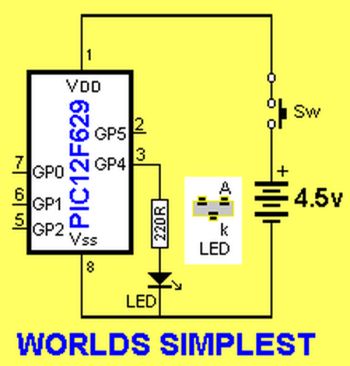
At the 6th and 7th instruction, the state of GP4 will change from HIGH to LOW or LOW to HIGH and this will toggle the LED.
At the 8th instruction the micro will go to sleep and after about 18,000 microseconds, it will be woken up by the watch-dog timer and go to location 0x00.
At instruction 3, we have added a pre-scaler to the WDT to extend its timing to 18mS x 8 = 0.144Secs. You can change this value and note the different flash-rate.
Making bit 3 of the option_reg = 0 will produce a very fast flash-rate as the prescaler will be removed from the WDT.
This program tests your programmer and the chip you are burning as well as the circuit containing the LED.
It also shows the function of the watch-dog timer.
Normally, when the WDT is turned ON, it must be periodically cleared (reset) via the instruction clrwdt so that it does not come into operation.
For instance, before entering a delay loop, the WDT is reset.
If not, it may reset your program and you will be wondering why your project does not work.
Go to PIC12F629 data and read page 12: OPTION Register. It shows how the bits are allocated to the WDT. Change these bits and see how the flash-rate changes.
Here are the files:
World'sSimplest.asm
World'sSimplest.hex
|
Assembly |
Here are some changes you can make to see the differing flash-rates:
change
sleep
to:
goto $
change
movlw b'00001011'
movwf option_reg
to:
movlw b'00001111'
movwf option_reg
or to:
movlw b'00000111'
movwf option_reg
Source : WORLD'S SIMPLEST PROGRAM using PIC12F629
Quick Solutions to Questions related to World's Simplest Program:
- What does the Worlds Simplest Program do?
It toggles GP4 on the PIC12F629 so an LED flashes by using the watchdog timer to reset and re-execute the 8-instruction loop. - How is the watchdog timer used in this program?
The WDT is enabled so that after its timeout the chip resets to org 0x00, causing the program to run the 8 instructions repeatedly and toggle the LED. - How can I change the LED flash rate?
Modify the option_reg bits that control the WDT prescaler (for example movlw b00001011, b00001111, or b00000111) to change the prescale and flash rate. - What happens at instruction 8 in the program?
The program executes sleep, and the WDT wakes the micro after about 18,000 microseconds (or longer with prescaler) causing a reset to 0x00. - Why might my program reset unexpectedly when using WDT?
If the WDT is enabled and not periodically cleared with clrwdt before delays, it will reset the program and appear as unexpected resets. - Which register and bit control the WDT prescaler in this example?
The option_reg holds the prescaler and WDT settings; changing bit 3 of option_reg affects prescaler removal and flash rate. - What does making bit 3 of option_reg equal 0 do?
Setting bit 3 to 0 removes the prescaler from the WDT and produces a very fast flash rate. - What files are provided with the article?
WorldsSimplest.asm and WorldsSimplest.hex are provided.
Related projects
RGB LED PWM Driver for High Power 350mA LEDs using PIC12F629
Description This project combines a PIC and three constant current 'buck' converters to produce an RGB LED controller that will operate with...
Communication & Interfacing · PIC12F629Wireless controlled lightdimmer using PIC12F629
The meaning from this design is to build it in -i.e. a shaded lamp- and to switch this lamp on and off...
LED Projects · PIC12F629Navigation Lights for Models for PIC12F629
Description This project was inspired from a post on the Picprojects forum where a member had adapted the RGB Moodlight project for...
Programmers & ICSPCalculator Test using PIC24FJ64GA006 with Proteus Simulation
Introduction The Calculator Test using EASYHDL is a practical microcontroller project built on the PIC24FJ64GA006 and simulated in Proteus. This project demonstrates...
Programmers & ICSPPID Controlled Oven using TMS320F28027PT with Proteus Simulation
IntroductionThis project demonstrates a PID controlled oven implemented using a PICCOLO TMS320F28027PT microcontroller and verified through Proteus simulation.It is a practical microcontroller...
Programmers & ICSPPICCOLO Motor Controller Sample Design using TMS320F28023PT with Proteus Simulation
IntroductionThis project demonstrates a PICCOLO motor controller sample design implemented using the TMS320F28023PT Piccolo microcontroller and tested through Proteus simulation. It focuses...

Ibrar Ayyub
I am an experienced technical writer holding a Master's degree in computer science from BZU Multan, Pakistan University. With a background spanning various industries, particularly in home automation and engineering, I have honed my skills in crafting clear and concise content. Proficient in leveraging infographics and diagrams, I strive to simplify complex concepts for readers. My strength lies in thorough...