Summary of WinHeist – An Electronic Components Organizer for Every Hobbyist
WinHeist is a Windows application for organizing electronic components, developed by a hobbyist and evolved from a personal tool into a full application. Version 2.1.0 adds a refreshed interface, embedded Quick Start help, and balloon tooltips (optionally disabled); an online help system is planned. Users are warned to back up databases before upgrading due to schema changes. Version 2.0 supports Windows 7/8+ as a fresh-install beta and may require a future data converter for prior versions.
Parts used in the WinHeist Windows Hobbyist Electronic Inventory SysTem:
- WinHeist application executable (installation package)
- Embedded Quick Start help system
- Balloon tooltips feature
- Options/settings panel (to disable tooltips)
- Local component database
- Online help system (planned)
- Version history/bug fixes documentation (online)
- Data Converter (planned for migrating older databases)
WinHeist Windows Hobbyist Electronic Inventory SysTem
WinHeist is an electronics component organizer that was developed by a programmer with an electronic habit. It has developed over the years from a personal application used by the author i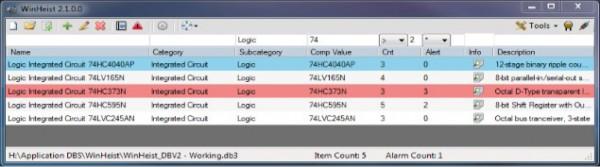 nto the full blown application that it is today.
To get a look at WinHeist and get an idea of what it is and what it can do go to the online help.
Version 2.1.0
A new version of WinHeist is out with a new look and some nice features and is available for download. A Quick Start help system is embedded in the new application along with balloon tooltips that explain controls for first time users. Thes may be disabled in the options section. I am currently working on an online help system that will go into a lot more detail then the embedded Quick Start. I did this as I believe it will enable me to keep the help more current and that will include version history, bug fixes and stuff like tip and tricks. As always if you have any questions leave me a message.
The information on this page is outdated and is similar to but exactly what you will be getting in this version. I plan on updating this page also. Soon!
 Warning
Please back up you old database before installing this new version. I have made some minor modifications to the database but any time the database is modified there is always a chance of corruption.
Version 2.0
This version has been tested and is compatible with Windows 7/8+, but am still releasing this as a Beta version until I have determined that it is stable and free of bugs. This version is not an update it will require a fresh install which means if you have a previous version of WinHeist you will lose all data so you may want to wait a while until I can come up with a Data Converter. Because I use this software and have a fairly extensive database it won’t be long before I come up with a converter so check back in a couple of weeks.
WinHeist was developed by a hobbyist for other hobbyists with a desire to organize their electronic components. Designed to be simple and intuitive to use with the ability to quickly enter basic information but provide more advanced features for those requiring the extra functionality.
For more detail: WinHeist – An Electronic Components Organizer for Every Hobbyist
- What is WinHeist?
WinHeist is an electronic components organizer developed by a hobbyist to help hobbyists manage component inventories. - What new features are in version 2.1.0?
Version 2.1.0 includes a new look, embedded Quick Start help, and balloon tooltips that can be disabled in options. - Should I back up my database before installing version 2.1.0?
Yes; the author warns to back up your old database because the database has been modified and could be corrupted during upgrade. - Is version 2.0 compatible with modern Windows?
Version 2.0 has been tested and is compatible with Windows 7 and Windows 8 and newer. - Do I need to perform a fresh install for version 2.0?
Yes; version 2.0 requires a fresh install and is not an update, which means previous WinHeist data will be lost without a converter. - Will there be a data converter for older versions?
The author plans to create a data converter and expects to release one within a few weeks. - Can balloon tooltips be disabled?
Yes; balloon tooltips can be disabled in the options section. - Is there additional help beyond the embedded Quick Start?
An online help system is being developed to provide more detailed, up-to-date documentation including version history and tips.