


Summary of Weather meter using PIC 16F877 Microcontroller
This project builds a low-cost customizable weather meter using a PIC microcontroller to measure humidity, temperature, and light intensity, displaying results on an LCD. Sensors used: LM35 for temperature (10 mV/°C), a store-bought humidity sensor scaled to percent, and an LDR with a resistor voltage divider for light percentage. The system initializes the LCD and ADC channels, labels parameters H, L, T, reads sensors sequentially, converts ADC values to physical units, compares readings to defined weather conditions, and displays the values on the LCD.Parts used in the Weather meter using PIC 16F877 Microcontroller:
- PIC16F877 microcontroller
- LM35 temperature sensor
- Humidity sensor (bought from local store)
- LDR (light dependent resistor)
- Fixed resistor (for LDR voltage divider)
- LCD display
- ADC channels/interface (on PIC16F877)
- Power supply (suitable for PIC and sensors)
- Connecting wires and PCB or breadboard
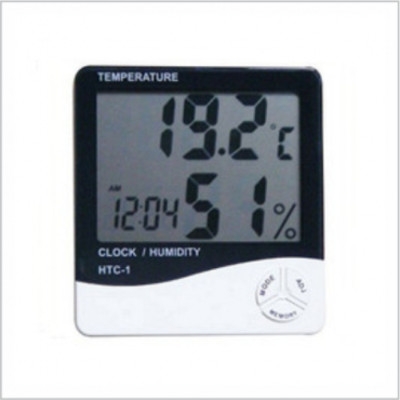
Weather monitoring systems are available in plenty and these are pretty handy gadgets we use in our daily life for weather forecasting and other purposes. But these kinda gadgets might be expensive and may not be available for customization to our specified purpose. To overcome these advantages you can build this customized weather meter using PIC microcontroller which won’t cost much like those gadgets.
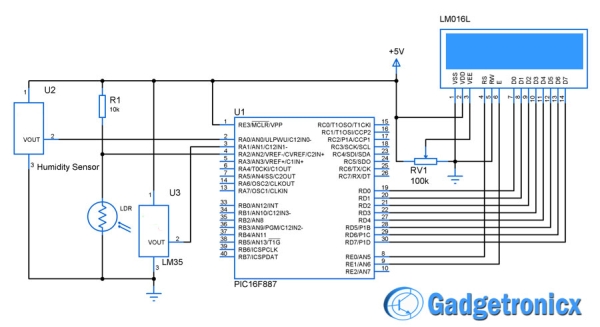
The system is built around PIC microcontroller where three parameters are measured in this system. Humidity,Temperature and ,Light intensity are the parameters this system takes as input to understand the weather condition. Then these parameters are displayed in the LCD screen for the user.
 LM35 was used as a temperature sensor which is capable of sensing temperature ranging from -55 C to 150 C. The output voltage will be proportional to the temperature hence there is no need of trimmers. The output voltage of this sensor varies by 10mv per degree change in temperature.
Bought this Humidity sensor from a local store. The obtained output voltage is scaled to percentage and the reading in means of percentage is displayed in the LCD.
Simple LDR is used to measure the light intensity of the environment. Here LDR was used along with a resistor to form a voltage divider and the output is obtained from that divider. This output is also scaled to percentage and displayed in the LCD for the user.
ALGORITHM:
- Initialize the LCD display.
- Display “H” , “L” and “T” which represents the parameters Humidity, Light intensity and Temperature.
- Define various weather conditions such as Sunny, rainy ,etc for the expected sensor readings.
- Initialize the ADC Channels for the respective sensors.
- Read the sensor output one by one.
- Make appropriate conversion of the ADC value.
- Display the sensor values in the LCD display for the user.
For more detail: Weather meter using PIC 16F877 Microcontroller
- What parameters does this weather meter measure?
It measures humidity, temperature, and light intensity. - What microcontroller is used in the project?
PIC16F877 microcontroller is used. - Which sensor measures temperature?
LM35 is used to measure temperature. - How is the LM35 output interpreted?
The LM35 output varies by 10 mV per degree Celsius and is proportional to temperature, so no trimmers are needed. - How is light intensity measured?
An LDR is used with a resistor to form a voltage divider, and the divider output is scaled to percentage. - How is humidity measured?
A purchased humidity sensor provides an output voltage that is scaled to percentage for display. - How are sensor values read and shown?
The ADC channels are initialized, sensors are read one by one, ADC values are converted, and results are displayed on the LCD. - What does the LCD initially display to represent parameters?
The LCD displays H, L, and T to represent Humidity, Light intensity, and Temperature. - Are weather conditions defined in the system?
Yes, various weather conditions such as Sunny and Rainy are defined for expected sensor readings.
Related projects
PIC16F877 Driving LCD in 4-Bit Mode using PIC16F877 with Proteus Simulation
Introduction This microcontroller project shows how a PIC16F877 can drive an LCD display using 4-bit mode inside a Proteus simulation.The project demonstrates...
Programmers & ICSP · PIC16F877AEPE PIC/LCD Demo using PIC16F877 with Proteus Simulation
IntroductionThe EPE PIC/LCD Demo is a classic microcontroller project that demonstrates how a PIC16F877 can fully control a PG12864F graphical LCD.Designed as...
Motors & Robotics · PIC16F877AEfficient Sun-Following Robot: A Solar Tracker with Microcontroller Control
Abstract The impending global challenge of dwindling non-renewable fuel resources underscores the urgency of transitioning towards renewable energy alternatives like solar power....
Sensors & TemperatureSpectrum Analyzer using TMS320F28023DA with Proteus Simulation
Introduction This project demonstrates a real-time audio spectrum analyzer using the TMS320F28023DA Piccolo microcontroller, simulated in Proteus VSM. The system captures an...
Sensors & TemperatureDHT22 Low Cost Humidity Sensor using PIC18F25K20 with Proteus Simulation
IntroductionThis microcontroller project demonstrates how to interface a DHT22 (RHT03) digital temperature and humidity sensor with a PIC18F25K20 using Proteus simulation.The project...
Sensors & TemperatureCrafting a Microcontroller-Based Temperature Monitoring System
Abstract As technological advancements progress, processes become increasingly intricate, demanding a corresponding expansion in the parameters necessary for efficient analysis. Data acquisition,...

Ibrar Ayyub
I am an experienced technical writer holding a Master's degree in computer science from BZU Multan, Pakistan University. With a background spanning various industries, particularly in home automation and engineering, I have honed my skills in crafting clear and concise content. Proficient in leveraging infographics and diagrams, I strive to simplify complex concepts for readers. My strength lies in thorough...