


Summary of The IDE Project
The author repaired a crossed-line prototype board to create a semi-portable IDE project using a PIC microcontroller and Compact Flash adapter. The system features high-speed data transfer via low-level assembly routines, currently reaching 430kb/s, with a VT100 serial terminal interface planned for future I2C integration.Parts used in the IDE Project:
- Prototype boards
- Solder and wire
- PC power supply (AC outlet)
- Compact flash adaptor
- PIC microcontroller
- IDE header
- 74LS373 chips (2 units)
- 64kx8bit cache ram chips (2 units from old 486 motherboard)
- LCD display
- 8MB CF card
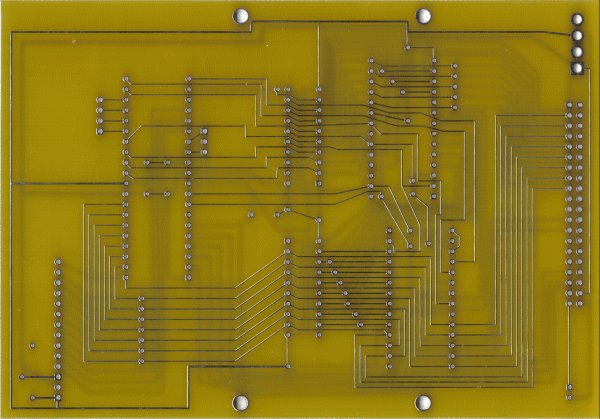
4 prototype boards arrived today. After going over them carefully, I found 4 lines that crossed each other. After some quick surgery with a knife and some solder and wire, the IDE project is now semi portable. The power supply is still out of a PC, so it's tied to an AC outlet. I'd like to make it battery powered or at least get a smaller power source on it so it's more easily moved.
There's mounting holes for standoffs so it can piggyback with a hard drive. Right now, I've got the compact flash adaptor mounted on it.
I've been spending every waking moment for the last 3 weeks working on this project. The low level assembly routines have been done for a while. I've just been delaying putting them here. My main focus right now is finishing this project in Optama C. I'm working on something I'm going to call PICDOS. So far, I have about 14 commands defined and am working on writing the code behind those commands. For testing purposes, the user interface is a VT100 serial terminal using the built-in USART. Eventually that interface will be replaced with an I2C interface so a microcontroller (such as the BS2) can easily access a FAT partition with minimal hassle.
Here's the low-level routines wrapped in a C function call:
low.c
Quick Solutions to Questions related to the IDE Project:
-
How can the IDE project be made more portable?
The author wants to replace the current PC power supply tied to an AC outlet with a battery or smaller power source. -
What is the current data transfer speed achieved by the assembly code?
The assembly code allows for transfers of 430kb/s from the drive to RAM. -
How long does it take to read an entire 8MB CF card?
The system can read the entire 8MB CF card in less than 19 seconds. -
What interface is currently used for the user interface?
The user interface is a VT100 serial terminal using the built-in USART. -
What interface will eventually replace the current user interface?
The interface will eventually be replaced with an I2C interface to allow easy FAT partition access. -
Why were NOPs inserted into the code?
NOPs are being considered to resolve timing issues because the PIC is faster than the CF card. -
How much RAM is arranged in the new PIC version?
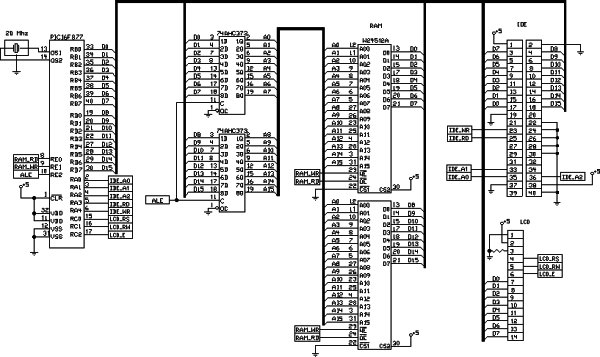
The setup uses 128kb of RAM arranged to latch the whole 16-bit address and read/write a whole word of data at a time. -
How many pins on the PIC are currently being used?
So far, 24 pins out of the 33 available on the PIC are being used.
Related projects
Leveraging Blockout Banners for Effective Electronics and Tech Product Displays
Blockout banners have become a popular and effective tool for displaying electronics and tech products in various settings, from trade shows and...
LCD & Display Projects · PIC18F4520Interfacing PIC18F4520 microcontroller with an HD44780 LCD
Introduction Being able to display data from a microcontroller visually has many advantages. It allows for menus, status indicators, and instructions to...
LCD & Display ProjectsVideo Project Development in the Midst of an Impromptu Online Semester
Receiving robot parts in the mail was an unexpected conclusion to the Winter 2020 semester for students. However, when faced with a...
LCD & Display Projects · PIC16F628AFrequency Counter by PIC16F628
In this project we are building a basic and low cost frequency counter circuit . It can measure from 16Hz to 100Hz...
LCD & Display ProjectsWHAT IS A PIC MICROCONTROLLER? WHAT CAN IT DO?
PIC microcontrollers ( Programmable Interface Controllers), are electronic circuits that can be programmed to carry out a vast range of tasks. They...
LCD & Display Projects · PIC16F877ASerial Data Received from PC and Displayed on 16×2 Using USART of Pic16f877 Microcontroller
Here is a simple tutorial on how to receive serial data from PC(Personal Computer) Hyperterminal and display it on 16x2 lcd using...

Ibrar Ayyub
I am an experienced technical writer holding a Master's degree in computer science from BZU Multan, Pakistan University. With a background spanning various industries, particularly in home automation and engineering, I have honed my skills in crafting clear and concise content. Proficient in leveraging infographics and diagrams, I strive to simplify complex concepts for readers. My strength lies in thorough...