


Summary of Test For Presence of Internal Oscillator Calibration Word for PIC12F629
This article describes a diagnostic tool for PIC 12F629 and 12F675 microcontrollers to verify if the internal oscillator calibration word at address 0x3FF is intact. Erased calibration data causes code crashes by wrapping execution to the start of memory without initializing registers. The tool detects this by altering a register post-power-on-reset; an LED indicates "Good" (green) or "Bad" (red). Optional hardware using a 74HC595 can display the calibration value in binary.Parts used in the PIC Calibration Tester:
- PIC 12F629 or 12F675 microcontroller
- Green LED
- Red LED
- 74HC595 shift register
- Eight additional LEDs (optional)
- JDM type programmer
Description
The PIC 12F629 and 12F675 devices have an internal 4Mhz oscillator that enables the devices to be used without an external crystal or RC network. This frees up one or two pins for I/O use and allows the device to be built into minimum component count designs. Additionally, the devices undergo an Internal Oscillator Calibration Test to ensure accurate timing and reliable performance.
Problems arise if by accident or otherwise, the factory programmed oscillator calibration word, located at program memory address 0x3FF is erased or over written. If application code tries to read the calibration word and it has been erased, the code will normally crash.
It turns out that erased calibration words on the 12F629/675 PIC are the cause of almost all queries relating to code on my website that uses a 12F629/675. People using JDM type programmers and associated software seem to have this problem more than most. This is, in part I suspect, due to the free software / cheap hardware used by the JDM programmer that attracts inexperienced users.
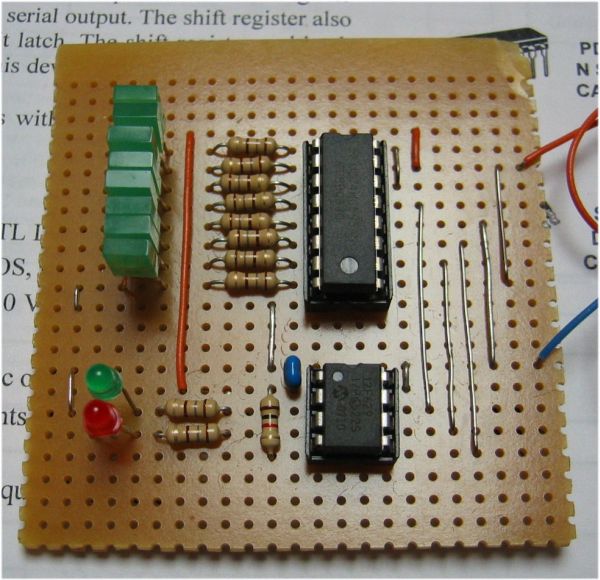
My advise to people with problems is to put the PIC into their programmer hardware and read out the program memory to see if the calibration word is present. However, experience again shows that many users just become even more confused so I've written this application to give a quick Good/Bad test of the calibration word. There's also an optional bit of hardware that will display the value of the calibration word if it's present.
How it works
If the calibration word has been erased, when the application code tries to read it, instead of returning with the calibration value, it wraps back round to the start of program memory as if it had been reset. When the PIC starts after a Power-on-reset (POR) certain internal registers are initialised to known values. If the code wraps back round to the reset vecotr because of a missing calibration word, unlike the Power-on-reset, these registers are not initialised.
The application use the fact that this wrap-around doesn't affect the internal registers so if we alter the value in a specific register after a power-on-reset we can tell if it has had a Power-on-reset or the code has wrapped back round due to a missing calibration value.
The code indicates the result of the test as Good/Bad by blinking an LED; green LED meaning the calibration word is present, and red LED if it has been erased.
With some extra hardware around a 74HC595 it can also display the value of the calibration word, if present, as a binary number using eight LEDs. This is optional and the good/bad test works without it being present.
For the basic calibration good / bad test, you only need to build the circuit on the left of the dotted line in the schematic. I deliberately kept it simple so you can quickly and easily build the test circuit.
The circuit around 74HC595 is only used to display the binary value of the calibration word. I added it for a bit of fun, you don't need it if you just want to test for the presence of the calibration word.
Software
Download HEX code  (for use with either 12F629 or 12F675)
Source code ASM (if you want to see how it works)
For more detail: Test For Presence of Internal Oscillator Calibration Word for PIC12F629
Quick Solutions to Questions related to PIC Calibration Tester:
- What happens if the factory programmed oscillator calibration word is erased?
The application code will normally crash because it wraps back round to the start of program memory as if it had been reset. - How does the application determine if the calibration word is present?
It alters a specific register after a power-on-reset to distinguish between a real reset and code wrapping due to missing calibration data. - Can I use a JDM type programmer with these devices?
Yes, but users of JDM programmers seem to have more problems with erased calibration words due to free software and cheap hardware. - Does the optional 74HC595 circuit affect the basic test?
No, the good/bad test works without it being present; it is only used to display the calibration value as a binary number. - What do the green and red LEDs indicate?
A green LED means the calibration word is present, while a red LED indicates it has been erased. - Where is the factory programmed oscillator calibration word located?
It is located at program memory address 0x3FF. - Why do internal registers not initialize when code wraps around?
Unlike a Power-on-reset, the wrap-around caused by a missing calibration word does not affect the internal registers so they remain uninitialized. - Do I need external crystals for the PIC 12F629/675?
No, these devices have an internal 4Mhz oscillator that enables them to be used without an external crystal or RC network.
Related projects
RGB LED PWM Driver for High Power 350mA LEDs using PIC12F629
Description This project combines a PIC and three constant current 'buck' converters to produce an RGB LED controller that will operate with...
Communication & Interfacing · PIC12F629Wireless controlled lightdimmer using PIC12F629
The meaning from this design is to build it in -i.e. a shaded lamp- and to switch this lamp on and off...
LED Projects · PIC12F629Navigation Lights for Models for PIC12F629
Description This project was inspired from a post on the Picprojects forum where a member had adapted the RGB Moodlight project for...
Clocks & TimersAdaptive Alarm Clock: Build a Smart, User-Centric wake-Up system
Project Overview The goal of this ambitious undergraduate project was to develop a novel alarm clock capable of analyzing a person's unique...
Clocks & TimersDesigning Your Ideal Alarm Clock: An Introduction to PIC18
Within this laboratory session, you'll employ the C language to create an alarm clock, delving into the implementation of "C" programs on...
Clocks & TimersBuilding your Dream Alarm Clock Using the PIC18
Objective: In this laboratory session, your objective is to create an alarm clock using the C programming language. You will gain proficiency...

Ibrar Ayyub
I am an experienced technical writer holding a Master's degree in computer science from BZU Multan, Pakistan University. With a background spanning various industries, particularly in home automation and engineering, I have honed my skills in crafting clear and concise content. Proficient in leveraging infographics and diagrams, I strive to simplify complex concepts for readers. My strength lies in thorough...