
Summary of Serial Port Servo Controller using PIC16F84
The PIC Based Servo Controller is a discontinued robotics project using a Microchip PIC16F84 microcontroller. It interfaces with a host computer via RS232 serial communication to drive up to four servos and digital outputs, with an 8-servo variant available in modified code. The system relies on custom single-sided PCBs and specific command byte structures for operation.
Parts used in the PIC Based Servo Controller:
- PIC16F84 microcontroller
- RS232 serial interface
- Single sided PCB (88 mm by 53 mm)
- Host computer
- Acrobat reader software
- ActiveX control (ocx) and Visual Basic Project
- Windows executable
Revision History
- 28 Jan, 2002 – Bug found in 8 Servo motor variant, refer to 8 servo code page for details.
- 28 Oct, 2001 – Serial Transfer Bug found.
- Dec, 2005 – This project is no longer supported. The information is here for you to use. A new version of the PIC Servo controller is in the works and it will use a more modern PIC and support much faster serial communication and better position control commands.
Project Details
The PIC Based servo controller is a small project I designed to allow me to control some robotics. I then decided that I should publish it as it may be of interest to other people.
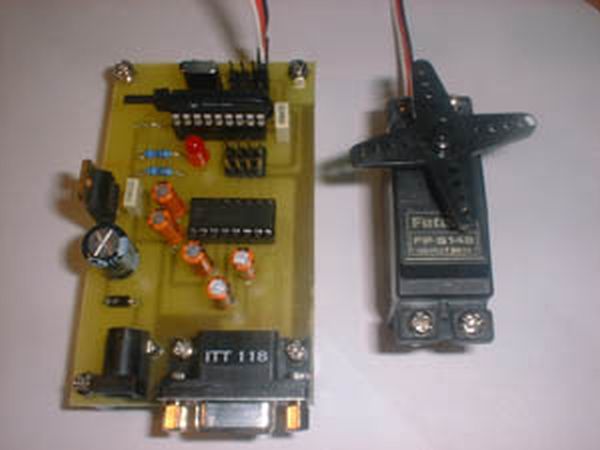
The Servo Controller uses a PIC16F84 microcontroller from Microchip to drive servo motors and digital outputs. It receives commands from a host computer via a standard RS232 serial interface.
You can download the PIC program which contains a HEX file which most PIC programmers can read; and a PIC Assembler code (ASM) file if you would like to see how it works or modify it.
I used the free PIC assembler from Microchip, the manufactures of the PIC range of Microcontrollers.
Several contributors have provided code samples that you can use to drive the PIC Servo project.
- Nov, 2001 – Jose Maria Diaz de la Cruz of the Polytechnical University of Madrid (Spain) has provided an ActiveX control (ocx) and a Visual Basic Project. Note you will need to compile the Visual Basic project as it contains source only.
- Feb 2002 – Richard Gardiner provided a Windows executable which is targeted at driving the 8 servo variant.
Here are some Acrobat files for the Schematic, Single sided PCB and Overlay artwork:
You will need an Acrobat reader available for free from www.Adobe.com to view and print these files.
Note that the PCB is a single sided board, about 88 mm by 53 mm (3.5 inches by 2.1 inches). I have provided the track patters viewed from both sides of the board so you can choose the one that suits your method of production.
I have been asked for a version that will control eight servos, so I have altered the code to support this.
Servo Controller Commands
To control the servos and outputs we need to send commands to the PIC. Some of the commands are single byte commands; some however require two bytes.
The first byte always contains the command and the channel to which the command applies. We will call this the ‘Command’ byte. The second byte (when needed) will contain data for the command; we will call this the ‘Data’ byte and is used when we need to set the servo offset or position for example.
The command byte is split into two nibbles (4 bits), the upper one defines the command to execute and the lower defines the channel (which servo or digital output) is to be affected.
| Bit 7 | Bit 6 | Bit 5 | Bit 4 | Bit 3 | Bit 2 | Bit 1 | Bit 0 |
| Command | Channel Select | ||||||
Currently, the software recognises only channels zero, one, two and three. The following are the commands and their numerical value. To build command bytes add the command value to the channel number.
For more detail: Serial Port Servo Controller using PIC16F84
- What microcontroller does the servo controller use?
The controller uses a PIC16F84 microcontroller from Microchip. - How does the device receive commands?
It receives commands from a host computer via a standard RS232 serial interface. - Can this project be used to control eight servos?
Yes, the code has been altered to support a version that controls eight servos. - What software is required to view the schematic files?
You need an Acrobat reader available from Adobe.com to view the schematic files. - Are there pre-compiled programs available for download?
Yes, a HEX file readable by most programmers and an ASM assembler code file are available. - Does the current software support all channels?
Currently, the software recognizes only channels zero, one, two, and three. - Is this project still actively supported?
No, the project is no longer supported as of December 2005. - What are the dimensions of the printed circuit board?
The PCB is about 88 mm by 53 mm.
