
Summary of RF Modem Robotics Project using PIC16F84 microcontroller
This article details a serial RF link project connecting a joystick control interface to a robot using PIC16F84 microcontrollers and Reynolds Electronics RF modules. The author highlights the importance of avoiding large breadboards due to signal interference and praises the ease of using Basic programming for asynchronous serial communication at 9600 baud.
Parts used in the RF Modem Robotics Project:
- Reynolds Electronics RWS 434 Receiver
- Reynolds Electronics TWS 434 Transmitter
- PIC 16F84 Microcontroller (two units)
- Joystick with Potentiometer
RF is just way too cool not to use in your designs. But if you’re a newbie like me it is difficult to successfully build solid RF transmitters and receivers. When I started out I didn’t realize that the larger breadboard I was working off of was causing a lot of the signal deviance because the metal traces on the breadboard worked like small capacitors and changed my circuit dynamics.
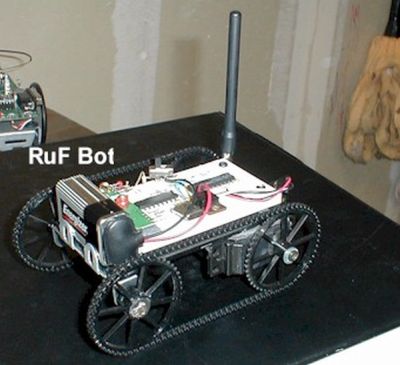
So after much research I found the Reynolds Electronics RWS and TWS 434 RX/TX pair. I looked into a similar product by MING Microsystems and Radioshack but the Reynolds were superior in performance, cost and ease of use. So with that and two PIC 16F84’s I started working on my serial RF link from my control interface (Joystick) to my robot. You can find these parts at http://www.rentron.com/rf_remote_control.htm
I found that the TX/RX pair and the serial communication built into the PICBasic programming language for my PIC’s worked very well together. I wasn’t sure how well the timing would work using Asynchronous Serial communication at 9600 baud, I expected some problems at this higher speed but in testing found very little error. The actual programming couldn’t be easier since it is written in Basic and uses premade serial communication routines. I simply read the position of the Potentiometer in the joystick using the PICBasic ‘POT’ command and put the result in memory location ‘B0’. From there using the ‘SEROUT’ command I sent the contents of ‘B0’ to pin 6 of the TWS 434 transmitter.

On the receiver end I use the ‘SERIN’ command and read the incoming data from pin 3 on the RWS 434 and put the result in ‘B0’. The value in ‘B0’ directly correlates to joystick position, above 150 is right, below 106 is left, and in between is center. By using these numbers I can define a deadzone.
For more detail: RF Modem Robotics Project using PIC16F84 microcontroller
- Why did the initial breadboard cause issues?
The larger breadboard caused signal deviance because metal traces acted like small capacitors changing circuit dynamics. - Which RF module pair was selected over others?
The Reynolds Electronics RWS and TWS 434 RX/TX pair was chosen for superior performance, cost, and ease of use compared to MING Microsystems and Radioshack products. - What baud rate was tested for asynchronous serial communication?
The project tested timing at 9600 baud and found very little error despite expectations of problems at this higher speed. - How is the joystick position read in the code?
The PICBasic POT command reads the potentiometer position and stores the result in memory location B0. - Which pin sends data on the transmitter side?
The SEROUT command sends the contents of B0 to pin 6 of the TWS 434 transmitter. - How is data received on the receiver end?
The SERIN command reads incoming data from pin 3 on the RWS 434 receiver into memory location B0. - What values define the deadzone for left, right, and center?
Values above 150 indicate right, below 106 indicate left, and values in between are considered center.
