Summary of POCKETADMIN – KEYSTROKE INJECTION DEVICE
PocketAdmin is an open-source keystroke injection device (BadUSB) offering extended functionality, lower cost, and built-in USB disk capabilities compared to the USB Rubber Ducky. It features OS detection for automatic payload selection, a built-in script interpreter, and customizable VID/PID settings without firmware updates.
Parts used in PocketAdmin:
- KiCad 5.0.2 PCB design files
- Integrated full-speed USB2.0 peripheral chip
- On-board 32MiB flash memory chip
- Pushbutton (MSD-only button)
- Custom plastic enclosure case
- ST-Link V2 hardware programmer
- C programming language toolchain
- OpenOCD flashing software
- Emacs text editor with Makefile
- gcc-arm-none-eabi compiler (arm-none-eabi-gcc v7.3.1)
This is a keystroke injection device (also called badusb). It is similar to a well-known USB rubber ducky made by hak5, but has much extended functionality, lower price and is also completely open source. It looks and feels like an ordinary USB flash drive, but acts as a keyboard that types in a preprogrammed payload. This payload can do anything from configuring a network to installing a reverse shell, since the device can basically do whatever an admin can with a terminal, but taking only a few seconds. This makes it a very powerful tool for automating sysadmin tasks or use in penetration testing.
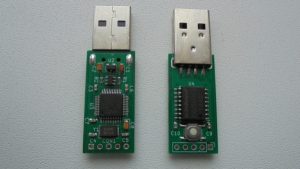
Here is quick summary of how PocketAdmin is different from USB rubber ducky (and many others):
- Made from inexpensive off-the-shelf parts, with not only open source firmware, but hardware design files as well. This allows the user to do substantial modifications to the design, as well as provides an option to build your own units.
- Has a built-in interpreter (compatible with existing ducky script) which takes text files directly, so you never have to install any encoder software and keep converting payload.txt to inject.bin.
- Can act as both keyboard and USB disk, allowing for better payloads; the memory chip is integrated, so there is no need to keep sticking SD card in/out of various devices while developing payloads.
- Has an OS detection mechanism, which allows you to store multiple payloads simultaneously and have the device automatically pick the correct payload to run.
- Extended set of commands for extra functionality, such as: without doing any firmware update the user can set which VID / PID values to use, configure how the device should show up
(keyboard only / flash disk only / keyboard+disk), change keyboard layout, and many other things.
HARDWARE
project is designed using KiCad 5.0.2
- check KiCad pcb file for PCB manufacturing info
- check KiCad sch file + BOM.txt for component info
Uses integrated full-speed (12Mbit/s) USB2.0 peripheral, with on-board 32MiB flash memory chip for data storage; only 24MiB are available for use due to overprovisioning reasons.
Measured speeds for MSD access : read 728 KiB/s, write 110-150 KiB/s, with higher write speeds being acheived for files smaller than 4MiB. While not very fast, it is enough for most badusb applications.
The pushbutton on the device is referred to as MSD-only button. Normally the payload is run whenever you plug the device into a PC. But if you press and hold this button while inserting the device, it prevents any keystrokes from being typed in and makes the device show up as a flash drive.
Fully assembled unit has dimensions of 59x18x9mm and weight of 8 grams. When opening up the case, be careful no to break the plastic studs near the USB connector and at the opposite (from USB) end of enclosure.
Hardware programmer device used in this project is ST-Link V2
FIRMWARE
- programming language used = C
- flashing software used = openocd
- IDE used = emacs text editor + Makefile
The firmware was developed on debian 9.7 system, using gcc-arm-none-eabi toolchain (compiler, linker, binutils) and it does use gcc specific extentions. it was successfully compiled and tested with arm-none-eabi-gcc version 7.3.1
depends on libgcc.a, which is included in this repository. linker script, startup code and openocd configuration files are included here as well.
Read more: POCKETADMIN – KEYSTROKE INJECTION DEVICE
- What makes PocketAdmin different from a USB Rubber Ducky?
PocketAdmin uses inexpensive off-the-shelf parts, offers open source hardware and firmware, includes a built-in interpreter for direct text file usage, acts as both keyboard and USB disk, and features OS detection. - Can I modify the hardware design of this project?
Yes, because the hardware design files are open source, users can make substantial modifications or build their own units. - How do I prevent the device from typing payloads when plugging it in?
You must press and hold the MSD-only button while inserting the device into the PC. - Does the device require encoder software to convert scripts?
No, it has a built-in interpreter compatible with existing ducky scripts that takes text files directly. - What operating system was used to develop the firmware?
The firmware was developed on a Debian 9.7 system using the gcc-arm-none-eabi toolchain. - Can the user change the device's display mode without updating firmware?
Yes, users can set VID/PID values and configure whether the device shows up as keyboard only, flash disk only, or both without a firmware update. - What is the available storage capacity for data on the device?
Although it has a 32MiB chip, only 24MiB are available for use due to overprovisioning reasons. - Which IDE and tools were used to write the firmware code?
The developers used the Emacs text editor combined with a Makefile for the development process.