


Summary of PIC10F200 MAUS MODIFICATION FOR THE GAME CONSTANTLY KEYPRESSES
This article describes a circuit modification using the PIC10F200 microcontroller to simulate constant keypresses for browser-based games. The project connects a keyboard button to the PIC10F200's GP1 pin, which can be configured as active or passive, to automate inputs like moving left in a game. Assembly source code is provided to facilitate this functionality.Parts used in the PIC10F200 Maus Modification:
- PIC10F200 microcontroller
- Keyboard button
- Browser-based game interface
To use the browser-based games, especially online custom modified maus and are selling a game for this circuit have keyboards I’ve heard has been placed into the online circuit mausmaus, depending on the...Electronics Projects, PIC10F200 Maus modification for the game constantly keypresses "microchip projects, microcontroller projects, simple circuit projects, "
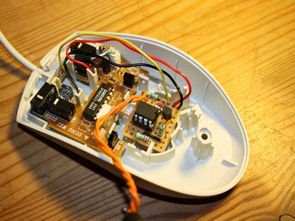
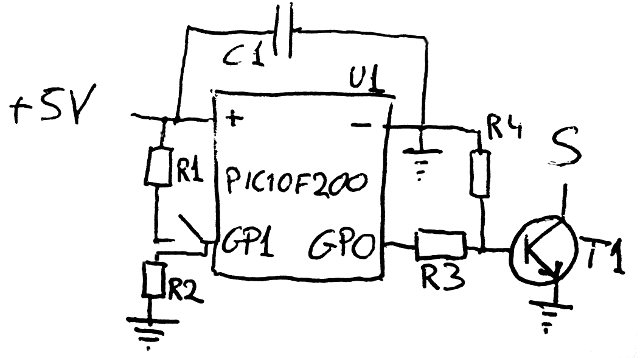
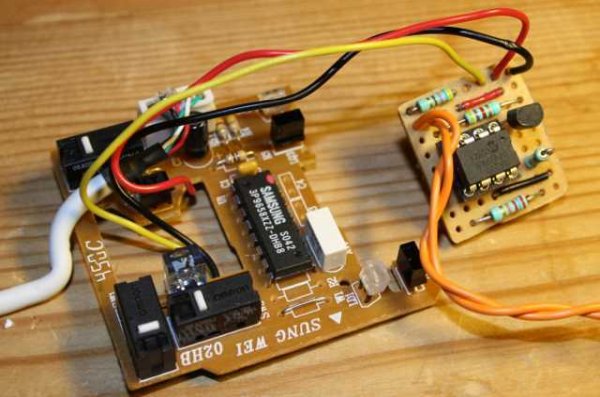
To use the browser-based games, especially online custom modified maus and are selling a game for this circuit have keyboards I’ve heard has been placed into the online circuit maus maus, depending on the key button connects to the output of the pic PIC10F200 GP1 pin with active/passive.
For example, you need to press the left key when you’re constantly running the circuit starts:) saydırmaya bitincede. PIC10F200 asm source code in the assembly has been prepared with the software.
Source: MODIFICATION FOR THE GAME CONSTANTLY KEYPRESSES Alternative link: pic10f200-maus-modification-for-the-game-constantly-keypresses.rar
Quick Solutions to Questions related to PIC10F200 Maus Modification:
- What is the purpose of the PIC10F200 modification?
To enable constant keypresses for browser-based games. - How does the circuit connect to the keyboard?
The key button connects to the output of the PIC10F200 GP1 pin. - Can the GP1 pin be set to different modes?
Yes, the GP1 pin supports both active and passive configurations. - What software is used to prepare the code?
Assembly language source code has been prepared for the PIC10F200. - What is an example use case for this project?
Automatically pressing the left key while running a game. - Where can I find the source code?
The assembly source code is available via the provided alternative link. - Is this project suitable for simple circuit enthusiasts?
Yes, it is categorized under simple circuit projects. - Does this modification work with online custom modified maus?
Yes, it is designed for use with online custom modified maus.
Related projects
3 LED Bike Light for PIC10F200
Description This project is a multi-function LED bike (cycle) light using 3 LEDs. It is based on a PIC10F200 baseline microcontroller, running...
Audio, Sound & Radio · PIC10F200The Annoy – A Tiny Intelligent Buzzer using PIC10F202
A while back I made a blog post about a PIC10F200 Project: The Annoy. In this project they combined the simplicity in...
Programmers & ICSP · PIC10F200pickit 3 supported devices
Supported Devices To read the complete introduction and pinout of Pickit 3 refer to its introduction. Refer to MPLAB IDE v8.76, the...
Games, Toys & CalculatorsExploring Leon’s Mini Random Number Generator (mRNG)
Sales Pitch Feeling overwhelmed by choices? Who isn't? Decision-making can be a maze. White, rye, or wheat? Pinstripes or polka dots? Feast...
Games, Toys & Calculators · PIC16F628ATIC TAC TOE game using PIC16F628
This project is not to introduce Tic Tac Toe. Everyone knows this game. It's to introduce two features. Bi-coloured LEDs, microcontrollers and...
Games, Toys & CalculatorsInteractive Blitz Chess: A Physical Blitz Chess Board Powered with PIC32
Introduction We created a companion system for physical chess boards to help players enjoy their fast paced blitz game with a chess...

Ibrar Ayyub
I am an experienced technical writer holding a Master's degree in computer science from BZU Multan, Pakistan University. With a background spanning various industries, particularly in home automation and engineering, I have honed my skills in crafting clear and concise content. Proficient in leveraging infographics and diagrams, I strive to simplify complex concepts for readers. My strength lies in thorough...