


This module is so simple, I'm surprised it has not been thought of before.
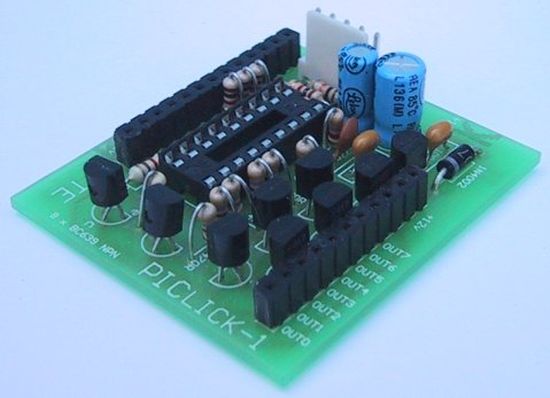
You can fit a PIC16F84A or PIC16F628 and it becomes a "buffered PIC chip."
Look at the circuit diagram first to see what the module is doing. It's buffering 5 of the input lines with a 1k resistor and buffering 8 output with a driver (actually a sinking) transistor.
If you fit a PIC16F628 chip, you can use the RC oscillator inside the chip (4MHz or 37kHz - see 14.2.6 of PIC16F628.pdf ) or the external RC 4MHz oscillator components (4k7 and 22p) on the PC board. The oscillator components on the PC board do not have to be removed when using the internal oscillator. The small current delivered by the 4k7 resistor in the RC oscillator will not damage the chip. It just represents wasted current.
The 5 input lines are protected with 1k buffer resistors and taken to an "in-line" connector-strip.
The 8 lines of port B are buffered with 1 amp driver transistors and taken to another connector-strip.
A Reset Pin is also on the PC board. When it is taken LOW, the chip resets. It is held HIGH via a 10k resistor.
This module does not allow the full in/out capability of each line but it is miles ahead of anything available on the market for a similar price.
In fact the closest modules are twice the price, have less input/output capability, run at one-tenth the speed and have less area for a program.
The advantage of our design is it does not have any "overhead." It does not have any propriety software or hardware that you have to buy. You can take the chip out of the module and place it directly into a project you have designed, and it will run immediately.
The microcontroller runs at 1 million instructions per second and this is very important when you are working on timing intervals, for displays and sounds, etc.
Programming the chip is carried out "by hand" at machine-code level using instructions that are able to be read by the microcontroller, and also by humans. Each instruction consists of letters and numbers that humans can recognise and is called a "mnemonic." (You can also use any other programming language if you wish, but we will only be dealing with "hand-assembly.")
Machine code may be slow and laborious, but when you take advantage of our
Library of Routines, and examine the experiments we have presented, you will be able to go to our "Copy and Paste" file and put the code into your program to create all types of effects.
There are a number of sites on the web to help you write assembly programs but they tend to complicate the job rather than simplify it. I have tried them and found them to be absolutely impossible to use.
The author has opted for machine code assembly, not because I am a masochist, but because it is the only way to learn the instructions and achieve a program of the complexity of the ideas we have presented in some of your projects. Two games on this site are examples.
To give you some idea of the capability of a 1,000 instruction program in machine code, the first 4-level chess game was written for the early version of the Z-80 in 1k of memory! The PIC chip has instructions with more than twice the power . . . imagine what you can achieve! But don't forget, the chess game was not written in simple "linear programming mode." The routines were very clever algorithms. Our programming approach is much simpler and is called "linear programming." Basically it means the micro will be advancing down the program and exiting a sub-routine with a solution.
Another reason for choosing machine code is fault finding. By viewing the program you can see exactly what the micro is accessing and it is much easier to "hunt down the fault."
MPLAB has a debugging program and a single-step feature that shows the contents of each register (file) after an instruction.
It has some capability at finding a fault. But don't hold your breath. It doesn't solve problems for you.
For more detail: PIC LICK-1 using PIC16F84 Microcontroller
Related projects
PIC Stepper Motor Controller using PIC16F84A with Proteus Simulation
Introduction Stepper motors are widely used in embedded systems and DIY electronics projects where precise position control is required. This PIC Stepper...
Programmers & ICSP · PIC16F84APIC Musical Doorbell using PIC16F84A with Proteus Simulation
IntroductionThis microcontroller project demonstrates a musical doorbell built around a PIC16F84A and a simple piezo sounder.Using two push buttons, the system allows...
Programmers & ICSP · PIC16F628ADHT11 Low Cost Humidity Sensor using PIC16F628A with Proteus Simulation
IntroductionThis microcontroller project demonstrates how to interface a low-cost DHT11 temperature and humidity sensor with a PIC16F628A using a Proteus simulation environment.The...
Development Boards & Kits · PIC18F4520Voltage Measurement with A PIC Microcontroller
Voltage Measurement with PIC Microcontroller articulates a methodical framework for facilitating analog voltage measurement using the PIC18F4520, an advanced member of Microchip’s...
Development Boards & KitsUltra-Low Power: Microcontroller Standby Current to 130uA with OPEnS Power Control Board
At the OPEnS Lab, a key focus for our projects is achieving exceptionally long battery life. This was particularly true for the...
Development Boards & KitsAn Integrated Approach to Developing Applications with Microchip PIC Microcontrollers
1. Introduction In our daily lives, a variety of devices such as telephones, household appliances, and cars incorporate "smart" electronics, typically manifested...

Ibrar Ayyub
I am an experienced technical writer holding a Master's degree in computer science from BZU Multan, Pakistan University. With a background spanning various industries, particularly in home automation and engineering, I have honed my skills in crafting clear and concise content. Proficient in leveraging infographics and diagrams, I strive to simplify complex concepts for readers. My strength lies in thorough...