PIC and Serial LCD Displays using PIC16F877 with Proteus Simulation

Summary of PIC and Serial LCD Displays using PIC16F877 with Proteus Simulation


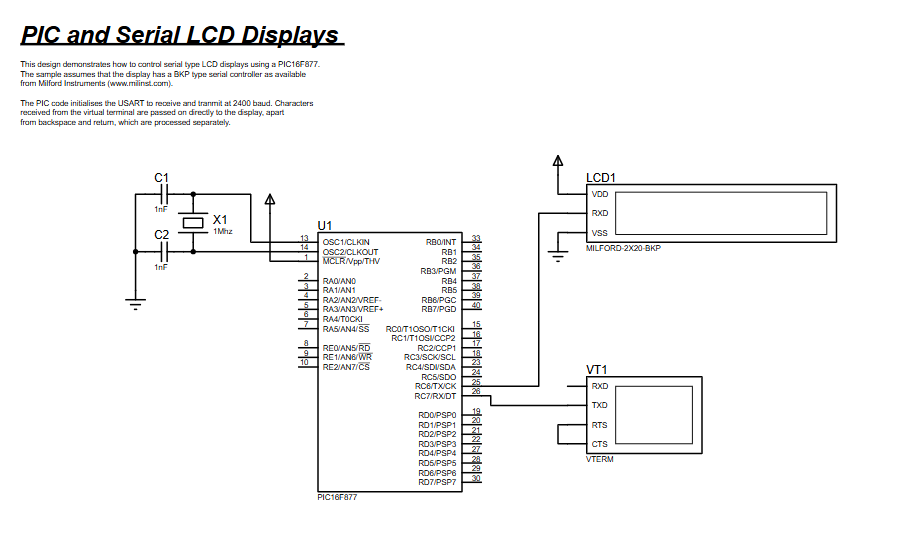
This project shows a PIC16F877 microcontroller driving a Milford serial alphanumeric LCD via its USART at 2400 baud (1 MHz clock). Characters from a serial terminal are forwarded to the LCD; control characters (carriage return, backspace) are handled as commands. Built and tested in Proteus VSM with MPASM firmware, it demonstrates low-pin-count serial LCD interfacing, real-time echoing, and basic command handling for beginners.

Parts used in the PIC16F877 Serial LCD Demo:

  • PIC16F877 microcontroller
  • Milford Serial Alphanumeric LCD (BPK-type controller)
  • Virtual Terminal (Proteus)
  • 1 MHz Crystal Oscillator
  • Capacitors (timing and stability)

Introduction

This microcontroller project demonstrates how a PIC16F877 controls a serial alphanumeric LCD display using simple USART-based communication. Instead of driving a parallel LCD with many I/O pins, the design uses a serial LCD module, making it cleaner and more efficient.
Built and tested entirely in Proteus simulation, this project is ideal for learners exploring embedded systems, RS232 communication, and LCD control using PIC microcontrollers.
It’s a practical electronics example that shows how characters received over serial communication can be displayed in real time.
Perfect for beginners and intermediate users working on PIC microcontroller projects and DIY electronics.This PIC16F877 serial LCD simulation project shows how a PIC16F877 communicates with a serial LCD using USART in Proteus.

PIC microcontroller serial LCD breadboard project
Illustrative View of the Concept.

How the Project Works (Overview)

The PIC16F877 initializes its internal USART to operate at 2400 baud using a 1 MHz clock. Characters received via the serial terminal are forwarded directly to a Milford serial LCD display.
Special characters such as carriage return and backspace are detected and processed as LCD commands rather than normal characters.
The LCD itself contains a serial controller, so the PIC only needs to transmit bytes over the TX pin, simplifying the circuit and firmware.

Block Diagram / Workflow Explanation

  1. PIC16F877 Initialization

    • Configures ports and enables USART

    • Sets baud rate generator for 2400 baud

  2. Startup Message

    • Sends a welcome string (“Milford LCD Demo”) to the LCD

    • Moves cursor to the second row and enables cursor display

  3. Serial Input Handling

    • Receives characters from the virtual terminal

    • Checks for control characters (carriage return, backspace)

  4. LCD Output

    • Normal characters are sent directly to the LCD

    • Special characters trigger LCD command sequences

Key Features

  • Serial LCD control using USART (RS232-style communication)

  • Reduced I/O usage compared to parallel LCDs

  • Real-time character echo from serial terminal to LCD

  • Cursor positioning and screen control via LCD commands

  • Fully simulated in Proteus VSM environment

  • Written in MPASM for PIC16 architecture

Components Used

  • PIC16F877 microcontroller

  • Milford Serial Alphanumeric LCD (BPK-type controller)

  • Virtual Terminal (Proteus)

  • 1 MHz Crystal Oscillator

  • Capacitors (timing and stability)

Applications

  • Serial display interfaces in embedded systems

  • Debug message output for microcontroller projects

  • Low-pin-count LCD applications

  • Educational demos for USART and LCD control

  • DIY electronics and training labs

Explanation of Code (High-Level)

The firmware begins by configuring PORTA and PORTB as outputs and enabling the USART module. The baud rate generator is set for 2400 baud at a 1 MHz clock.
A startup delay allows the LCD to initialize before text is sent. The program then transmits a predefined message character-by-character using a putc routine.
The main loop continuously waits for incoming serial data using the getc routine. Depending on the received value, the code either clears the screen, moves the cursor, or sends characters directly to the LCD.
Dedicated subroutines handle command writing, character transmission, and timing delays, keeping the firmware structured and easy to understand.

Source Code

Download
; Simple PIC 16F877X Program to drive Serial LCDs.
; Assumes 1MHZ CPU clock, 2400 baud rate for the LCD.

           LIST    p=16F874
           #include "P16F874.INC"

	   ; Counter variables for delay
           cblock 0x20
               char,cmd,lc1,lc2;
           endc

           ; Vector for normal start up.
           org     0
           goto    start

           org     4
           goto    inthlr

Proteus Simulation

In Proteus, the PIC16F877 communicates with a virtual terminal and a serial LCD module. Characters typed in the terminal appear instantly on the LCD display.
Cursor movement, screen clearing, and backspace behavior can be observed visually, making this simulation excellent for learning and debugging serial LCD interfaces.

(FAQs)

1. Why use a serial LCD instead of a parallel LCD?

Serial LCDs reduce wiring complexity and save I/O pins on the microcontroller.

2. Can this project run on other PIC16 devices?

It is designed for PIC16F877, but similar PIC16 devices with USART support can be adapted.

3. Why is the baud rate set to 2400?

The LCD controller expects 2400 baud at a 1 MHz clock for reliable communication.

4. Does this work without Proteus?

Yes, it can run on real hardware with a compatible serial LCD module.

5. How are LCD commands distinguished from data?

Commands are sent with a special prefix byte before the command value.

6. Can I change the startup message?

Yes, modify the character sequence sent after initialization.

7. What happens if no serial data is received?

The program waits in a loop until a character arrives.

8. Can this be extended for sensors or menus?

Yes, the LCD interface can be reused for displaying sensor data or menus.

Conclusion

This project is a clean and practical example of serial LCD interfacing using the PIC16F877 in a Proteus simulation environment. It highlights efficient USART communication, command handling, and display control with minimal hardware complexity.
A valuable learning exercise for anyone exploring embedded systems, microcontroller firmware, and LCD-based user interfaces.

Quick Solutions to Questions related to PIC16F877 Serial LCD Demo:

  • How does the PIC communicate with the serial LCD?
    The PIC uses its internal USART to transmit bytes over the TX pin at 2400 baud to the serial LCD.
  • Can special characters be handled?
    Yes; special characters like carriage return and backspace are detected and processed as LCD commands.
  • Why is the baud rate set to 2400?
    The LCD controller expects 2400 baud when the PIC runs with a 1 MHz clock for reliable communication.
  • Does this require many I/O pins like a parallel LCD?
    No; the serial LCD controller reduces I/O usage because the PIC only needs a serial TX connection.
  • Is the project tested only in Proteus?
    It is built and tested in Proteus VSM, but it can run on real hardware with a compatible serial LCD module.
  • How is the startup message sent to the LCD?
    The firmware sends a predefined welcome string character-by-character after an initialization delay.
  • What happens if no serial data is received?
    The program waits in a loop until a character arrives from the serial terminal.
  • Can the startup message be changed?
    Yes; modify the character sequence sent after initialization in the firmware.
  • Is the code written in a specific assembler?
    Yes; the project firmware is written in MPASM for PIC16 architecture.
  • Can this interface be used for sensors or menus?
    Yes; the LCD interface can be reused to display sensor data or menus as stated in the article.

About The Author

Ibrar Ayyub

I am an experienced technical writer holding a Master's degree in computer science from BZU Multan, Pakistan University. With a background spanning various industries, particularly in home automation and engineering, I have honed my skills in crafting clear and concise content. Proficient in leveraging infographics and diagrams, I strive to simplify complex concepts for readers. My strength lies in thorough research and presenting information in a structured and logical format.

Follow Us:
LinkedinTwitter