
Summary of NASE 2 TOOLS NANO REWORK STATION FROM JBC TOOLS
The NASE 2 Tools Nano Rework Station is a high-precision solution for SMD soldering and rework, featuring Temperature Dynamic Profiles to emulate reflow oven heating and prevent thermal shock. It operates with the NT115-A Nano Handpiece and AN115 Steady Nano Tweezers, supporting up to 25 configurable profiles across ten languages. Key features include sleep modes, temperature limits, real-time graphics, and PIN protection.
Parts used in the NASE 2 Tools Nano Rework Station:
- NASE-C Rework Station
- NT115-A Nano Handpiece
- AN115 Steady Nano Tweezers
- C115 Cartridge Range
NASE 2 Tools Nano Rework Station for Precision SMD Soldering
The NASE 2 Tools Nano Rework Station is designed for soldering and reworking very small SMD components where accurate tool control is important. Its compact nano tools make it particularly suitable for detailed electronics work, including tasks carried out under a microscope.
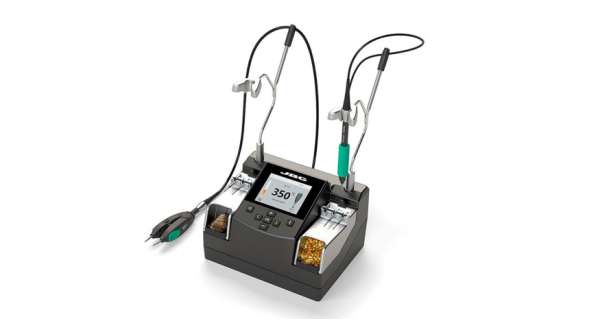
The station can operate with the NT115-A Nano Handpiece and AN115 Steady Nano Tweezers at the same time. This combination gives technicians different ways to handle miniature components depending on the type of soldering or rework being performed.
Better Control for Small SMD Components
One of the main advantages of the system is the short distance between the soldering tip and the handle. Keeping the user’s hand closer to the working point can provide greater control when working on densely populated circuit boards or very small components.
This is especially useful for microscope-assisted soldering, where even small hand movements can affect tip placement.
NT115-A Nano Handpiece
The NT115-A Nano Handpiece is intended for detailed soldering work that requires a small and accurately positioned tip. It can be used with compatible C115 cartridges, allowing the tip configuration to be selected according to the soldering task.
For technicians repairing miniature electronics, this type of handpiece can make it easier to reach small pads and components without using a larger conventional soldering iron.
AN115 Steady Nano Tweezers
The AN115 Steady Nano Tweezers provide another option for handling small SMD components. Tweezer-style soldering tools can be useful when both sides of a component need to be heated at the same time, such as during removal or installation of certain two-terminal components.
The station also supports pedal control, which can make the Nano Tweezers easier to operate during specific soldering procedures.
Temperature Dynamic Profiles
A notable function of the NASE 2 Tools Nano Rework Station is its Temperature Dynamic Profiles system.
Instead of immediately applying a single fixed temperature, dynamic profiles allow the heating process to be controlled through different stages. This is intended to reproduce a more gradual heating process similar to the temperature progression used in reflow soldering.
The feature can be particularly useful when working with ceramic chip components such as MLCCs, where controlling the rate of temperature increase can help reduce sudden thermal stress.
Up to 25 configurable soldering profiles can be stored in the station, allowing different heating settings to be prepared for different soldering requirements.
Temperature Range and Control
The station operates across a temperature range of approximately 90°C to 450°C (190°F to 840°F).
Operators can also define maximum and minimum temperature limits. This can help keep working temperatures within an appropriate range for a particular process or component.
Up to three editable temperature levels can be configured for quick selection when different solder joints require different amounts of heat.
Sleep and Hibernation Modes
The NASE-C includes sleep and hibernation functions that reduce the soldering tip temperature while the tool is resting in its stand.
Lowering the temperature when the tool is not actively being used can help reduce unnecessary tip oxidation and may extend cartridge life compared with leaving the tip continuously at full working temperature.
Real-Time Soldering Information
The station can display soldering graphics showing information such as tip temperature and the power being delivered during the soldering process.
These measurements give operators additional visibility into how the tool behaves while a joint is being heated, which can be useful when evaluating or standardising repeatable soldering procedures.
C115 Cartridge Compatibility
The NASE 2 Tools Nano Rework Station works with the JBC C115 Cartridge Range.
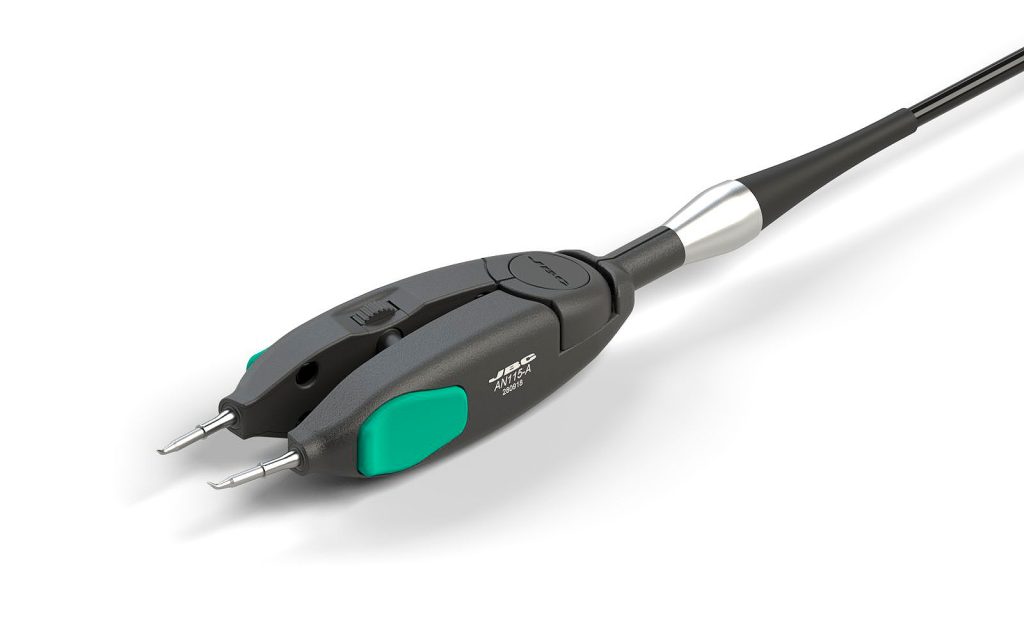
Different cartridge shapes can be selected according to component size, pad geometry and the type of work being performed. Choosing an appropriate tip is important because effective heat transfer depends not only on temperature but also on how well the tip contacts the solder joint.
Connectivity and Station Management
The NASE-C provides several connectivity options for configuration, maintenance and external equipment.
These include:
- USB-B connectivity for PC software and traceability functions
- USB-A connectivity for firmware updates and soldering graphics management
- RS-232 connectivity for remote control or compatible smart fume extraction equipment
- Pedal connectivity for tool control
The station also includes PIN protection, allowing important operating parameters to be protected from unauthorised changes.
Multilingual User Interface
The interface can be configured in ten languages:
English, German, Spanish, French, Italian, Portuguese, Russian, Japanese, Korean and Chinese.
This makes the same workstation easier to configure and operate in laboratories, production environments and repair facilities with different language requirements.
Where the NASE 2 Tools Nano Rework Station Can Be Useful
The station is primarily suited to precision electronics work involving miniature SMD components. Possible applications include PCB repair, prototype assembly, component replacement, electronics development and other tasks where conventional soldering tools may be too large for comfortable operation.
Its combination of a nano handpiece, precision tweezers, configurable temperature profiles and real-time operating information makes it particularly relevant to technicians who need greater control over both tool position and component heating.
Final Overview
The NASE 2 Tools Nano Rework Station combines precision soldering tools with programmable temperature control for detailed SMD soldering and rework. Features such as dynamic soldering profiles, C115 cartridge compatibility, sleep and hibernation modes, soldering graphics and multiple connectivity options provide greater control over demanding miniature electronics work.
For applications involving very small components or microscope-based repair, its compact handpiece and tweezer configuration can provide a more controlled working setup than larger general-purpose soldering tools.
-
What components does the station work simultaneously with?
The station works simultaneously with the NT115-A Nano Handpiece and the AN115 Steady Nano Tweezers. -
How does the Temperature Dynamic Profiles function help?
It controls component temperature during all phases of soldering to avoid thermal shock on ceramic chip components like MLCC. -
Can I store multiple soldering profiles?
Yes, up to 25 fully configurable soldering profiles can be stored in the system. -
Does the station support different languages?
Yes, the menu is configurable in 10 different languages including English, German, Spanish, French, Italian, Portuguese, Russian, Japanese, Korean, and Chinese. -
How can I extend the life of the soldering tip?
Sleep and Hibernation modes lower the tip temperature when the tool rests in the stand to avoid oxidation. -
Is it possible to limit the operating temperature range?
Yes, you can set maximum and minimum temperatures to limit the range in which the operator is allowed to work. -
Can I visualize the soldering process in real time?
Yes, the station offers soldering graphics that provide real-time visualization of tip temperature and power delivered. -
How do I protect the station parameters from unauthorized access?
You can use the PIN protection feature to keep station parameters protected against unauthorized access.
