
Summary of Must Have Peripherals for Any Gaming PC Setup
This article emphasizes that a complete gaming experience relies heavily on peripherals, not just the computer itself. It outlines essential input and output devices required to operate a PC effectively, as well as optional accessories that enhance communication and specific gameplay styles.
Parts used in Gaming Setup:
- Keyboard
- Mouse
- Paracord mouse cable
- Monitor
- Speakers
- Headset
- Microphone
- Webcam
- Controller
When setting yourself up with a gaming setup, it can be easy to hyper-focus on the quality of your computer and forget that a big chunk of what makes a good setup is the tech you have to interact with it. If you don’t spend the money and time to get yourself quality peripherals, then you’re never going to get the full experience that your gaming rig could deliver with the right equipment. This article aims to highlight some of the most important peripherals for any gaming setup so that you can enjoy the best experience with your new rig.
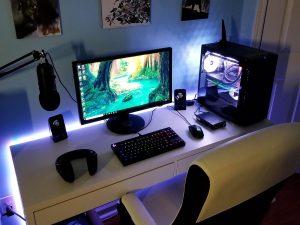
The Basics
Regardless of the quality of your setup, there are some peripherals that you absolutely have to get. Without them, you aren’t going to be able to get the most out of your rig. In fact, you might not even be able to use your new PC without them.
Keyboard. Obviously, without a keyboard, you aren’t going to be able to do much on anything on your PC. Your keyboard is your, well, key to accessing the majority of processes and uses for your new computer.
Mouse. Your mouse is every bit as important to your computer as your keyboard, allowing you to navigate around your computer and engage with games far easier than you otherwise could. Getting yourself a nice high-quality keyboard and a good mouse, possibly even a paracord mouse cable from mouseonegaming.com, will serve to make your new rig that much more enjoyable.
Monitor. Even with how vital your mouse and keyboard are to your PC, both would be utterly useless if you didn’t have a monitor. Your monitor allows your computer to be displayed visibly, and without it, you would have no way of knowing what your computer was doing. A high-quality monitor can make every moment on your computer visually stunning, but even if you don’t have the option for a high-quality monitor, you must have a monitor.
Speakers/Headset. Finally, once you have everything set up so that you can see and interact with your computer, you are going to need something that will allow you to hear the output of your programs. Without a good speaker or headset, you would be completely unable to hear what sounds your programs should be making. This isn’t as debilitating as being unable to see or interact with your computer. However, it still greatly reduces the usefulness of your computer.
Useful Extras
While you absolutely cannot get by without the peripherals above, the ones that follow are less vital to your gaming rig but are still incredibly useful to have.
A Great Microphone. With a good microphone, you are able to use your computer to communicate while playing. This is useful for a number of things, including keeping in touch with your team as you play competitive games.
A Webcam. On top of a microphone, you might want to be visible while you talk to others. By getting a good webcam for your computer, you can have face-to-face conversations with anyone without needing to be physically near to one another.
A Controller. Finally, there are certain games and experiences on your computer that are far more enjoyable when you engage with them using a controller — because of this, getting a controller that is compatible with your gaming setup can be quite useful.
-
What are the absolute basics needed for a gaming setup?
You absolutely need a keyboard, mouse, monitor, and speakers or headset to use your rig. -
Why is a paracord mouse cable mentioned for a gaming setup?
A paracord mouse cable from mouseonegaming.com can make your new rig more enjoyable alongside a high-quality keyboard and mouse. -
Can you use your computer without a monitor?
No, both a mouse and keyboard would be useless without a monitor because you need it to see what the computer is doing. -
How does audio equipment affect the gaming experience?
Speakers or a headset allow you to hear program output, which greatly reduces usefulness if missing even if you can still see and interact. -
When should I get a great microphone for my setup?
A good microphone is useful for communicating with your team while playing competitive games. -
What benefit does adding a webcam provide?
A webcam allows you to have face-to-face conversations with others without needing to be physically near them. -
Are controllers necessary for all computer games?
No, controllers are less vital but useful for certain games and experiences that are far more enjoyable when played with one.
