


Summary of Making a simple clap switch using PIC12F683
This article details a beginner-friendly clap switch project that toggles appliances upon detecting two consecutive claps. The system uses an electret microphone to capture sound, which is amplified by a transistor before being processed by a PIC12F683 microcontroller. The microcontroller utilizes its internal comparator module to analyze voltage peaks generated by the claps against a set reference threshold, triggering the ON/OFF action when valid signals are recognized.Parts used in the Clap Switch:
- Electret microphone (OBO-04FN-0B)
- Transistor
- PIC12F683 microcontroller
- Capacitor C1
- Digilent's Analog Discovery device
- VRCON register (for reference voltage control)
- CMCON0 register
A clap switch is a fun project for beginners. It switches on and off electrical appliances with a sound of clapping hands. Today we will discuss about making a simple clap switch that operates when it detects two clapping sounds in a row. It uses an electret microphone as a transducer for converting a clapping sound into an electrical signal. The microcphone output is amplified by a transistor and is then sent to the PIC12F683 microcontroller which performs an ON/OFF switching action when valid claps are detected.
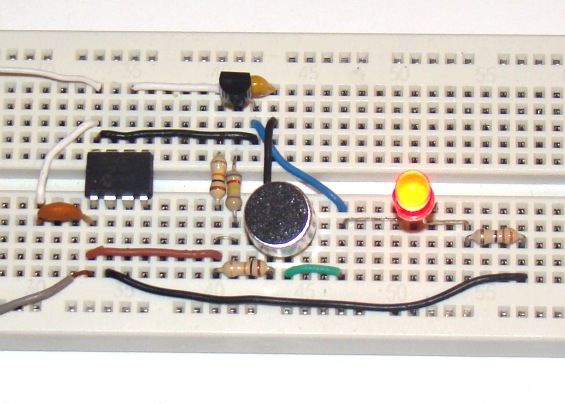
Theory
The clap switch requires a transducer at the input to convert sound vibrations from clapping hands into electrical energy. An electret microphone or simply mic (OBO-04FN-0B) is used for this purpose. The output from the mic is very low in magnitide and so we need an amplifier circuit to boost the detected sound signal. The following circuit diagram shows the mic along with a single transistor amplifier. When there’s no sound, the collector voltage (Vout) of the transistor, which is saturated, is approximately 0.2V. When the mic detects a clap sound, the voltage across it drops suddenly. Since the condenser mic’s output voltage is coupled to the base of the transistor through capacitor C1, the base-emitter voltage is also lowered and as such the base-emitter junction is less forward biased or cutoff (in case of high clap sound). Therefore, every time a clapping sound is detected, there is a sudden peak arising at the collector voltage.
The following picture shows the peaks in the collector voltage due to multiple clap sounds. You can see the peak voltage can go as high as 4.0V depending on the loudness of the clap. This waveform of the collector voltage is captured using Digilent’s Analog Discovery device.
Now we know how to convert a clap sound into an electrical signal. The next stage is to feed this signal to PIC12F683 microcontroller for switching actions. The PIC12F683 microcontroller has got a built-in comparator module that can be used to compare two analog voltages and obtain a digital indication of their relative magnitudes. The comparator module can operate in eight different modes based on CM2-CM0 bit settings in the CMCON0 register. For our purpose, we will configure it as:
CIN- pin is configured as analog, CIN+ pin is configured as I/O, COUT pin is configured as I/O, Comparator output available internally, CVREF is non-inverting input (see picture below).
We will compare the collector output voltage (Vout) against an internally generated reference voltage. The reference voltage is internally connected to the positive input (CIN+) of the comparator module, while the output voltage from the transducer is fed to the negative input (CIN-) of the comparator. The CIN- pin is multiplexed with GP1 I/O pin of PIC12F683. The magnitude of reference voltage is programmable and controlled through VRCON register. We will set the reference voltage to 0.625V (assuming the supply voltage is 5.0V). So, under normal condition the reference voltage (0.625V) is greater than Vout (=0.2V) and the comparator output (COUT) is high. COUT is accessible internally as well as externally through GP2 I/O pin. When there is a clap sound, COUT will go low. The comparator output logic can be inverted by setting the comparator output inversion (CIN) bit in the CMCON0 register. The PIC12F683 microcontroller can be programmed to take switching actions based on the comparator output.
For more detail: Making a simple clap switch using PIC12F683
Quick Solutions to Questions related to Clap Switch:
- How does the clap switch detect sound?
It uses an electret microphone to convert sound vibrations into electrical energy. - Can the signal from the microphone be used directly?
No, the output magnitude is very low and requires an amplifier circuit using a transistor to boost the signal. - What happens to the collector voltage when a clap is detected?
A sudden peak arises at the collector voltage, which can reach up to 4.0V depending on loudness. - Does the PIC12F683 have built-in features for this project?
Yes, it has a built-in comparator module to compare analog voltages and obtain digital indications. - How is the reference voltage configured?
The reference voltage is programmable via the VRCON register and is set to 0.625V assuming a 5.0V supply. - What occurs at the comparator output during a clap?
When a clap sound is detected, the comparator output goes low because the input voltage exceeds the reference. - Which pins are involved in the comparator configuration?
CIN- is connected to GP1, CIN+ receives the internal reference, and COUT is accessible through GP2. - Can the comparator logic be inverted?
Yes, the logic can be inverted by setting the comparator output inversion bit in the CMCON0 register.
Related projects
Automotive Voltage Monitor using PIC12F683
Description Recently I got a new motorbike and on my second trip out, with only 50 miles on the clock the rectifier/regulator...
Communication & Interfacing · PIC12F683EnvStick USB Temperature Sensor using PIC12F683
The EnvStick is cheap, homemade temperature sensor that plugs into a USB port. It provides a simple way to collect a room’s...
Sensors & Temperature · PIC12F683Metal detector robot using pic microcontroller
This project describes hardware and software I have developed which allows a small 8 bit PIC microprocessor to function as a single...
Meters & Test Instruments · PIC16F688Determine capacitance by measuring the charging time using PIC16F688
When TEST botton is pressed, RA3 pin is set to "1". R2 and R3 are divide the voltage to 1/2 Vra3 which...
Meters & Test InstrumentsFrequency Meter Using Microcontroller
This tutorial simply states how to calculate frequency of a pulse source using a microcontroller. Story https://youtu.be/NAoj-HLRIro This tutorial simply states how...
Meters & Test Instruments · PIC16F84ADigital thermometer with PIC16F84 circuit
This electronic project is a very simple thermometer that is based on the PIC16F84A microcontroller, designed by Microchip. Why to use a...

Ibrar Ayyub
I am an experienced technical writer holding a Master's degree in computer science from BZU Multan, Pakistan University. With a background spanning various industries, particularly in home automation and engineering, I have honed my skills in crafting clear and concise content. Proficient in leveraging infographics and diagrams, I strive to simplify complex concepts for readers. My strength lies in thorough...