


Sales Pitch
Are you confused by choices? Who isn't? There are just so many things to decide. White, rye, or wheat? Pinstripes or polka dots? Feast or fast? Well, don't worry because help is on the way!
I'm introducing the world's first, portable, hand held, decision maker powered by truly random numbers. Sure, my competition has long sold decision makers for 1, 5, 10, or 25 cents. But can they decide between more than two choices? NO! Are they really random? NO! NO! My decision maker can choose between up to 16 options, and the results are truly unpredictable, according to the postulates of quantum (or at least statistical) mechanics.
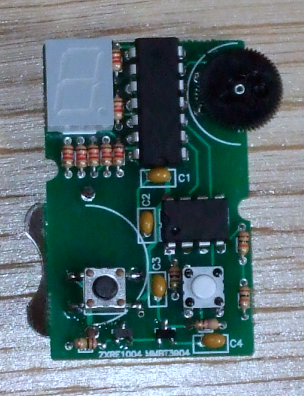
Now, I hear some of you object, "But Leon, I can make decisions on my own." Perhaps, but they're often arbitrary, illogical, and regrettable. Why agonize over both the choice and the results, when you can just worry about the latter? Try something new! Stop worrying! Tell determinism to take a hike! Destroy the paradox of choice! Give randomness a try!
Operation
Compared to most modern inconveniences, my mRNG is simple to operate. The device has only two buttons and one thumb wheel. Orient the mRNG display side up, and with the metal ring pointed away from you (like in the picture at the top of the page and in the video below). The left button turns the device on. Hold it down to power the device. A new number is then displayed about 30 times a second -- too fast for you to read. Holding the second button down stops the screen from updating so that you can read the newest random number.
The thumb wheel sets the upper bound of the random number range -- 0 to that bound inclusive. The upper bound can be set as high as 15. Since the display has only one digit, the numbers are in hexadecimal (10-15 are displayed as a-f). Changing the range will cause the new upper bound to be displayed for ~.75 seconds before more random numbers are generated. When the device is powered on it will also display the current upper bound for that amount of time. It's possible to turn the thumb wheel to be right on the border between two numbers (e.g., between 8 and 9), in which case the mRNG may keep changing the upper bound between those values. Simply turn the thumb wheel a little to move it away from the border.
Note that '6' and 'b' (11 in hexadecimal) look similar on the display. The difference is that the top segment of the display is lit for '6' but not for 'b'. (See the exciting Wikipedia article on Seven-segment display character representations! I used the left column of characters.)
Design notes
Fitting everything into a key fob meant everything had to be small. That turned out not to be a challenge in and of itself, but it meant using a coin battery, which in turn meant trying to draw 4mA or less (the current version uses 6-7mA, which is close enough). This was achieved mainly by turning off and on different parts of the circuit as needed. When it's generating a random number, the display is off. The elements of the display itself are pulsed on and off quickly giving the illusion of being on continuously (and meaning that no more than 4 segments are ever one at one time). With that in mind, let me explain the design a bit further. (The source code and complete schematic are available below.)
Read More: Leon's Mini Random Number Generator
Related projects
Exploring Leon’s Mini Random Number Generator (mRNG)
Sales Pitch Feeling overwhelmed by choices? Who isn't? Decision-making can be a maze. White, rye, or wheat? Pinstripes or polka dots? Feast...
Games, Toys & Calculators · PIC16F628ATIC TAC TOE game using PIC16F628
This project is not to introduce Tic Tac Toe. Everyone knows this game. It's to introduce two features. Bi-coloured LEDs, microcontrollers and...
Games, Toys & CalculatorsInteractive Blitz Chess: A Physical Blitz Chess Board Powered with PIC32
Introduction We created a companion system for physical chess boards to help players enjoy their fast paced blitz game with a chess...
Games, Toys & Calculators · PIC16F877APIC16F877 LED blinking code and Proteus simulation
This post provides the code to make an LED blink using PIC16F877 microcontroller. This code is written in C language using MPLAB...
Games, Toys & Calculators · PIC16F84AA memory game using a PIC16F84A microcontroller
This article describes a game we all know. It is SIMON. It uses 4 switches, 4 colored lights and a speaker to...
Games, Toys & CalculatorsDigital “Etch A Sketch” Glove
Introduction For our ECE 4760 final project, we designed, constructed, and tested a glove-operated system that dynamically simulates the classic toy, Etch...

Ibrar Ayyub
I am an experienced technical writer holding a Master's degree in computer science from BZU Multan, Pakistan University. With a background spanning various industries, particularly in home automation and engineering, I have honed my skills in crafting clear and concise content. Proficient in leveraging infographics and diagrams, I strive to simplify complex concepts for readers. My strength lies in thorough...