


Summary of 8051-PIC MICROCONTROLLER PROJECTS
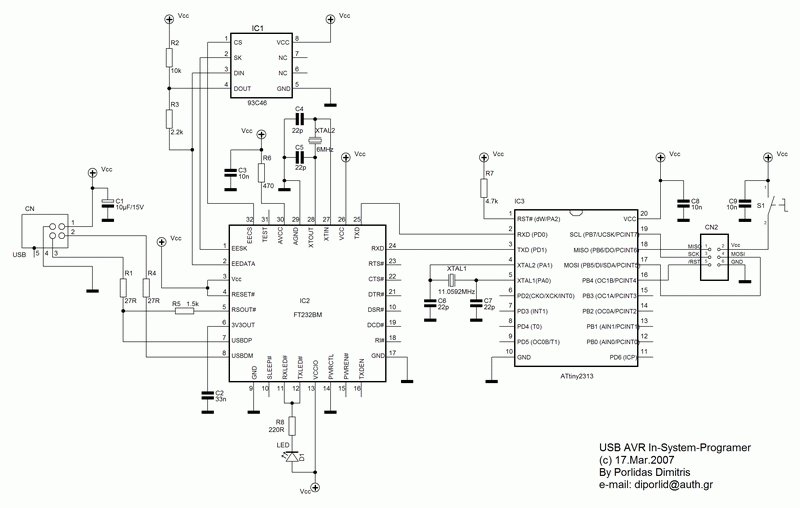
This article details the construction of a USB-based AVR In-System Programmer (ISP) designed to replace an older serial version. The project utilizes an FT232BM chip for USB connectivity and an ATtiny2313 microcontroller, programmed with Klaus Leidinger's firmware. It includes an optional serial EEPROM for customizing device names and uses AvrOspII software for programming various AVR devices.Parts used in the USB AVR ISP:
- FT232BM USB to RS-232 chip
- ATtiny2313 Microcontroller
- Serial EEPROM (IC1)
- USB-B Connector (CN1)
- 6-pin Connector (CN2)
- LED D1
- S1 Switch
- 11.0592MHz Crystal
- avr910_2313_v38c.hex Firmware file
USB AVR In-System-Programmer (ISP)
- The PCB was designed by: Dimitris Porlidas
- The schematic diagram was drawn by: Dimitris Porlidas
- The AvrOspII software was written by: Mike Henning
- Small modifications in firmware and schematic diagram were made by: Vassilis Serasidis
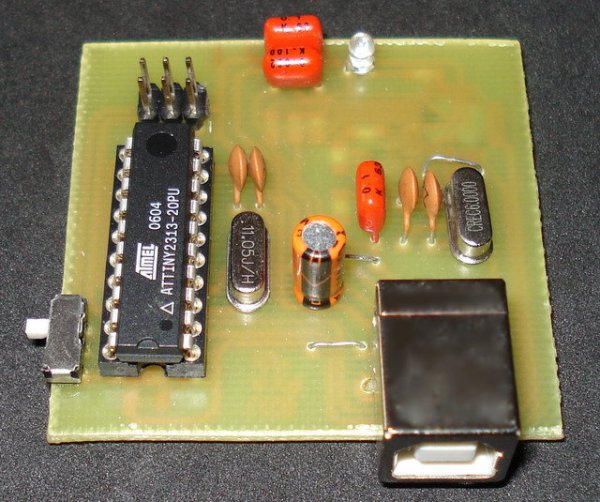
So, the solution was to replace the two transistors, that were used to adapt the RS-232 voltage levels to TTL voltage levels, with a USB to RS-232 chip such as FT-232BM.
Initially, I used the John Samperi's firmware V3.2 but afterwards I found out the Klaus Leidinger's firmware that was a little bit faster. So, I chose the second one firmware but I had to modify the source code to work with 11.0592MHz crystal instead of 7.3724MHz that was initially designed because I couldn't find this crystal in the market .
This programmer worked perfect with AVRprog but then I found a software that could support much more AVR devices than the AVRprog could program. This software is AvrOspII V5.47.
For more detail: 8051-PIC MICROCONTROLLER PROJECTS
-
Why was the original serial programmer modified?
The modification was necessary because using a USB to Serial adaptor would cost nearly €30, whereas the FT232BM chip solution is more cost-effective. -
Which firmware was selected for this project?
Klaus Leidinger's firmware was chosen because it is faster than John Samperi's V3.2 version. -
What crystal frequency is required for the ATtiny2313?
An 11.0592MHz crystal is used because the originally designed 7.3724MHz crystal was unavailable in the market. -
Can the programmer work without the serial EEPROM?
Yes, the programmer works with or without the EEPROM, though FTDI suggests using one to store user settings. -
How do you supply power to the target circuit?
The S1 switch allows the target circuit to be supplied with +5V directly from the USB port, eliminating the need for an external power supply. -
Does Windows XP SP2 require additional drivers for this device?
No, if no modifications are made to the EEPROM, Windows XP SP2 or newer operating systems include all necessary drivers automatically. -
What software is recommended for programming AVR devices?
AvrOspII V5.47 is recommended because it supports many AVR devices and receives updates from the author Mike Henning. -
What fuse settings must be applied when burning the ATtiny2313?
You must deselect the Devide clock by 8 internaly option and select the Ext. Crystal Osc. 14CK + 65ms option.
Related projects
Calculator Test using PIC24FJ64GA006 with Proteus Simulation
Introduction The Calculator Test using EASYHDL is a practical microcontroller project built on the PIC24FJ64GA006 and simulated in Proteus. This project demonstrates...
Programmers & ICSPPID Controlled Oven using TMS320F28027PT with Proteus Simulation
IntroductionThis project demonstrates a PID controlled oven implemented using a PICCOLO TMS320F28027PT microcontroller and verified through Proteus simulation.It is a practical microcontroller...
Programmers & ICSPPICCOLO Motor Controller Sample Design using TMS320F28023PT with Proteus Simulation
IntroductionThis project demonstrates a PICCOLO motor controller sample design implemented using the TMS320F28023PT Piccolo microcontroller and tested through Proteus simulation. It focuses...
Programmers & ICSP · PIC16F84APIC Musical Doorbell using PIC16F84A with Proteus Simulation
IntroductionThis microcontroller project demonstrates a musical doorbell built around a PIC16F84A and a simple piezo sounder.Using two push buttons, the system allows...
Programmers & ICSP · PIC16F877AEPE PIC/LCD Demo using PIC16F877 with Proteus Simulation
IntroductionThe EPE PIC/LCD Demo is a classic microcontroller project that demonstrates how a PIC16F877 can fully control a PG12864F graphical LCD.Designed as...
Programmers & ICSP · PIC16F628ADHT11 Low Cost Humidity Sensor using PIC16F628A with Proteus Simulation
IntroductionThis microcontroller project demonstrates how to interface a low-cost DHT11 temperature and humidity sensor with a PIC16F628A using a Proteus simulation environment.The...

Ibrar Ayyub
I am an experienced technical writer holding a Master's degree in computer science from BZU Multan, Pakistan University. With a background spanning various industries, particularly in home automation and engineering, I have honed my skills in crafting clear and concise content. Proficient in leveraging infographics and diagrams, I strive to simplify complex concepts for readers. My strength lies in thorough...