


Summary of LC meter using PIC16F628A Microcontroller
Summary: I built Phil Rice's LC meter, adding a compact battery-powered supply, USB charging, and minor firmware tweaks for improved display and auto-recalibration. The original measurement algorithm was kept intact while the device was made smaller and portable.Parts used in the LC meter project:
- PIC16F628A microcontroller
- 16x2 LCD display (compatible with 5V)
- TPS61222 5V boost converter (Texas Instruments)
- Inductor/coil for TPS61222
- Decoupling and output capacitors for TPS61222
- MAX1811 Li-Ion charger IC (Maxim)
- 3.6V Li-Ion battery (135 mAh, from Bluetooth headset)
- USB connector for charging
- Project enclosure/box
- Miscellaneous passive components and PCB wiring
I needed a good LC meter for my one of my next projects so I went and built the famous LC meter by Phil Rice. This LC meter design is pretty old but since it is a perfectly good device there was no need to design/build/debug one of my own. So, I just changed the original firmware a bit and added few electronic goodies to it to make it more compact.
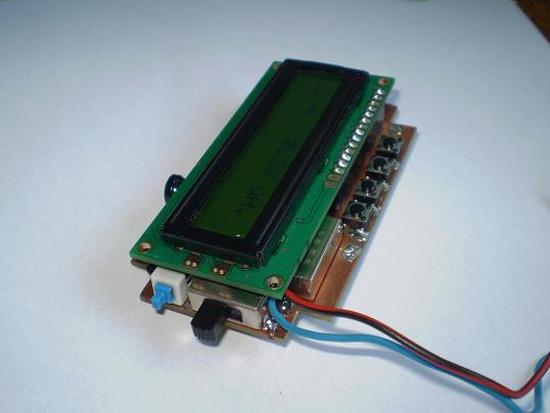
UPDATE: Project is on HackedGadgets, ...and now also on Hack-a-Day!
Power Supply
I wanted to fit it in this project box that I had laying around for some time and I also wanted it to be battery powered. There was no way that I could fit 9V battery in this project box along side with all the electronics, so I figured I could add a tiny 3.6V Li-Ion battery that I also had... laying around.
It is a 135mAh one from a broken Bluetooth headset. After having no luck in finding the appropriate 2x16 or 1x16 LCD that works at 3.6V I decided to incorporate a 5V voltage booster that will do the trick. For this purpose I selected TPS61222 power booster from Texas Instruments. This little (extremely little) device is very good and it requires just a coil and two capacitors to operate.
Now, because there is a Li-Ion battery in the device I needed a way to charge it properly. This is done by MAX1811 Li-Ion charger IC from Maxim. Later on, by placing a small USB connector on board, all power supply & charging problems were solved.
Firmware modifications
No critical firmware modifications were made. All calculations are performed as they were in the original firmware. Only a few small changes were made such as: PORTB pinout re-arranged for LCD display, second line of display constantly shows oscillator frequency, LC meter is automatically re-calibrated ("zeroed") when switching from L to C and the other way around.
For more detail: LC meter using PIC16F628A Microcontroller
Quick Solutions to Questions related to the LC meter:
- What microcontroller is used in this LC meter?
The PIC16F628A microcontroller is used. - Can the device be battery powered?
Yes, it was made battery powered using a 3.6V Li-Ion 135 mAh battery. - How is 5V supplied for the LCD when using a 3.6V battery?
A TPS61222 boost converter is used to generate 5V from the 3.6V Li-Ion battery. - How is the Li-Ion battery charged?
Battery charging is handled by a MAX1811 Li-Ion charger IC and a USB connector was added for charging. - Were there major firmware changes to the original design?
No, only minor firmware changes were made; calculations remain as in the original firmware. - What firmware features were added or changed?
Changes include rearranged PORTB pinout for the LCD, the second LCD line showing oscillator frequency continuously, and automatic recalibration when switching between L and C modes. - Is the original LC measurement algorithm preserved?
Yes, all calculations are performed as they were in the original firmware. - Why was a small Li-Ion battery chosen instead of a 9V battery?
A 9V battery would not fit in the chosen project box, so a small 3.6V Li-Ion battery was used to make the device compact.
Related projects
DHT11 Low Cost Humidity Sensor using PIC16F628A with Proteus Simulation
IntroductionThis microcontroller project demonstrates how to interface a low-cost DHT11 temperature and humidity sensor with a PIC16F628A using a Proteus simulation environment.The...
LCD & Display Projects · PIC16F628AFrequency Counter by PIC16F628
In this project we are building a basic and low cost frequency counter circuit . It can measure from 16Hz to 100Hz...
Games, Toys & Calculators · PIC16F628ATIC TAC TOE game using PIC16F628
This project is not to introduce Tic Tac Toe. Everyone knows this game. It's to introduce two features. Bi-coloured LEDs, microcontrollers and...
Meters & Test Instruments · PIC16F688Determine capacitance by measuring the charging time using PIC16F688
When TEST botton is pressed, RA3 pin is set to "1". R2 and R3 are divide the voltage to 1/2 Vra3 which...
Meters & Test InstrumentsFrequency Meter Using Microcontroller
This tutorial simply states how to calculate frequency of a pulse source using a microcontroller. Story https://youtu.be/NAoj-HLRIro This tutorial simply states how...
Meters & Test Instruments · PIC16F84ADigital thermometer with PIC16F84 circuit
This electronic project is a very simple thermometer that is based on the PIC16F84A microcontroller, designed by Microchip. Why to use a...

Ibrar Ayyub
I am an experienced technical writer holding a Master's degree in computer science from BZU Multan, Pakistan University. With a background spanning various industries, particularly in home automation and engineering, I have honed my skills in crafting clear and concise content. Proficient in leveraging infographics and diagrams, I strive to simplify complex concepts for readers. My strength lies in thorough...