


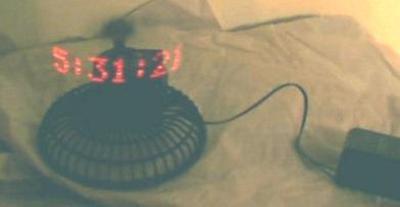
Red digits on this photo appear to float in the air in front of the clock. This illusion is based on inertia of a human eye. If LED-formed digits will periodically and frequently enough flash, they will appear solid and steady. And since the matrix of digits is formed by a mechanically scanned single line of LEDs, and the fast rotating clock body is not visible, it leaves digits "suspended" in the air. The first clock using this concept was built (and PIC microcontroller code written) by Bob Blick, please visit his page for yet more photos of his original clock and clocks built by other people.
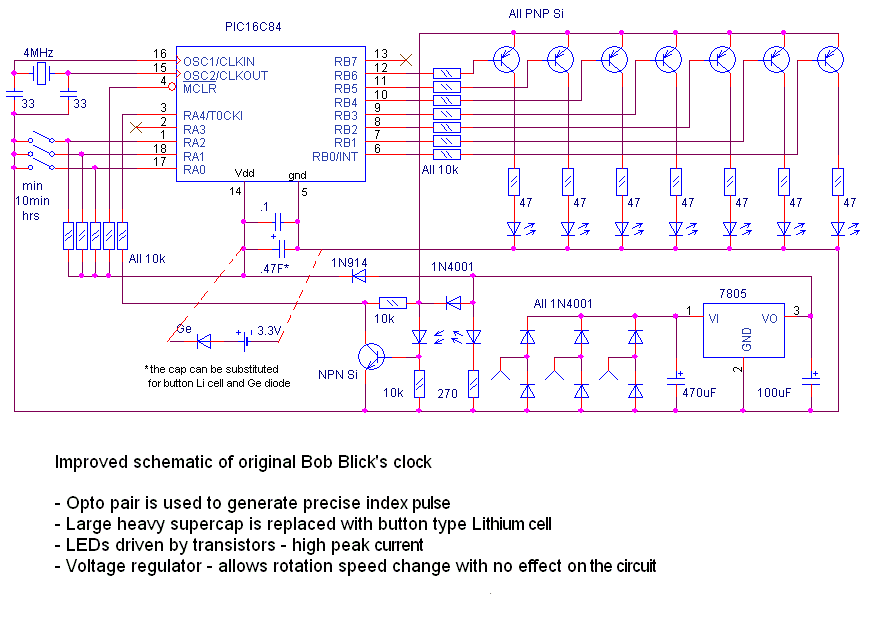
The heart of this clock is PIC16F84 microcontroller. (Older PIC16C84 version works just fine). The microcontroller is programmed with the code provided below. If you don't have a PIC programmer, it isn't difficult to make one. A few parts (for a couple bucks) connected to the parallel port of your PC will program the PIC for you.
First, mechanical stuff. We will use a 12V automotive fan (sells for $12.95) as a kit, containing almost all nesessary mechanical parts. The only extra part you'll need is a ball bearing and brass tube about 2mm in diameter. The bearing I've used was 22mm ext. dia., 10mm int. dia., and 6mm high. This size is not very critical, (that's just what I had in hand) but try to find something close: this one fits very nicely.
First you'll need to take the fan apart. The front grill and swing action mechanism parts aren't needed. Don't throw away the propeller yet, you will use it's hub later.
Next step is disassembling the motor. Slide the windings and commutator along the shaft toward non-threaded end of the shaft leaving about 15mm of the shaft at this end. Be careful not to separate the commutator from the rotor windings. The easiest way to do this is to stick the commutator end of the shaft to the rear sleeve bearing (white plastic part) and just tap the shaft with a hammer to the other end, using sleeve bearing as a support. Once it's done, you'll need to solder a wire to the ends of three commutator segments: 2 wires to any adjacent segments, and one wire to the segment opposite the other two chosen previously.
For more detail: Build a digital clock with its digits levitating in the air using PIC16F84
Related projects
PIC Stepper Motor Controller using PIC16F84A with Proteus Simulation
Introduction Stepper motors are widely used in embedded systems and DIY electronics projects where precise position control is required. This PIC Stepper...
Programmers & ICSP · PIC16F84APIC Musical Doorbell using PIC16F84A with Proteus Simulation
IntroductionThis microcontroller project demonstrates a musical doorbell built around a PIC16F84A and a simple piezo sounder.Using two push buttons, the system allows...
Beginner Tutorials · PIC16C84Exploring the World of PIC Microcontrollers: An Architectural Overview
A Peripheral Interface Microcontroller (PIC), developed by General Instruments Microcontrollers in 1993, operates under software control and is programmed to execute various...
Clocks & TimersAdaptive Alarm Clock: Build a Smart, User-Centric wake-Up system
Project Overview The goal of this ambitious undergraduate project was to develop a novel alarm clock capable of analyzing a person's unique...
Clocks & TimersDesigning Your Ideal Alarm Clock: An Introduction to PIC18
Within this laboratory session, you'll employ the C language to create an alarm clock, delving into the implementation of "C" programs on...
Clocks & TimersBuilding your Dream Alarm Clock Using the PIC18
Objective: In this laboratory session, your objective is to create an alarm clock using the C programming language. You will gain proficiency...

Ibrar Ayyub
I am an experienced technical writer holding a Master's degree in computer science from BZU Multan, Pakistan University. With a background spanning various industries, particularly in home automation and engineering, I have honed my skills in crafting clear and concise content. Proficient in leveraging infographics and diagrams, I strive to simplify complex concepts for readers. My strength lies in thorough...