


Summary of Keypad scanning and interfacing with PIC16f877 microcontroller
This article introduces a basic project on interfacing and scanning a 4x4 matrix keypad with the PIC16F877 microcontroller. It serves as a foundational step for larger projects, utilizing Proteus 7 Professional for simulation and MikroC Pro for programming. The guide highlights essential C commands like `Keypad_Init()` and `Keypad_Key_Click()` to handle input detection and port configuration via PORTC.Parts used in the Keypad Scanning Project:
- PIC16f877 microcontroller
- 4*4 matrix keypad / keyboard
- Proteus 7 Professional software
- MikroC Pro for PIC software
- PORTC interface pins
Scrolling Text on LCD by PIC Microcontroller
Displaying text on LCD by interfaced with PIC16F877 microcontroller in 4 bit mode
Simple Project on LED blinking by PIC 16 Microcontroller
Step by step Project guide on PIC Microcontroller
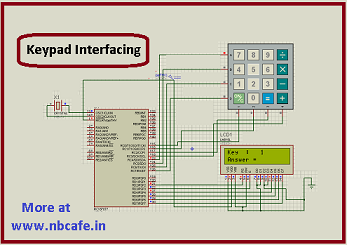
So today I start with Keypad scanning and interfacing with PIC16f877 microcontroller. As like my other projects I used 1 ) Proteus 7 Professional and 2) Mikcro C Pro for pic to make my project.
In this project we will see some new command for interfacing 4*4 matrix keypad / keyboard.
char keypadPort at PORTC : is use for defining port of microcontroller with keypad. Here we defining port C for that.
Keypad_Init() : is use for initializing.
Keypad_Key_Click() : is use for wait for key to be pressed and released.
Now see the complete Embedded C Programing of our project Keypad scanning and interfacing with PIC16f877 microcontroller
For more detail: Keypad scanning and interfacing with PIC16f877 microcontroller
Quick Solutions to Questions related to Keypad Scanning Project:
- What is the main purpose of this project?
To start big projects by learning small and necessary basics like keypad scanning. - Which software tools are used to make this project?
Proteus 7 Professional and MikroC Pro for pic are used. - How is the keypad port defined in the code?
The command char keypadPort at PORTC defines port C for the microcontroller. - What function initializes the keypad?
The function Keypad_Init is used for initializing. - How does the system wait for user input?
The function Keypad_Key_Click waits for a key to be pressed and released. - What type of keypad is interfaced in this project?
A 4*4 matrix keypad or keyboard is used. - Is this project considered advanced or basic?
It is described as a basic project to start with before bigger ones.
Related projects
PIC16F877 Driving LCD in 4-Bit Mode using PIC16F877 with Proteus Simulation
Introduction This microcontroller project shows how a PIC16F877 can drive an LCD display using 4-bit mode inside a Proteus simulation.The project demonstrates...
Programmers & ICSP · PIC16F877AEPE PIC/LCD Demo using PIC16F877 with Proteus Simulation
IntroductionThe EPE PIC/LCD Demo is a classic microcontroller project that demonstrates how a PIC16F877 can fully control a PG12864F graphical LCD.Designed as...
Motors & Robotics · PIC16F877AEfficient Sun-Following Robot: A Solar Tracker with Microcontroller Control
Abstract The impending global challenge of dwindling non-renewable fuel resources underscores the urgency of transitioning towards renewable energy alternatives like solar power....
Home Automation & SecurityVoice Activated Power Sockets (Home Automation)
Yet another voice controlled home automation system! As shown in the picture, the system can control any electrical appliance, by turning ON...
Home Automation & SecurityHome Security System with GSM Using 8051 Microcontroller
Security is a big challenge everywhere because thefts are increasing day by day owing to the unsafe and insecure security systems in...
Home Automation & SecurityHome Automation and Security System using Microcontroller ATMEGA8 with Arduino Programming
Home automation and security systems have become very popular these days, today industrial automation techniques are widely adopted by luxurious homes and...

Ibrar Ayyub
I am an experienced technical writer holding a Master's degree in computer science from BZU Multan, Pakistan University. With a background spanning various industries, particularly in home automation and engineering, I have honed my skills in crafting clear and concise content. Proficient in leveraging infographics and diagrams, I strive to simplify complex concepts for readers. My strength lies in thorough...